
Players who enjoy long sessions
You’ll want to avoid the headband or ear cushions becoming uncomfortable during a long RPG session. Try the fit for yourself rather than relying on the stated weight alone.


Start with a fit you’ll find comfortable over longer periods and a connection that works with your PC or console. Then choose between the convenience of a wired connection and the freedom to move around wirelessly. Simultaneous game and phone audio is only relevant if you use both together, while the stated battery life or surround features alone tell you nothing about fit or compatibility with your platform.
You’ll want to avoid the headband or ear cushions becoming uncomfortable during a long RPG session. Try the fit for yourself rather than relying on the stated weight alone.
You prioritise game audio and clear dialogue, and look at extra audio features afterwards. Check that those features are available on your platform.
You want to use one headset with your devices or talk to others while gaming. Connections, the right platform variant and microphone controls are all important.
| What to consider | What should you check? | Who should prioritise this? |
|---|---|---|
| Comfort | Check the adjustability, space around your ears, and the materials used for the headband and cushions. If possible, try the headset for longer than a few minutes. | If I play for a long time, I want the headband and ear cushions to stay comfortable; around 36% of consumers put comfort first. |
| Game audio and dialogue | Check how stereo and any spatial audio features work on your platform. Set the volume to a level you like without turning it up unnecessarily. | If I want to follow the story and soundtrack closely, I focus on game audio and dialogue; around 29% of consumers give this listening experience top priority. |
| Connection and platform | Check which port is available, the full model variant, and which cable or dongle you need. Also check whether your phone can play audio at the same time or whether you’ll need to switch between connections. | If I want to use the headset with my own PC or console, I want to be sure the connection and features are compatible; around 21% of consumers start with platform and connectivity. |
| Voice chat and controls | Check that the microphone works with your connection and that you can reach the mute control while playing. | If I talk to others while playing, I want to be able to control the microphone easily; around 14% of consumers prioritise voice chat. |
A stated weight or a cushion that looks soft won’t necessarily tell you how the headset will fit your head. Pressure points can make it less comfortable to wear during a long session.
Check the headband and ear cushions too, and review the returns policy if you can’t try the headset for an extended period beforehand.
Razer lists the BlackShark V2 X’s 7.1 feature for Windows 11 only. So don’t assume it will also be available on a console.
Check the software and platform requirements for the specific feature you want to use.
SteelSeries describes simultaneous game and mobile audio for the Arctis Nova 7 Wireless Gen 2. For the G321, Logitech describes switching between LIGHTSPEED and Bluetooth.
Choose a model that explicitly supports simultaneous audio if you also want to hear phone audio while gaming.
An additional warranty product is separate from your existing statutory rights. According to the Government of the Netherlands, there is no fixed statutory warranty period in the Netherlands, but you are entitled to a product that works properly.
Check what additional cover is offered, and contact the seller if there’s a fault.
The wired Cloud III is worth considering if you’re looking for multiple connection options and controls on the ear cup.
The Arctis Nova 7 Wireless Gen 2 is worth considering if you want to hear game audio and phone audio at the same time.
The G321 LIGHTSPEED is a good fit if you’re looking for a lightweight wireless headset and want to switch between a gaming connection and Bluetooth.
The wired BlackShark V2 X is worth considering if low stated weight and a microphone matter more to you than wireless use.
This selection includes wired and wireless gaming headsets, with options for simultaneous audio, different connections and voice chat.
 No image available
For anyone who wants to hear phone audio during a long gaming session and values replaceable batteries.
The product description lists simultaneous 2.4 GHz and Bluetooth audio, Bluetooth 5.3, a microphone and on-ear cup controls.
 No image available
An option if you want to choose between wireless and wired connections and are looking for a detachable microphone.
The product description lists 2.4 GHz, Bluetooth, a wired mode, a detachable microphone and an adjustable headband with ear cushions.
 No image available
For anyone looking for a wired headset with a 3.5 mm connection and a microphone with a mute control.
The product description lists a flip-to-mute microphone, mesh ear cushions, a 40 mm speaker and a weight of 0.228 kg. This is a wired model.
 No image available
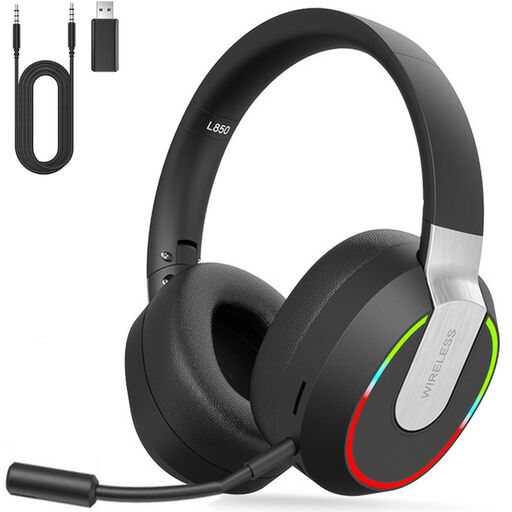
An option if you want to game wirelessly and also use Bluetooth or a wired mode.
The product description lists Bluetooth, a 3.5 mm mode and a detachable microphone. It also states latency of less than 30 ms and up to 9 hours of play time.
 No image available
For anyone looking for a wired headset with multiple connection options and chat controls.
The product description lists 3.5 mm and USB-C connections, microphone controls, software-based audio adjustment and memory foam ear cushions. This is a wired model.
The label alone doesn’t guarantee it. Razer lists the BlackShark V2 X’s 7.1 feature for Windows 11 only. Check which spatial audio features actually work with each headset and platform.
Start with the connection supported by your device. HyperX lists 3.5 mm, USB-C and USB-A connections for the wired Cloud III. For a wireless headset, also check which dongle and platform variant you need.
The World Health Organization recommends keeping the volume down and giving your ears regular breaks. As an example, it cites an average of 80 dB for up to 40 hours per week, compared with four hours per week at 90 dB. This is health advice, not a purchasing requirement or a guarantee that an unmeasured headset volume is safe.
No, extra cover isn’t a legal requirement when buying a headset. According to the Government of the Netherlands, you are entitled to a product that works properly, there is no fixed statutory warranty period in the Netherlands, and you should contact the seller if there’s a fault. Consider what paid additional cover offers on top of your existing rights.