
Players who value team chat
If you give instructions and discuss tactics while practising, look for easy-to-use microphone controls and check that the features work on your gaming platform.


Start by checking the connection to your gaming device and whether you can control the microphone during team chat. Then consider whether the headset will stay comfortable throughout your practice sessions. A wired connection means no battery to manage, but it limits your movement; a wireless headset needs charging. If you want to hear game audio and phone audio at the same time, check that the model supports simultaneous audio. Specifications won’t tell you how a headset will fit your head or sound in your room.
If you give instructions and discuss tactics while practising, look for easy-to-use microphone controls and check that the features work on your gaming platform.
If you wear your headset at your desk for long stretches, fit and ear cushion comfort are important to assess for yourself. Specifications can’t replace trying it on.
If you want to hear your phone as well as game audio, check the difference between Bluetooth connectivity and simultaneous audio from two sources.
| What to consider | What should you check? | Who is this important for? |
|---|---|---|
| Clear team chat | Check the microphone controls and mute indicator, as well as any software requirements for your platform. | If I give instructions while practising, I want to be able to control my microphone quickly and check whether my platform supports its features. Around 33% of consumers say clear team chat is their main concern when buying. |
| Comfort during long sessions | Look at the adjustability and ear cushion material; try the headset on yourself if possible. | If I have long practice sessions at my desk, I want to know whether the headset feels comfortable rather than relying only on a description of its materials. Around 27% of consumers prioritise comfort. |
| Game audio and a second source | Look for explicit support for simultaneous audio and check the microphone routing separately. | If I want to hear phone audio while gaming, I want to know whether both sources work at the same time and where my microphone sends audio. Around 20% of consumers prioritise combining audio sources. |
| The right connection | Check which ports your gaming device has and whether the software features you want work with it. | If I mainly want to practise without managing a battery, I want a connection that suits my device. Wireless also means charging and a compatible receiver connection. Around 20% of consumers start by looking for a simple connection that works with their device. |
A headset with Bluetooth and 2.4GHz doesn’t automatically support playing two audio sources at the same time.
Look specifically for simultaneous audio if you want to hear your game and phone together. Also check separately which device the microphone sends audio to.
Logitech states that the advanced Blue VO!CE features on the wired PRO X require a PC with G HUB.
Check which features are available for each model and gaming device. Don’t rely solely on the product name or a mention of a microphone feature.
HyperX lists different maximum battery life figures for the Cloud III S Wireless, depending on the connection mode. A maximum isn’t a prediction of how long it will last in every situation.
Compare battery life figures alongside the connection mode, and remember that you’ll need to charge the headset if you play wirelessly.
ACM ConsuWijzer distinguishes between your legal guarantee rights and any manufacturer’s or seller’s warranty.
Consider any extra warranty service separately from your legal rights, and keep your proof of purchase.
The wired PRO X is worth considering if you want to use microphone settings at your PC desk.
The Arctis Nova 7 Wireless Gen 2 is worth considering if you want to combine game audio with a second Bluetooth audio source.
The wired Cloud III offers several connection options, while the Cloud III S Wireless is designed for use via 2.4GHz or Bluetooth.
The BlackShark V3 Pro is an additional wireless option if microphone and ambient sound features are high on your list.
These models suit practice sessions from your home office, with wired options for use at a desk and wireless options for anyone who wants more freedom to move. Before buying, check the connection, platform support and audio features you need.
 No image available
A wired option if you practise at your desk and don’t want to manage a battery.
The product name lists a 3.5mm connection, a flip-to-mute microphone and compatibility with Nintendo Switch, PC and mobile devices. Check that your device has the right connection.
 No image available
A wireless option if you want more freedom to move and want to assess the fit for longer sessions.
The product name lists 2.4GHz and Bluetooth, a detachable 10mm boom microphone and memory foam ear cushions. HyperX claims maximum battery life of up to 120 hours via 2.4GHz and up to 200 hours via Bluetooth. Bluetooth doesn’t automatically mean that two sources are mixed at the same time.
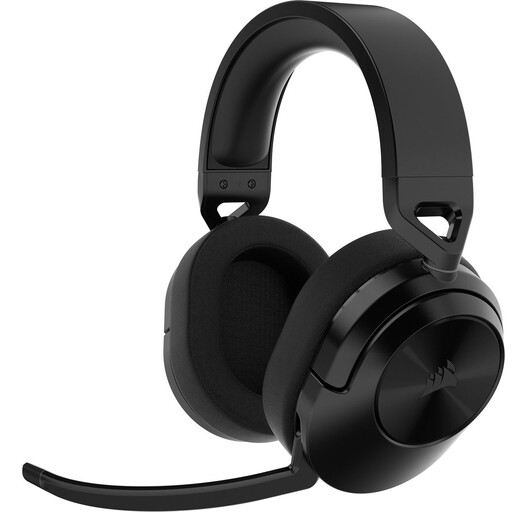 No image available
An option if you’re looking for a wireless headset for practice sessions at your home workspace.
Check which connection works with your gaming device and whether the features you need, such as simultaneous audio from two sources, are explicitly supported.
 No image available
A wired option for use at your desk. Check in advance which connection suits your gaming device.
HyperX lists a 10mm microphone and 3.5mm, USB-C and USB-A connection options for the Cloud III. The mute indicator and software features may vary depending on your set-up.
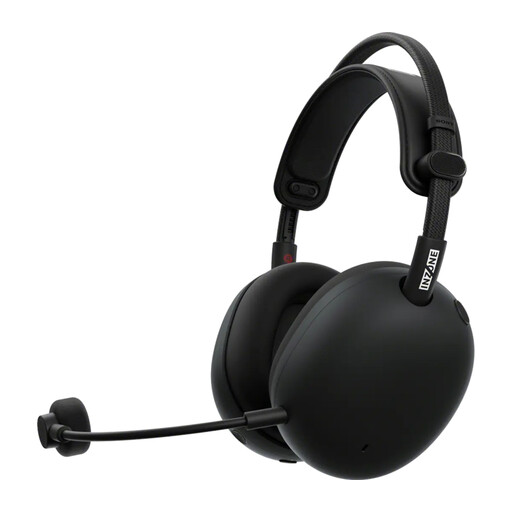 No image available
A wireless option to compare if you want to use multiple audio sources during team chat.
Before buying, check that the connections and microphone routing suit your gaming device and how you use your phone.
No, this varies by model and platform. Logitech states that Blue VO!CE and DTS Headphone:X 2.0 on the wired PRO X are only available on PC via G HUB. Check which features your gaming device supports.
Check the fit and microphone controls in your own set-up, and keep the listening volume at a sensible level. The World Health Organization points out that both volume and listening time contribute to the risk of hearing damage.
No, there isn’t a fixed two-year statutory guarantee period for every headset. ACM ConsuWijzer explains that your legal guarantee rights are separate from any manufacturer’s or seller’s warranty, and depend on what you could reasonably expect from the product with normal use.
Online consumer purchases generally come with a statutory cooling-off period; ACM ConsuWijzer states that it ends 14 days after delivery. Check the terms and any exceptions that apply to your purchase.