
Vandaag of morgen in huis

Kwaliteit gegarandeerd

Welkomstaanbiedingen ontgrendelen: GRATIS bezorging | Tot 80% korting | Gratis 30 dagen JoyPlus-proefperiode
Download de app
A gaming headset needs to do more than play sound. You want to play comfortably, communicate clearly and be sure the connection works with your PC, PlayStation, Xbox or Nintendo Switch. Yet many disappointing purchases come down to the same issues: the wrong connection, exaggerated sound claims and a headset that becomes uncomfortable after a long session.
The Joybuy Product Recommendation Officer helps you distinguish the key specifications from marketing language. This makes it easier to choose a gaming headset with microphone that suits the way you play.
A wireless gaming headset can work via Bluetooth, a 2.4GHz receiver or both. These connections are not interchangeable. Some consoles do not support Bluetooth audio directly, while a USB dongle does work. Always check:
For example, the ONIKUMA GT806 states that Bluetooth does not connect directly to PS5 or PS4. For these consoles, you need the 2.4GHz mode or the cable.
A 40, 50 or 53 mm driver can deliver clear sound, but size alone does not determine whether voices, footsteps or music sound good. Also look at the frequency response, audio type and any accompanying software.
With a 7.1 surround sound headset, the surround sound is often virtual. According to the product information, the Logitech G432 uses DTS Headphone:X software and a USB DAC for this feature. Without the right software or a compatible connection, the experience may differ from what you expect.
A lightweight over-ear gaming headset is not automatically suitable for every user. Consider the weight, shape of the ear cushions, adjustability and materials. Faux-leather cushions can partly block outside noise, but may feel warmer during extended use. An adjustable headband and swivelling ear cups help distribute pressure more evenly.
A wired gaming headset with a 3.5 mm connection is often easy to use with a controller, laptop, PC or mobile device. It does not require a battery, and you do not need to pair a wireless connection. If your PC has separate microphone and headphone ports, check whether a splitter is included.
A wireless model offers greater freedom of movement. Pay attention to the stated battery life and how it was measured. The Trust GXT 491 Fayzo states a battery life of up to 22 hours. According to the product information, the HyperX Cloud III S offers up to 120 hours via 2.4GHz and up to 200 hours via Bluetooth. These are stated maximum figures; lighting, volume and usage conditions can affect the actual operating time.
A good gaming headset with microphone should offer a practical way to mute the microphone. Options include:
According to the product information, the Razer BlackShark V2 X has a cardioid HyperClear microphone and a mute button. The Trust GXT 415 Zirox has a flip-up microphone, but it is not detachable. This difference is relevant if you also want to use the headset away from gaming.
Check the frequency response as a technical indication, but do not treat it as a complete prediction of sound quality. Most models in this selection state a range of around 20 Hz to 20 kHz. More important when choosing is whether the headset supports stereo, virtual surround sound or platform-specific spatial audio.
For PS5 users, a stereo headset can still be suitable when the console processes 3D audio. According to the product information, the Trust GXT 498W Forta is a stereo headset with support for 3D audio on PS5. This is different from built-in, true multi-channel playback.

Why it suits this profile: This wired gaming headset connects easily via 3.5 mm and, according to the product information, works with PC, laptop, PlayStation, Xbox and Nintendo Switch.
The fixed cable prevents charging issues and uncertain wireless compatibility.
244 grams, 50 mm drivers, over-ear ear cushions and a 2-metre cable.
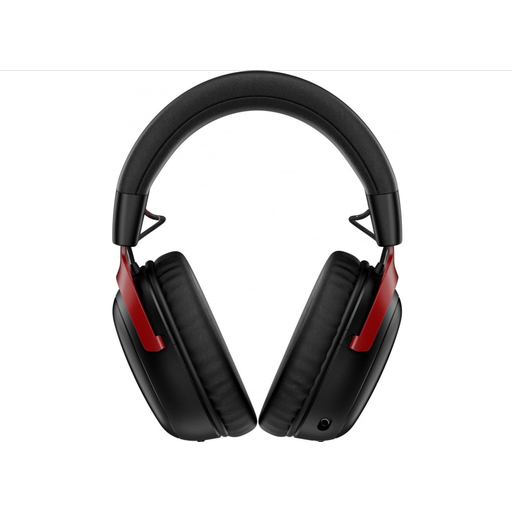
Why it suits this profile: Ideal for players who want to combine wireless freedom, long battery life and multiple connection options.
The product information specifies both 2.4GHz and Bluetooth and mentions a detachable microphone; however, check the preferred mode for each device.
53 mm drivers, USB-A and USB-C connections, detachable microphone and stated battery life of up to 120 hours via 2.4GHz.

Why it suits this profile: A practical choice for players who switch between PC, console and smartphone and do not want to rely on a fixed cable.
The product specifications list 2.4GHz, Bluetooth and a 3.5mm cable. This makes the headset less dependent on a single connection type.
Stated battery life of up to 22 hours, virtual 7.1 surround sound, 50 mm drivers and a detachable microphone.

Why it suits this profile: For gamers who want to use one wired headset with PC, Mac, PlayStation, Xbox, Nintendo Switch and mobile devices with a 3.5mm connection.
The 3.5mm connection makes platform compatibility straightforward. According to the product information, software and activation on PC are required for 7.1 sound.
240 grams, 50 mm drivers, memory foam ear cushions and a flip-up mute function for the microphone.
We have put together a complete, up-to-date list of products that fully meet these strict selection criteria and the applicable European safety regulations.
It depends on the connection. A 3.5mm headset usually works via the controller or console connection, but check the compatibility list. For wireless models, you need to check whether the USB receiver is compatible with your platform. Xbox may also have its own compatibility restrictions.
A wireless model needs to be charged regularly. The electricity costs are generally limited, but the battery does have a finite lifespan. A wired gaming headset has no charging costs and remains usable as long as the cable and connections are in good condition.
Lifespan depends on cable strain, hinges, ear cushions, battery use and storage. Keep the headset dry, do not pull on the cable and avoid using extremely high volume levels. With wireless models, the built-in battery is particularly likely to deliver less capacity over time. Also check the statutory guarantee and your consumer rights within the EU.
