Who is this headset guide for?

World explorer

You play mainly for the atmosphere, music and distinctive sounds of the game world. Look for good stereo sound and check that any spatial audio processing works with your game and platform. Megekko Academy discusses stereo as a viable option for gaming, while PlayStation Support explains the 3D audio settings on PS5.

Long-session gamer

You wear your headset for long periods, so comfort, ear cushions and warmth are all worth considering. Material and product specifications can’t tell you exactly how a headset will feel on your head, so try it on if you can.

Multiplatform gamer

You switch between a PC and consoles and want the same headset to connect to every device you use. Check the full model name, platform variant and connection type, as different versions within the same product range may vary.

What should you look for when choosing?

What to consider What should you check? Who should pay extra attention?
Atmosphere and positioning of in-game sounds Compare listening impressions and check that the spatial audio feature you want works with your game and platform. If music and environmental cues matter to me, I want to know how they sound in my game. Around 27% of consumers prioritise atmosphere and the positioning of in-game sounds.
Comfort Check the adjustability and cushion material, and try the fit if possible. For long gaming sessions, I want a headset that feels comfortable and doesn’t get too warm. Around 27% of consumers prioritise comfort.
Connection and platform Note your exact PC or console and check the connection for that specific version. If I switch between devices, I want to know in advance whether the headset will connect to each one. Around 20% of consumers prioritise platform compatibility.
Noise isolation or ambient sound Compare an open-back design with a closed-back alternative for the room where you play. In a shared room, I may want to block out more noise; in a quiet room, I may prefer to hear what’s going on around me. Around 13% of consumers choose mainly based on their room and how much contact they want with their surroundings.
Cable and charging Decide whether a cable would get in your way and whether you want to play wirelessly, with the charging that involves. If I just want an easy gaming setup, I don’t want a cable or charging feature I won’t use. Around 13% of consumers prioritise ease of use and cost.

Common buying mistakes

  • Assuming a surround sound label means better in-game audio

    Stereo can also work well for gaming. Spatial audio depends partly on the game, software and platform, so a 7.1 label alone doesn’t tell you how convincingly sounds are positioned.

    Check compatibility with your platform and compare listening impressions rather than relying on product labels alone.

  • Assuming every wireless version works with every console

    According to Tweakers, the HyperX Cloud III Wireless they tested didn’t work with Xbox; the SteelSeries Arctis Nova 7X Wireless they tested was a different platform version. The model name and connection type therefore matter.

    Before buying, check the full model name, platform version and connection type for your console.

    An incompatible connection may mean you need a different version or additional equipment.

  • Confusing the manufacturer’s warranty with all your statutory rights

    According to the Dutch government, there is no fixed statutory warranty period in the Netherlands of exactly two years. If a product is faulty, the retailer is still your point of contact.

    Check what an additional paid warranty covers, and remember that your statutory rights for a faulty product are separate.

Brands to consider

HyperX

The Cloud III range includes a wired version and a separate wireless version.

  • HyperX lists 3.5 mm, USB-C and USB-A connections and memory foam ear cushions for the wired Cloud III.
  • Tweakers praised the sound positioning of the Cloud III Wireless they tested, but also noted that it made their ears warm and didn’t support Xbox. These test findings don’t automatically apply to the wired version.

SteelSeries

The Arctis Nova range includes several platform versions; the Nova 7X Wireless tested is one option for people who use multiple devices.

  • Tweakers described the Nova 7X Wireless they tested as connecting to consoles and PCs via a dongle, while connecting to a phone via Bluetooth at the same time.
  • The same test found that the version they tried didn’t feel particularly secure. Check that the exact X, P or other version is right for your devices.

Turtle Beach

The Atlas Air is an open-back option for gaming on PC or PlayStation in a quiet room.

  • Turtle Beach lists an open-back design, 2.4GHz connection, Bluetooth and a wired option for the Atlas Air.
  • The descriptions of spatial audio and comfort come from the manufacturer, not an independent listening test. The open-back design also lets you hear more of your surroundings.

Logitech G

The Astro A50 X is designed for use with multiple gaming platforms via a single base station.

  • Logitech says you can switch between three connected systems and specifies a charging station.
  • A setup with a base station may not be necessary if you only play on one device. Logitech’s sound claims haven’t been treated here as independent test findings.

Headsets at Joybuy

This selection includes wired and wireless gaming headsets for a range of gaming devices. For the exact version, check that the connection, any required software and stated platform support are right for your setup.

SteelSeries Arctis Nova Pro Wireless, PlayStation, Black

SteelSeries Arctis Nova Pro Wireless, PlayStation, Black

An option for consumers who want to play wirelessly on the listed PlayStation, PC or Switch devices. Check that the exact connection suits your setup.

View at Joybuy

Razer Kraken V3 X Headset, Black

Razer Kraken V3 X Headset, Black

An option for consumers who want to play on PC using a wired connection. Check that this version’s connection suits your device.

View at Joybuy

HyperX Cloud III S Wireless Gaming Headset, Black

HyperX Cloud III S Wireless Gaming Headset, Black

Suits consumers who want to game wirelessly on the listed PC, PlayStation or Switch devices. Check compatibility with your exact platform.

The product title states battery life of up to 120 hours via 2.4 GHz and up to 200 hours via Bluetooth. DTS Spatial Audio is listed for computer use.

View at Joybuy

Razer BlackShark V2 X 7.1 Wired Gaming Headset, Black

Razer BlackShark V2 X 7.1 Wired Gaming Headset, Black

A wired option for consumers considering a headset with a 7.1 label. According to the product information, 7.1 surround sound requires software and the included activation code; the label alone doesn’t prove better positioning of in-game sounds.

View at Joybuy
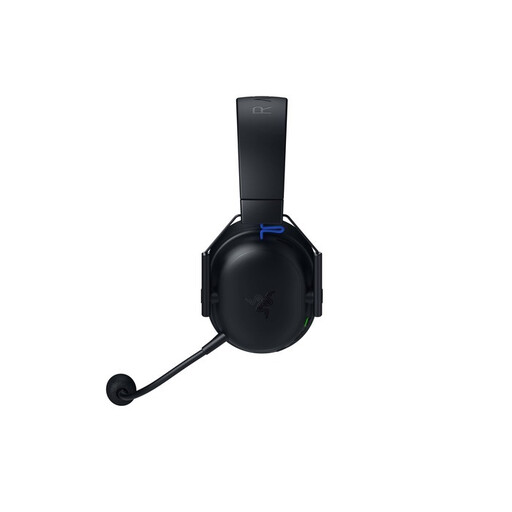
Razer BlackShark V3 X Hyperspeed Gaming Headset, PlayStation Licensed, Black

Razer BlackShark V3 X Hyperspeed Gaming Headset, PlayStation Licensed, Black

A wireless option for consumers who want to play on PlayStation or PC. Check that the stated connection works with your device and preferred setup.

View at Joybuy

Frequently asked questions

Do I need a 7.1 headset for spatial audio on PS5?

No. A 7.1 label alone doesn’t prove better sound positioning. PlayStation Support explains the 3D audio settings for headphones on PS5; also check that your headset’s connection works with your setup.

Can I connect a Bluetooth headset directly to my Xbox?

Don’t assume so: Xbox doesn’t describe a direct Bluetooth headset connection to the console. Check whether your exact headset supports a compatible wireless connection or whether its 3.5 mm connection works with your controller.

How can I use a headset responsibly during long gaming sessions?

Keep the volume down and take regular breaks. The World Health Organization gives an average of 80 dB for up to 40 hours a week as an example; at higher sound levels, the recommended time is shorter. This is listening advice, not a legal product limit or a guarantee for every situation.

What are my rights when buying a headset online in the Netherlands?

Online purchases from a business generally come with a 14-day cooling-off period, subject to legal exceptions. According to the Dutch government, there is no fixed statutory warranty period in the Netherlands of exactly two years; if a product is faulty, the retailer is your point of contact.

What should I check for EU product compliance?

Check the conformity information for the exact version. The European Commission explains that CE marking is mandatory for products covered by applicable harmonised EU rules. The mark is the manufacturer’s declaration, not an independent EU approval.
