
Vandaag of morgen in huis

Kwaliteit gegarandeerd

Welkomstaanbiedingen ontgrendelen: GRATIS bezorging | Tot 80% korting | Gratis 30 dagen JoyPlus-proefperiode
Download de app
A gaming headset needs to do more than play sound. You want to hear your teammates clearly, react quickly and play for hours without constantly adjusting the headband or ear cushions. However, comparing product pages properly can be difficult. Terms such as “surround sound”, “noise cancelling” and “professional microphone” do not always tell you what you will actually get in practice.
The following points will help you distinguish marketing claims from verifiable features. Afterwards, you will find some popular choices for different playing styles and platforms.
A 7.1 surround sound headset often uses software to simulate spatial audio. This can be useful for positional sounds in games, but it does not work in the same way on every console or connection. With some models, the feature is only available through PC software.
So check:
A stereo model is not automatically unsuitable. For consoles and mobile devices, a simple 3.5mm connection can sometimes be more practical than software features that are only available on PC.
With gaming headsets, noise reduction can refer to several different things:
These are not equivalent features. A wired gaming headset with closed, soft ear cushions can partially reduce surrounding noise, but that does not automatically mean the microphone will remove every background sound. Look at the descriptions of both the earcups and the microphone.
A headset may be described in its title as suitable for several platforms, while certain features remain limited. A 3.5mm headset will generally work easily through a controller or combined connection. However, some PCs have separate audio and microphone ports, in which case you will need a splitter.
With wireless models, you should also check whether the supplied USB dongle works with your device. Bluetooth is not always available on consoles. Also check the difference between:
A wired gaming headset does not need a battery and works as soon as you connect the cable. This makes it suitable for long sessions and switching between different devices. Do check the cable length and whether the cable is detachable.
A wireless gaming headset gives you greater freedom of movement. Pay attention to the connection used: 2.4GHz is intended for a wireless dongle, while Bluetooth is particularly convenient for phones, tablets and laptops. Check the stated battery life for your preferred connection method. Lighting can increase power consumption.
An over-ear gaming headset completely surrounds your ears. This can be comfortable during longer sessions and helps with passive sound isolation. Look out for:
A lightweight model is not automatically comfortable; the pressure from the headband and the shape of the cushions are just as important.
With a gaming headset with microphone, positioning and controls matter more than the term “noise reduction” alone. A directional microphone mainly picks up sound from the front, while an omnidirectional microphone can register sound from multiple directions.
Useful features include:

Why it suits this profile: This lightweight wired gaming headset is suitable for PC, laptop, PlayStation, Xbox and Nintendo Switch via 3.5mm. The 2-metre cable is practical for a desk setup.
The specifications clearly state stereo audio and no virtual 7.1 feature. You therefore do not pay for a surround feature you may not use.
244 grams, 50mm drivers, over-ear ear cushions and controls for volume and the microphone.
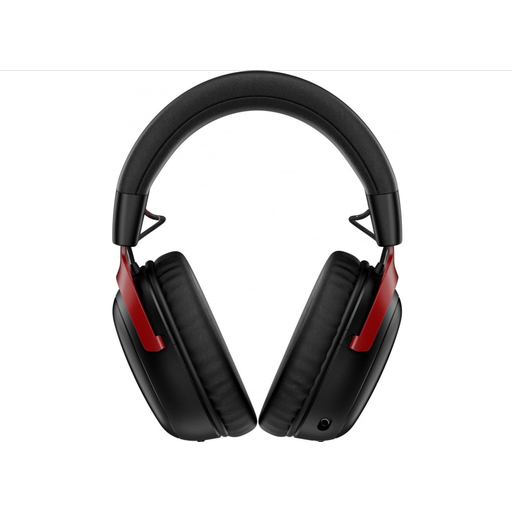
Why it suits this profile: This wireless model combines 2.4GHz and Bluetooth. According to the product information, the battery lasts up to 120 hours via 2.4GHz and up to 200 hours via Bluetooth.
The two connection methods and the supplied USB-A and USB-C dongles are clearly listed. Do check beforehand that your platform appears on the compatibility list.
53mm drivers, detachable microphone, Bluetooth 5.3 and DTS Spatial Audio according to the product description.

Why it suits this profile: This over-ear headset is designed for players looking for a lightweight, wired solution for multiple platforms. The product information states support for PC, Mac, PlayStation, Xbox, Nintendo Switch and mobile devices.
The product description states that 7.1 surround sound is activated through Razer software and an activation code. Check the software requirements before expecting to use this feature.
240 grams, 50mm TriForce drivers, 3.5mm connection and a cardioid HyperClear microphone according to Razer.
We have put together a complete, up-to-date list of products that fully meet these strict selection criteria and the applicable European safety regulations.
That depends on the connection. A headset with a 3.5mm jack will often work with devices that have a combined audio and microphone connection. For PCs, check whether a splitter is required. With wireless headsets, the supported platforms vary depending on the dongle and connection method.
A wired model does not need a battery and can be connected straight away. A wireless gaming headset offers greater freedom of movement, but needs to be charged and may have different modes for PC, console and mobile use. Choose based on where you play and which devices you use, rather than just the product name.
Its lifespan depends on cable use, hinges, the microphone arm, ear cushions and storage. A detachable cable or microphone can be practical if a component needs replacing. Keep the headset dry, do not pull on the cable and avoid using excessive volume. In the EU, consumer purchases are covered by a legal guarantee of at least two years; additional rights may depend on the applicable national rules.
