What should you consider when choosing?
First decide which sound and level of isolation suit your room, then check the fit and connection. Wireless use and extra audio features are additional considerations.
Open-back, wired
Best for: playing on your own in a quiet space, if a spacious sound is important to you.
Keep in mind: background noise gets in, and sound can leak out to others.
Closed-back, wired
Best for: playing in a shared room or if you’d rather not have to charge a headset battery.
Keep in mind: check the connection for each device; fit and comfort vary from person to person.
Wireless
Best for: playing without a headset cable, as long as the connection works with your device.
Keep in mind: you’ll need to charge the headset and choose the right connection mode or variant.
| What to consider |
What to look for |
Who is this important for? |
| Sound and room type |
Decide whether the room is quiet and private; compare open-back and closed-back ear cups. |
I mainly want to immerse myself in music and ambient sounds in a quiet room; around 28% of consumers prioritise sound experience. |
| Comfort during long sessions |
Look at adjustability, cushion material and the space around your ears. |
If I play for a long time, I want a headset that feels comfortable, even if that matters more than extra features; around 22% of consumers prioritise wearing comfort. |
| Platform and features |
Check the connection, model variant and any software requirements for your device. |
I want to be sure the connection and audio mode I want will work with my PC or console; around 22% of consumers prioritise platform compatibility. |
| Sound in a shared room |
Consider background noise, sound leakage and the microphone. |
If other people are nearby, I want to consider what they can hear and how much outside noise gets through the headset; around 17% of consumers prioritise peace and quiet in a shared room. |
| Wireless use |
Check the connection required, compatibility and battery use. |
I want to move around without a headset cable and don’t mind having to charge the battery; around 11% of consumers prioritise freedom of movement. |
Gaming headsets at Joybuy
This selection of Joybuy products includes wired headsets for PC and console, as well as a wireless option. Check the connection, variant and platform requirements for each model.
 No image available
Trust GXT 498W Forta, wired, white
Suitable for PS5 or PS4 gaming via 3,5mm and voice chat.
The product information lists a detachable microphone, stereo sound and a weight of 253 g. PS5 3D audio is also mentioned; this is not a claim of true surround sound.
View at Joybuy
 No image available
HyperX Cloud III S Wireless
Suitable for anyone who wants to game without a headset cable and switch between devices with a compatible connection.
The product information lists 2.4 GHz and Bluetooth, memory foam ear cushions and a detachable microphone. Wireless use requires charging.
View at Joybuy
 No image available
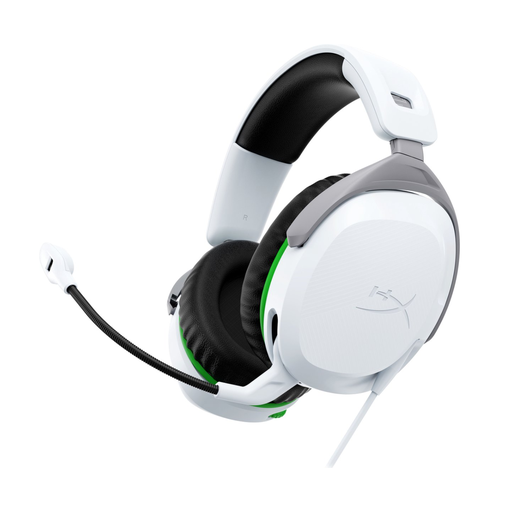
HyperX CloudX Stinger II, wired, white
Suitable for Xbox gaming via a wired 3,5mm connection.
The product information lists memory foam ear cushions and a swivel-to-mute microphone. A wired connection doesn’t offer the freedom of movement you get with wireless.
View at Joybuy
 No image available
HyperX Cloud Stinger II, wired, white
Suitable for PS5 or PS4 gaming via a wired connection.
The product information lists a 3,5mm connection, memory foam ear cushions and a swivel-to-mute microphone. A wired connection doesn’t offer the freedom of movement you get with wireless.
View at Joybuy
 No image available
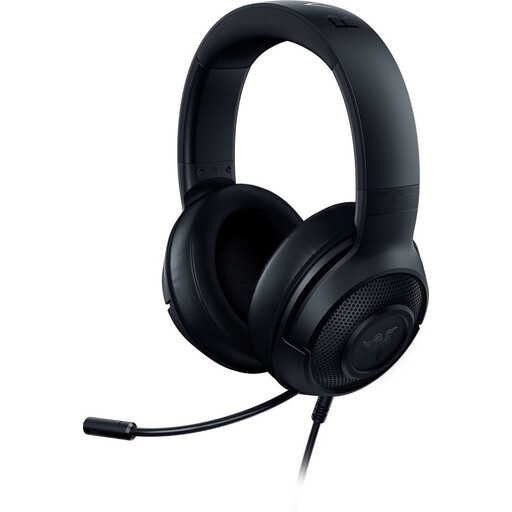
Razer Kraken X Lite RZ04-02950100-R381
Suitable for gaming on devices with a compatible 3,5mm connection.
The product information lists a weight of 230 g and compatibility with PS4, PS5, Xbox, PC and Nintendo Switch. The stated 7.1 surround feature is limited to Windows 10 64-bit.
View at Joybuy
Frequently asked questions
Does a bright room mean I need a different gaming headset?
No, the light itself doesn’t determine your choice. When choosing a headset, consider background noise and whether the room is shared: an open-back design lets sound in and can leak sound out. Screen reflections are a separate issue.
Will the Logitech G432’s 7.1 feature work on my PS5?
Don’t assume it will. Logitech G states that the G432’s DTS Headphone:X 2.0 and EQ presets are only available on Windows with G HUB. Always check that features work on the platform you play on.
What should I look for during long gaming sessions and for safe listening?
Look for an adjustable fit and ear cushions that feel comfortable to you, and keep the volume low. The WHO, for example, advises not going above 60% of the maximum volume and, if you use a sound meter, staying below an average of 80 dB. This is listening advice, not a legal Dutch volume limit for gaming at home.
What cooling-off period and legal protection apply to an online purchase in the Netherlands?
Online purchases generally come with a statutory 14-day cooling-off period after delivery, subject to legal exceptions. Products must also meet reasonable expectations; if a fault arises that you wouldn’t have expected with normal use, the seller is responsible for providing a solution. ACM ConsuWijzer explains these consumer rights.
How can I check whether a headset is compatible with my console?
Check the full model name and variant, your console’s connection and any software requirements. SteelSeries, for example, specifies that the Nova 5X is for Xbox; Logitech G says the G432’s DTS and EQ features are limited to Windows with G HUB.


