
Vandaag of morgen in huis

Kwaliteit gegarandeerd

Welkomstaanbiedingen ontgrendelen: GRATIS bezorging | Tot 80% korting | Gratis 30 dagen JoyPlus-proefperiode
Download de app
A gaming headset might seem straightforward at first: choose a model with a microphone, plug it in and start playing. In practice, headsets vary considerably in comfort, connectivity, microphone quality and compatibility. A low price can be tempting, but an awkward cable, limited console support or a poorly fitting headband can quickly make your purchase less appealing.
As a Joybuy Product Recommendation Officer, I focus on specifications you can verify. Read on to find out which pitfalls to avoid and which type of gaming headset suits the way you play.
A product described as a 7.1 surround sound headset often uses virtual audio channels created by software. This can help you pinpoint sounds in games, but the feature won’t necessarily work with every console or connection. Check whether surround sound is available only on PC or also on PlayStation, Xbox or Nintendo Switch.
A standard stereo headset may also be perfectly suitable if you mainly play single-player games or listen to music and watch films. So check which devices and software are supported, rather than relying on the term ‘7.1’ alone.
A wireless gaming headset keeps your desk free of cables, but it runs on a rechargeable battery or disposable batteries. Check the connection type: 2.4 GHz via a USB dongle is different from Bluetooth. Not every console fully supports both options. Also check whether the microphone and audio features remain available over Bluetooth.
A wired gaming headset doesn’t need charging and often connects easily via 3.5 mm, USB or both. On the other hand, the cable can get in the way or wear out more quickly if it’s bent often.
An RGB gaming headset can complement a colourful gaming room, but lighting has no direct bearing on sound quality or microphone performance. On some models, the USB connection only powers the LEDs. This is stated explicitly, for example, for the ONIKUMA K8. So check which connection carries the audio and which is only for the lighting.
Start by choosing your main platform. A headset for PC and PS5 may offer different features from an Xbox gaming headset. For Xbox, check whether the 3.5 mm connection plugs straight into the controller or whether you need a separate adapter.
A model with a 3.5 mm connection is usually compatible with a wide range of devices, including controllers, laptops, mobile devices and Nintendo Switch. USB headsets can offer digital audio and software features, but depend more on the available port and operating system.
Also look out for:
When choosing a gaming headset with a microphone, the type, positioning and mute function are particularly important. A boom microphone that you can position close to your mouth is handy for team chat. A flip-to-mute function makes it easy to mute yourself and helps prevent you from accidentally broadcasting.
Terms such as ‘noise cancelling’ describe a technical feature, but don’t guarantee a completely silent background. How clearly you can be heard also depends on the microphone’s distance from your mouth, the software and background noise. If you’re unsure, use your PC or console’s microphone settings to check the input level.
For a comfortable headset during long gaming sessions, memory foam ear cushions, an adjustable headband and a suitable weight are all worth considering. Over-ear cups surround your ears, while on-ear models rest on them. The former can provide more isolation, while the latter are often more compact.
Also consider the material. Faux leather can be easy to clean, but may feel warmer. A metal frame can add strength, but it won’t necessarily make a headset more comfortable. Fit is personal: a lightweight headset with less pressure may suit you better than a heavier model with thicker cushions.

Why it suits this profile: The wired 3.5 mm connection is easy to use with a PC, laptop, Mac and compatible consoles. The flexible microphone and volume control are handy for new online players.
The product information states that the USB port only powers the RGB lighting. This means you know in advance that audio and the microphone use the 3.5 mm connection.
Wired plug-and-play connection, over-ear design, RGB lighting and flexible microphone.

Why it suits this profile: This model combines USB-A, USB-C and 3.5 mm connections with compatibility for PC, PlayStation, Xbox, Nintendo Switch, Mac and mobile devices.
The range of connections reduces the chance of choosing the wrong cable. DTS Headphone:X 2.0 is listed as a virtual surround feature; check which features are available on each platform.
53 mm angled drivers, memory foam in the headband and ear cushions, detachable microphone and metal frame.
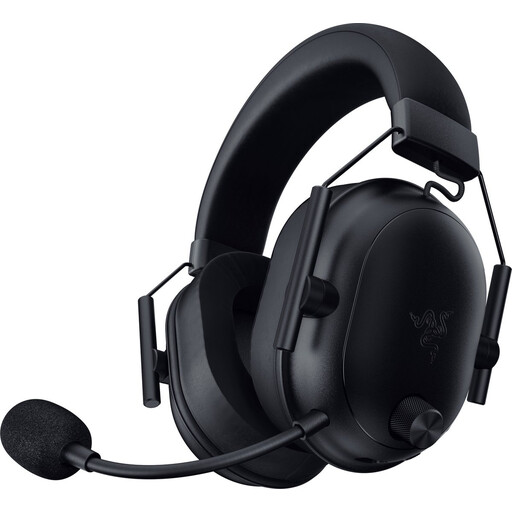
Why it suits this profile: This is an option for players who want to game wirelessly on PC and other supported devices, with a choice of Bluetooth or 2.4 GHz.
The product specifications list both wireless connections and an included USB-C dongle with a USB-A adapter. The stated battery life varies by mode, helping you make a more informed choice.
Weight of 280 grams, Bluetooth 5.2, 50 mm drivers and a stated battery life of up to 70 hours.
We’ve put together a complete, up-to-date list of products that meet these strict selection criteria and current European safety regulations.
It depends on the connection. Check whether the model specifically lists your console and supports the USB dongle, Bluetooth or controller connection. A headset may work with several platforms, but not necessarily offer the same features on all of them.
Its lifespan depends on how the cable is used, the hinges, the ear cushions and how it’s stored. A metal frame or replaceable microphone can be practical, but doesn’t tell you everything about durability. Store the headset somewhere dry, don’t pull on the cable and clean the ear cushions with a soft, dry cloth.
Often, yes. Virtual surround features may depend on software, a USB sound card or a specific console setting. Before you buy, check which features work without software and whether the required app is available for your device.
