
Vandaag of morgen in huis

Kwaliteit gegarandeerd

Welkomstaanbiedingen ontgrendelen: GRATIS bezorging | Tot 80% korting | Gratis 30 dagen JoyPlus-proefperiode
Download de app
A gaming headset needs to do more than play sound. You want to hear your teammates clearly, react quickly to sounds in the game and wear the headset for longer periods without discomfort. However, there are several pitfalls that can make an attractive model less suitable in practice.
As a Joybuy Product Recommendation Officer, I therefore focus mainly on verifiable specifications: connectivity, platform compatibility, weight, microphone and how surround sound works. Below, you’ll find what to look out for and which models suit different uses.
A 7.1 surround sound headset may use virtual surround sound. That’s different from having seven physical speakers in each earcup. Some models require software, such as a PC programme or activation code. The feature may also be limited to PC or a specific USB connection.
A wired stereo headset isn’t automatically less suitable as a result. For a gaming headset for PS5, Xbox or Nintendo Switch, a direct 3.5mm connection may actually be more practical. Always check whether surround sound is available on your platform.
A 50mm driver may sound impressive on paper, but its size doesn’t tell you everything about sound quality. Also consider the type of connection, audio channels and available settings. A model with 40mm drivers may be perfectly adequate for your needs, while a 7.1 model may require additional software.
According to the product descriptions, several models in this selection use 50mm drivers for stereo or virtual surround sound. Treat this as a technical indication, not a fixed guarantee of a particular listening experience.
A lightweight headset is comfortable, but the fit, ear cushions and headband also matter. An over-ear gaming headset should sit around your ears without pressing too firmly. Also look for breathable materials, adjustability and the shape of the earcups.
The cable can become a weak point over time, too. Check its length and whether you need a 3.5mm port, USB port or adapter before ordering.
A wired gaming headset using 3.5mm usually works straight away with a controller, laptop or console. There’s no need to recharge it and the connection is straightforward. A 2-metre cable, as found on some Trust models, gives you more freedom of movement around a PC or console.
A wireless gaming headset offers greater freedom, but requires a battery, receiver or Bluetooth connection. Check the stated battery life and make sure the wireless connection is compatible with your platform. A headset with Bluetooth isn’t automatically suitable for wireless game audio on every console.
Check that the headset is suitable for your device:
A gaming headset with microphone should have a practical mute option. This may be via a button, a control on the earcup or by flipping the microphone upwards. A detachable microphone is useful if you also want to use the headset for music.
The weight of the products in this selection ranges from approximately 240 to 340 grams. This is a useful comparison, but the fit remains a personal preference. Turn the volume down before you start and take regular breaks during long sessions.

Why it suits this profile: According to the product description, this wired headset uses a 3.5mm connection and works with PC, laptop, PlayStation, Xbox and Nintendo Switch.
The product information clearly states that this is a stereo headset. You’re not paying for a surround feature that isn’t included.
50mm drivers, over-ear ear cushions, a flip-up microphone and a 2-metre cable. According to the specifications, it weighs 244 grams.

Why it suits this profile: According to the product information, this model combines memory foam ear cushions, a metal frame, a detachable microphone and several connection options.
The compatibility and connections are clearly specified: USB-C, USB adapter and 3.5mm. This makes it easier to check everything in advance.
53mm drivers, DTS Headphone:X virtual surround sound according to the product description, and a detachable microphone with mute indicator.

Why it suits this profile: A wireless gaming headset is practical for players who frequently switch between gaming, mobile use and multiple devices.
The product information mentions both 2.4GHz and Bluetooth, and states the battery life for each mode. This helps you estimate the required usage time more accurately.
According to the product information, up to 120 hours via 2.4GHz and up to 200 hours via Bluetooth, with 53mm drivers and a detachable microphone.
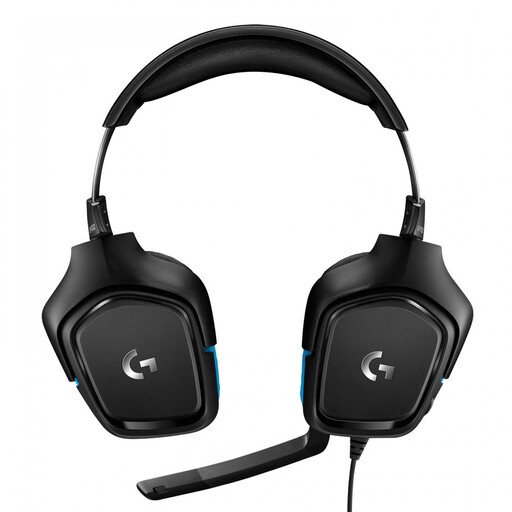
Why it suits this profile: The USB DAC and 3.5mm connection offer flexibility for PC and various consoles, while DTS Headphone:X is activated via software.
The product description makes it clear that software is required for 7.1 functionality. You therefore know that the surround feature isn’t entirely plug-and-play.
50mm drivers, a flip-to-mute microphone, USB DAC and a 2-metre cable according to the listed specifications.
We’ve put together a complete, up-to-date list of products that fully meet these strict selection criteria and the applicable European safety regulations.
A wired gaming headset doesn’t need a battery and works via a direct cable connection. This can be useful for long sessions and fixed PC setups. A wireless model offers greater freedom of movement, but needs to be recharged. The right choice therefore depends on where you play and your personal preference.
Only if the connection and platform support match. A headset with a 3.5mm jack is often widely compatible, but check whether your PC has one combined port or separate audio and microphone ports. For USB and wireless models, check the compatibility list carefully.
Its lifespan depends on how the cable is used, the hinges, ear cushions and storage. Don’t pull on the cable, don’t bend the microphone beyond its intended range and store the headset somewhere dry. With wireless models, the battery is another component to consider. The statutory guarantee in the EU is separate from the product’s practical lifespan, and your statutory rights continue to apply.
