
Vandaag of morgen in huis

Kwaliteit gegarandeerd

Welkomstaanbiedingen ontgrendelen: GRATIS bezorging | Tot 80% korting | Gratis 30 dagen JoyPlus-proefperiode
Download de app
A gaming headset might seem straightforward to choose at first glance. Yet marketing terms like “7.1 surround sound”, “noise cancellation” and “ultra-low latency” can paint an incomplete picture. The right choice depends mainly on your platform, how you play and how long you wear the headset in one go.
For British gamers, three pitfalls are particularly relevant:
A wired gaming headset with a 3.5mm connection is usually easy to plug into a controller, laptop or console. You don’t need to charge the battery and there’s no wireless dongle required. Do check whether your PC has separate audio and microphone jacks; sometimes a splitter or extension cable is needed.
A wireless gaming headset typically works via Bluetooth or a 2.4GHz USB dongle. These two connections are not interchangeable. Bluetooth is handy for smartphones and tablets, while 2.4GHz is often used for gaming on PC or console. The Trust GXT 491 Fayzo combines both options with a 3.5mm cable. According to the product description, this model can be used with a 2.4GHz dongle or Bluetooth, and the battery offers up to 22 hours of use.
If you’re looking for one model for multiple devices, read the product page carefully. A headset for Xbox and Nintendo Switch, for example, might support a 3.5mm connection, while the wireless function is only available for PC or certain consoles.
The label 7.1 surround sound headset on gaming headsets often means virtual surround sound. The Logitech G432 uses 7.1 channels and DTS Headphone:X via the included USB DAC and Logitech G HUB software, according to the product specifications. The 3.5mm connection does not deliver the same software experience.
A PS5 gaming headset can also support spatial audio without it being “true” 7.1 sound. The Trust GXT 498W Forta is a wired stereo model that, according to the description, supports 3D audio on PS5. For those who mainly listen to music, neutral stereo can actually be more practical than a pronounced gaming profile.
Alongside the surround format, look at:
A gaming headset with microphone shouldn’t just play sound; it also needs to provide clear team communication. Look at the type of microphone, whether it can be removed or folded away, and the mute control. “Noise cancelling” in the product description often refers to the microphone or passive sound isolation. That’s not automatically active noise cancellation in the ear cups.
For long-term use, an over-ear gaming headset, soft ear cushions and an adjustable headband are often practical. Also compare the weight: models in this selection range from around 240 to 340 grams. A comfortable gaming headset also stays in place when you move your head, without putting excessive pressure on your ears.

Why this fits the profile: The Zirox is a simple wired model for PC, laptop, PlayStation, Xbox and Nintendo Switch. The 3.5mm connection requires no charging or installation.
The product description clearly states that this is stereo sound and has no virtual 7.1 function. The microphone also folds up rather than being muted only through software.
50mm drivers, over-ear cushions, 244 gram weight and a 2-metre cable with 3.5mm connection.

Why this fits the profile: This wired model combines USB-C, USB-A and 3.5mm connectivity with memory foam ear cushions and a metal frame.
The connections and supported platforms are clearly stated. The detachable microphone also has a mute indicator, so the status is visible.
53mm drivers, DTS Headphone:X virtual surround sound, microphone noise cancellation and multi-platform compatibility.

Why this fits the profile: Suitable for players who want wireless freedom but also need a cable option and Bluetooth for smartphone use.
The connection options are specified as 2.4GHz radio, Bluetooth and 3.5mm cable. This makes it clear that wireless use depends on the chosen mode and the device.
Up to 22 hours battery life according to the product information, virtual 7.1 surround sound, 50mm drivers and a detachable microphone.
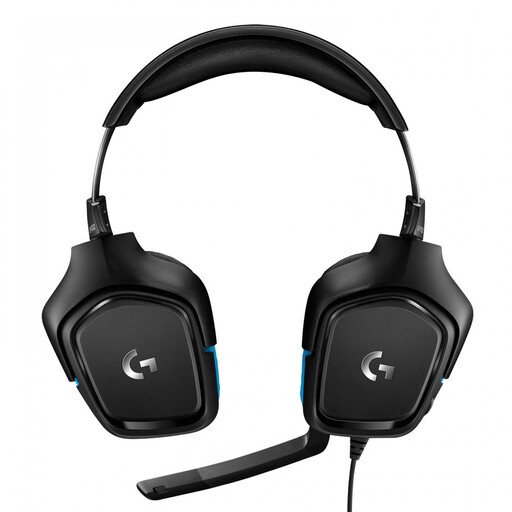
Why this fits the profile: This model is aimed at players who value positional game audio and broad platform support.
The product information states that DTS Headphone:X and 7.1 functionality are used via Logitech G HUB and the USB DAC. The software requirement is therefore visible before purchase.
50mm drivers, flip-to-mute microphone, USB DAC and compatibility with PC, PlayStation 4, Xbox One and Nintendo Switch.
We’ve put together a full, up-to-date list of products that fully meet these strict selection criteria and comply with current European safety regulations.
That depends on the connection. A 3.5mm model often works with a controller or combined headset port. USB and wireless models can be platform-specific. Always check the stated compatibility and whether a USB dongle is included.
You don’t need to replace cables, but you do have a built-in battery that needs charging. Pay attention to the stated battery life, charging time and the use of lighting. With intensive use, a wired gaming headset can be more practical because there’s no need to charge.
The lifespan depends on cable strain, hinges, headband and ear cushions. Store the headset in a dry place, don’t pull on the cable and clean the cushions with a soft, dry cloth. A model with replaceable or detachable parts can be easier to maintain in the long run. Also keep the volume at a moderate level and take regular breaks during long gaming sessions.
