
Players who want to be heard clearly
You regularly talk to teammates and want a microphone that does the job, an easy-to-reach mute button and the right audio input. Test your voice in the voice chat you actually use.


First, choose a headset whose microphone and audio output work with the device you play on. A wired headset means no charging, but you’ll need a suitable port and somewhere to manage the cable. Wireless gives you more freedom to move, but you’ll need to check the receiver, the correct platform variant and charging requirements. Where possible, try the fit and test how your voice sounds in the voice chat you use. Specifications alone can’t tell you what that experience will be like.
You regularly talk to teammates and want a microphone that does the job, an easy-to-reach mute button and the right audio input. Test your voice in the voice chat you actually use.
Check more than just the product name: make sure the connection, receiver and exact console variant are right for you. Hearing audio doesn’t automatically mean the microphone will work with the same device.
If a cable gets in the way, weigh up the extra freedom to move against the need to charge the headset and connect and store a wireless receiver.
Best if: you play in one place and don’t want to charge your headset.
Consider: the cable and connection need to suit your desk and device; software features won’t necessarily work on every platform.
Best if: you want to keep a headset cable off your desk.
Consider: you’ll need to charge it and check that the receiver, platform variant and any switch settings are right.
Best if: you want to use your phone as well as game.
Consider: being able to switch between connections doesn’t automatically mean you can hear two audio sources at once.
Start with the device you use for gaming and voice chat. Then decide whether the freedom to move without a cable matters more to you than having to charge the headset.
| What to consider | What should you check? | Who is this important for? |
|---|---|---|
| Clear team chat | Check the microphone, mute control and selected audio input. Make a short test recording in your voice chat. | If I often talk to my team, I want to be able to test my voice and mute quickly. Around 31% of consumers say clear team chat is their top priority. |
| Connection and platform variant | Make a note of what you play on and check that the connection, receiver and full model name are suitable. | If I switch between PC and console, I want to know that both the audio and microphone will work. Around 25% of consumers put the right connection and platform variant first. |
| Comfort during long sessions | Check the material used for the ear cushions and headband, and try the fit if you can. Keep the listening volume moderate. | If I play at my desk for longer periods, I want my headset to feel comfortable. Around 25% of consumers choose comfort as their top consideration. |
| Freedom to move without a cable | Check which receiver and port you need, and whether the stated battery life suits the way you use your headset. | If a cable makes my desk awkward to use, I want more freedom to move and may be happy to manage charging. Around 19% of consumers prioritise a cable-free desk. |
SteelSeries identifies the Nova 5X as the Nova 5 variant for Xbox. The dongle also needs to be set to the correct mode.
Before buying, check the full model name and the receiver setting required for your console.
Razer limits the BlackShark V2 X’s advertised 7.1 feature to Windows 11, so it won’t necessarily be available when you use the headset with a console.
Check the software and platform requirements for each feature, not just the general compatibility information.
The wired Cloud III is worth comparing if you switch between PC and console.
The Arctis Nova 5 range is worth considering if you want to game wirelessly and use Bluetooth too.
The wired BlackShark V2 X is worth a look if microphone positioning and a 3.5 mm connection matter to you.
The PRO X 2 LIGHTSPEED is a wireless option worth comparing if you also want Bluetooth and a 3.5 mm connection.
This selection includes wired 3.5 mm headsets and wireless models. For each headset, check that its connection and microphone are suitable for the device you play on.
 Image unavailable
A wired option for team chat at a fixed gaming setup. The product information lists a detachable microphone and mute control; check that the connection is suitable for your device.
The product name specifies 50 mm drivers and a white finish.
 Image unavailable
A wireless option if you want to avoid a headset cable. Before buying, check that its connection, microphone controls and compatibility suit your gaming device.
The product information lists 2.4 GHz, Bluetooth and a bendable microphone. The headset has a rechargeable battery; according to the description, it charges via USB-C.
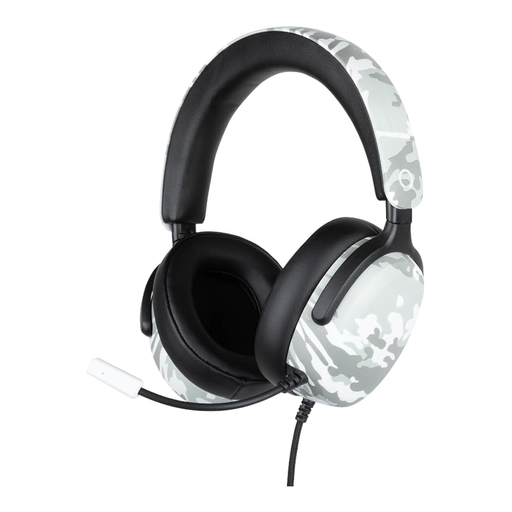 Image unavailable
A wired option to consider if you want a microphone and controls on the earcup. Check that the 3.5 mm connection works with your gaming device.
The product name lists compatibility with PS5, Switch 2 and Xbox Series X|S, 40 mm drivers and a 1.5 m cable. It has a camouflage pattern.
 Image unavailable
A wired option if you use team chat and want to be able to mute the microphone. Check which of the listed connections is suitable for your device.
The product information lists USB-C and 3.5 mm, as well as volume and mute controls. The product name specifies a black and red finish.
 Image unavailable
A headset to consider if you play on PC and need a microphone for voice chat. Check that the USB connection and features suit your setup.
The product information lists a cardioid microphone and mic mute. According to the product description, the 7.1 surround feature is limited to Windows.
In Discord, select the intended audio input and output under ‘Voice & Video’. Also check the physical mute setting and make sure the USB or 3.5 mm connection is secure.
No. SteelSeries identifies the Nova 5X as the Nova 5 variant for Xbox and says to set the dongle to Xbox mode. For PC and PlayStation, SteelSeries specifies USB mode.
Check that the ear cushions and headband feel comfortable, and take listening breaks. The World Health Organization advises keeping the volume of personal audio devices low; this is listening advice, not a product specification or legal volume limit.
The Dutch government states that consumers are entitled to a product that works as it should, and that there is no fixed statutory warranty period in the Netherlands. In many cases, online purchases from a business come with a 14-day cooling-off period. Check the terms that apply to your purchase.
According to the Dutch Authority for Digital Infrastructure, radio equipment placed on the market in the European Union must meet the applicable requirements; manufacturers affix a CE marking when these requirements are met. This doesn’t confirm that a specific model has been checked separately in the Netherlands.