
Console gamer on the sofa
You play on a big screen and want to make sure the headset works with your console, controller or receiver. HyperX lists several connections and platforms for the Cloud III; always check that they suit your set-up.


Start with the device you play on, not the size of your screen: check that the headset connection and any microphone connection work with it. Then choose between a wired connection and a suitable wireless option. Assess the fit and how dialogue sounds to you separately, as specifications can’t predict either.
You play on a big screen and want to make sure the headset works with your console, controller or receiver. HyperX lists several connections and platforms for the Cloud III; always check that they suit your set-up.
You want to follow dialogue and audio cues comfortably. A spatial audio feature described for a particular platform or supported game won’t automatically improve the sound on every device.
You want fewer cables around your seat or play on multiple systems. The connection and charging method of the exact headset variant are important factors to consider.
Start with the device you play on and the connection that suits it. Then decide whether a wired connection or the freedom to move around wirelessly is more practical, before considering dialogue, fit and the features you’ll actually use.
The percentages below show which main need might take priority when making your choice; these are distinct priorities when choosing a gaming headset for narrative puzzle games on a big screen.
| What to consider | What to look for | Who is this important for? |
|---|---|---|
| Connection and platform | Check the exact console or PC, headset variant and connection, and whether the microphone works through that connection. | If my main concern is making sure the headset works with my gaming device, I start with the connection. For around 28% of consumers, connectivity is the top priority. |
| Dialogue and audio cues | Check which audio features are available on your platform, then assess speech, music and audio cues at a comfortable volume. | If you mainly want to follow dialogue and subtle sounds during a story, pay attention to how they sound in the games you play. Around 22% of consumers put this listening need first. |
| Freedom to move around | For wireless use, check the receiver and connection. Also consider charging and where any equipment will go. | If a cable running to my seat gets in the way, I look for a wireless option that suits my device. Around 22% of consumers put freedom to move around first. |
| Comfort | Look for adjustability and check for pressure around your ears and glasses. Check the returns policy if you’re unsure about the fit. | For consumers planning long gaming sessions, fit may matter more than extra features. Around 17% choose comfort as their main consideration. |
| Value for money | Compare the features of the right variant and decide whether you need voice chat, wireless use or the ability to switch between systems. | If I mainly want to pay for features I’ll actually use, I check basic compatibility first. Around 11% of consumers put getting the right value for money first. |
Sony says you can’t pair a standard Bluetooth headset with a PS5 for Bluetooth audio directly. So, the word ‘wireless’ alone doesn’t tell you which console connection is used.
Check the exact connection and which receiver or adapter you need for it.
HyperX links the Cloud III’s advertised DTS feature to PC use. PlayStation describes 3D audio for PS5 games that support it; these conditions don’t automatically apply to other platforms or games.
Compare the features available for the device and games you actually use.
SteelSeries specifies Xbox support for the Arctis Nova 5X. A similar model name doesn’t prove that another variant has the same support.
Before buying, check the full model name and the listed platform support.
The Dutch government states that the Netherlands has no fixed statutory warranty period. An additional warranty is separate from the rights you have if a product is faulty.
Check what an additional warranty covers, and contact the seller if a product is faulty.
The wired Cloud III could be a good option if you’re looking for a cable and several connection options.
The PULSE Elite is a wireless option to consider for a PS5 set-up with PlayStation Link.
The Arctis Nova 5X is a wireless variant to look into if you also need Xbox compatibility.
The Xbox Wireless Headset is designed to pair wirelessly with supported Xbox consoles.
The Astro A50 X with base station is designed for a set-up where you switch between several supported systems.
This selection includes wired headsets with a 3.5mm connection and a wireless headset for an Xbox set-up. For each model, check that the connection listed suits your device.
 Image unavailable
A wired option for a PS5 or PS4 set-up with a compatible controller connection.
The product name lists 50mm drivers, an over-ear design and an official PS5 licence.
 Image unavailable
A wired option for a Nintendo Switch set-up; check that the connection suits your device.
The product name lists a 3.5mm connection and a flip-to-mute microphone.
 Image unavailable
A wired option to consider if your console or PC has a compatible 3.5mm connection.
The product name lists a 3.5mm connection and a flip-to-mute microphone. Listed compatibility includes PC, PS5, Switch 2 and Xbox Series X|S.
 Image unavailable
A wireless option for an Xbox set-up if a cable running to your seat would be inconvenient. Check the connection for the device you play on.
The product name lists support for Xbox Series X|S, Xbox One, PC, Switch 2 and mobile devices.
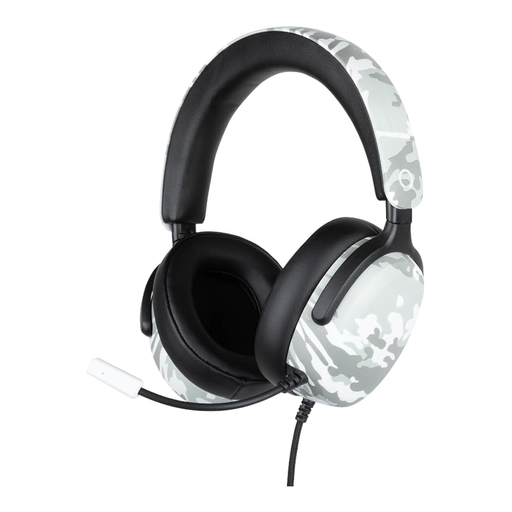 Image unavailable
A wired option for a listed console with a compatible connection; check that it suits your set-up.
The product name lists 40mm drivers, a microphone and a 1,5 m cable. Listed compatibility includes PS5, Switch 2 and Xbox Series X|S.
Use the connection specified for your headset and gaming device. Options may include a compatible cable, a USB receiver, PlayStation Link or a direct Xbox connection. A big screen alone doesn’t mean the headset or microphone will work with it.
According to Sony, not for standard Bluetooth audio. Before buying, check which wired connection or supported wireless option works with the headset and your PS5; Sony doesn’t guarantee that third-party adapters will work.
For a compatible PlayStation Link device, PlayStation describes these steps: charge the device, connect the PlayStation Link USB adapter, switch on the device and use the PlayStation Link button.
The World Health Organization recommends limiting the volume, taking regular listening breaks and considering both sound levels and listening time. The organisation suggests keeping the volume at no more than 60% of the device’s maximum as a practical way to keep it low; this is listening advice, not a product guarantee.
For an applicable distance purchase in the Netherlands, you generally have a 14-day cooling-off period, according to the Dutch government. Your statutory rights if a product is faulty are separate from a manufacturer’s warranty; according to the Dutch government, the Netherlands has no fixed statutory warranty period.