
Vandaag of morgen in huis

Kwaliteit gegarandeerd

Welkomstaanbiedingen ontgrendelen: GRATIS bezorging | Tot 80% korting | Gratis 30 dagen JoyPlus-proefperiode
Download de app
A gaming headset needs to do more than just play sound. You want to hear your teammates clearly, react quickly, and play for hours without a tight headband or a cable getting in the way. Yet it’s difficult to judge marketing claims properly. Terms like “7.1 surround sound”, “noise cancellation” and “low latency” only mean something when you understand how the feature works and which platform it’s available on.
In this guide, you’ll learn what to look for when buying a gaming headset, which pitfalls are often overlooked, and which type suits your needs.
A headset with “7.1 surround sound” often uses virtual processing via software, a USB dongle or an external sound card. On some models, the feature is only available on PC. The Logitech G432, for example, uses DTS Headphone:X via Logitech G HUB, while the Razer BlackShark V2 X activates the 7.1 function through Razer software.
On a PlayStation, Xbox or Nintendo Switch, the headset may therefore work in stereo. So don’t just check the surround label, but also:
A wireless gaming headset can use Bluetooth, 2.4 GHz radio, or both. Bluetooth is handy for a mobile phone, but not every console model supports Bluetooth audio directly. With the ONIKUMA GT806, for example, it’s stated that Bluetooth doesn’t work directly with PS4 or PS5; for that, the 2.4GHz connection with the USB transmitter is intended.
Also pay attention to battery life. Manufacturers sometimes give different values for music, Bluetooth and gaming via 2.4 GHz. RGB lighting can increase power consumption. So look at the usage mode you actually use.
A lightweight headset isn’t automatically comfortable. The shape of the ear cups, the pressure of the headband and the material of the ear cushions determine how pleasant a comfortable over-ear gaming headset feels. Leatherette can seal well but feel warm. Fabric cushions often breathe differently.
When comparing, check:
A wired gaming headset via 3.5 mm is simple to connect and doesn’t need charging. This is practical for a controller, laptop or Nintendo Switch. The Trust GXT 489W Fayzo and Trust GXT 415 Zirox use this connection and, according to the product information, are suitable for PC, laptop and multiple consoles.
Wireless models offer more freedom of movement. A headset with both 2.4 GHz and Bluetooth can be useful when you’re gaming on PC or console and simultaneously using a mobile device. Do check whether the USB receiver is compatible with your device and whether a USB-A-to-USB-C adapter is needed.
With a gaming headset with microphone, the placement, mute function and connection are more important than just the term “noise cancelling”. According to the product description from various brands, a directional or noise-cancelling microphone can reduce background noise, but the actual experience also depends on your room, keyboard and settings.
A detachable microphone is handy if you also want to use the headset for music or on the go. A flip-to-mute microphone, like on the Logitech G432, makes muting quickly visible and simple. Also check whether the microphone works in both wireless and wired mode.
A driver of 40, 50 or 53 mm mainly tells you about the diameter; it’s not a direct guarantee of sound quality. Also look at the stated frequency range, the connection and the software support. A headset with “7.1” usually has virtual surround processing, while the speakers themselves are often specified as 2.0 stereo.
For FPS games, positioning and a well-tuned microphone can be more important than extra bass or RGB lighting. For music and films, a wireless Bluetooth mode or a more neutral stereo tuning may be more practical.

Why this fits the profile: This wired headset uses a 3.5mm connection and, according to the product information, works with PC, laptop, PlayStation, Xbox and Nintendo Switch.
No battery or wireless pairing needed. The headset makes no surround claim; it’s stereo audio with a fixed cable.
244 grams, 50mm drivers, over-ear cushions, volume control and a foldable microphone.

Why this fits the profile: A multi-platform gaming headset with USB-C, USB-A and 3.5mm support for PC, PlayStation, Xbox, Switch, Mac and mobile.
The compatible connections are clearly stated. DTS Headphone:X is virtual and software-dependent, not the same as physical 7.1 speakers.
53mm drivers, memory foam ear cushions, detachable microphone and a metal frame according to the product description.

Why this fits the profile: The combination of 2.4 GHz, Bluetooth and a wired option suits gamers who switch between PC, console and smartphone.
The connection types and battery life are specified: up to 22 hours according to the product information. The virtual 7.1 function shouldn’t be confused with real multi-channel speakers.
50mm drivers, over-ear cushions, adjustable headband, detachable microphone and USB-C charging.
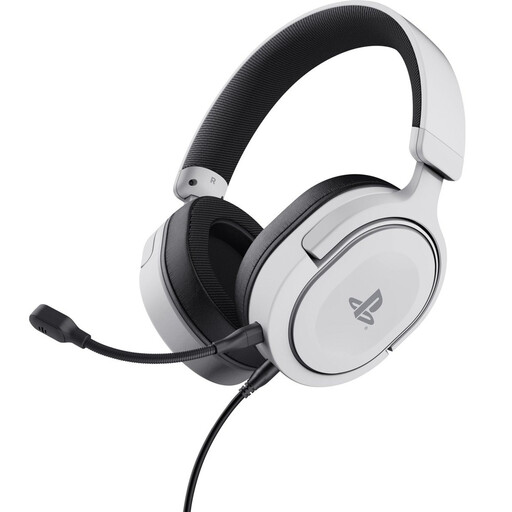
Why this fits the profile: This gaming headset for PlayStation is officially licensed for PS5 and, according to the product information, also works with PS4 via 3.5mm.
The wired connection avoids charging. The product information states stereo audio with PS5 3D audio; this isn’t a standalone 7.1 solution.
50mm drivers, 253 grams, detachable microphone and volume and mute controls on the ear cup.
We’ve put together a full, up-to-date list of products that fully meet these strict selection criteria and comply with current European safety regulations.
That depends on the connection. A 3.5mm headset usually works with devices that have a suitable audio input. With wireless models, you need to check whether the USB receiver is compatible with PC or PlayStation. Bluetooth doesn’t always work directly with consoles.
The lifespan depends on cable strain, hinges, ear cushions and battery usage. A wired model has no battery that loses capacity, while a wireless model needs to be charged and stored carefully. Keep the headset dry, don’t pull on the cable, and clean the ear cushions with a soft, dry cloth.
Aside from the purchase price, there are few fixed costs. You do need to factor in charging and possibly replacing ear cushions or cables. With a model that has a detachable cable or microphone, parts are sometimes easier to replace than with a fully integrated design. During long sessions, use a moderate volume and take regular breaks.
