
Vandaag of morgen in huis

Kwaliteit gegarandeerd

Welkomstaanbiedingen ontgrendelen: GRATIS bezorging | Tot 80% korting | Gratis 30 dagen JoyPlus-proefperiode
Download de app
A gaming headset may seem easy to choose at first glance. Yet many gamers pay for features that do not suit their setup. A wireless connection can be convenient, for example, but only if the headset also works with your platform. And “surround sound” does not automatically mean that footsteps will sound clearer.
As a Joybuy Product Recommendation Officer, I filter product information using verifiable specifications. This helps you see more quickly which gaming headset is right for PC gaming, console use, streaming or long gaming sessions.
A surround sound headset can provide virtual spatial audio, but the result depends on the software, game support and settings. On some models, the feature only works via a USB dongle, DAC or specific PC software. So check:
The term “noise cancelling” can refer to the microphone or to sound isolation around the ears. These are different features. A microphone with noise reduction attempts to reduce background noise in your voice recordings. Passive sound isolation is created by the ear cushions and the headset’s construction.
A headset with noise cancelling therefore does not always actively block the sound of a vacuum cleaner, housemates or traffic. Check the product information to see whether it says “passive” or “active”, and whether the feature applies to the microphone or the speakers.
A lightweight headset is not automatically comfortable. Also consider the pressure from the headband, the diameter of the ear cushions and the material. Synthetic leather can be easy to clean, but may feel warmer. Memory foam often provides a closer fit, although the right fit remains a personal matter.
For long sessions, weight, adjustability and soft ear cushions are more important than RGB lighting.
A wired gaming headset with a 3.5mm connection often works straight away with a controller, laptop, Nintendo Switch or mobile device. You do not need to charge the battery or use a wireless receiver. The downside is having a cable on your desk or next to your chair.
A wireless gaming headset gives you greater freedom of movement. Before buying, check:
A USB headset, such as some PC models, is not necessarily suitable for a console. A 3.5mm headset usually works through the connection on the controller, but features such as virtual surround sound may be limited.
If you play online or stream frequently, you need a gaming headset with a microphone that is practical to control. A flip-to-mute microphone switches off when you rotate the microphone upwards. Other models have a mute button or controls on the cable.
Pay attention to the following details:
A microphone with “noise cancelling” should be treated as a manufacturer’s product specification, not as a guarantee that all background noise will disappear.
The diameter of the drivers, such as 40 mm, 50 mm or 53 mm, indicates the speaker size, but does not predict sound quality on its own. Tuning, housing and software also play a part.
Frequency ranges such as 20 Hz–20 kHz are technical specifications, but say little about how a headset will sound to you. So also consider information about the type of audio: stereo, surround or spatial audio.

Why it suits this profile: According to the product description, this wired gaming headset uses a 3.5mm connection and is suitable for PC, Xbox, PlayStation, laptop, Mac and mobile use.
According to the product specifications, the USB connection is intended for the LED lighting only. You use the 3.5mm connection for audio and the microphone, making the purpose of each connection clear.
Flexible microphone, volume control and over-ear ear cushions; plug and play with no installation required.
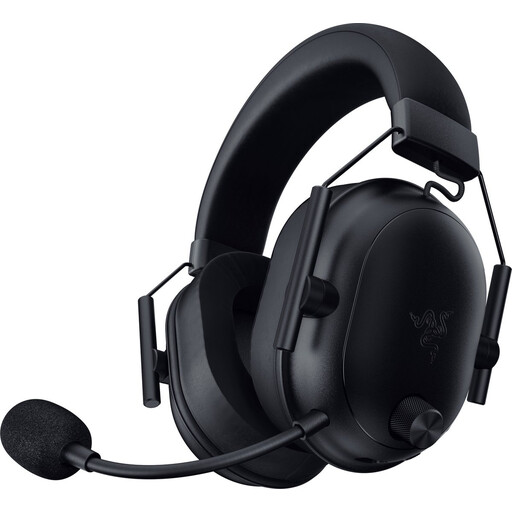
Why it suits this profile: This model is aimed at users who value wireless freedom, a stated low weight of 280 grams and multiple connection types.
The product details list Bluetooth 5.2, 2.4GHz radio and a USB-C dongle. However, check which wireless mode is available for your particular platform.
Stated battery life of up to 70 hours, 50mm drivers and a detachable cable alongside the wireless connection.

Why it suits this profile: Streamers and gamers who regularly switch between PC, PS5, Switch, mobile and Bluetooth devices get multiple connection options in one headset.
The headset lists 2.4GHz and Bluetooth separately. This means you can assess the stated battery life for each mode instead of relying on one general figure.
Stated battery life of up to 120 hours via 2.4GHz and up to 200 hours via Bluetooth; detachable microphone and USB-A-to-USB-C accessories.
We have put together a complete, up-to-date list of products that fully meet these strict selection criteria and the applicable European safety regulations.
No. Check the connection and platform compatibility list. A 3.5mm model often works via the controller, while a USB or wireless headset may have different limitations. For Xbox, pay particular attention to whether Xbox Series X|S or Xbox One is mentioned. Surround sound may also only be available on PC.
Its lifespan depends on cable use, hinges, ear cushions and battery care. Store a wired headset without tightly bending the cable. Charge a wireless model using a suitable USB cable and keep it dry when stored. A detachable cable or microphone can be useful if a component needs replacing.
Not always. Start by choosing the right connection, microphone and fit. A cheaper wired model may be sufficient for casual gaming, while a wireless model mainly offers greater freedom of movement and convenience. Only pay extra for features you will actually use, such as Bluetooth, longer battery life or software-based spatial audio.
