
Vandaag of morgen in huis

Kwaliteit gegarandeerd

Welkomstaanbiedingen ontgrendelen: GRATIS bezorging | Tot 80% korting | Gratis 30 dagen JoyPlus-proefperiode
Download de app
A gaming headset might seem straightforward to choose at first glance. Yet marketing jargon, unclear compatibility and mediocre comfort often lead to a poor purchase. A large number of millimetres on the drivers doesn’t automatically mean the sound will suit your games. Likewise, “wireless” doesn’t always mean the headset works directly with every console.
So pay particular attention to three common pitfalls:
A wired gaming headset with a 3.5mm connection often works directly with a controller, laptop, PC, Xbox or Nintendo Switch. You don’t need to charge the battery and the connection is simple. On a desktop PC, do check whether a splitter or extension cable is needed.
A wireless gaming headset usually uses a 2.4GHz USB receiver or Bluetooth. 2.4GHz is typically designed for low latency during gaming. Bluetooth is handy for smartphones and tablets, but console compatibility varies by model. The ONIKUMA GT806, for example, states that Bluetooth does not work directly with PS4 and PS5; for those, the 2.4GHz mode or the wired Type-C mode is intended.
Check before you buy:
A driver of 40 mm, 50 mm or 53 mm mainly tells you about the size of the speaker. It is not a direct guarantee of better game audio. Also pay attention to the frequency response, impedance and software support.
A 7.1 surround sound headset usually uses virtual processing. The Razer BlackShark V2 X, for example, mentions 7.1 via software, while the Trust GXT 489W Fayzo only delivers stereo. The HyperX Cloud III uses virtual DTS Spatial Audio on compatible devices, according to the product description. So check whether the feature is available on your headset for PC, PS5 or other console.
For music and general use, a natural stereo sound can be more pleasant. For competitive gaming, positional audio and a well-tuned microphone can be more important than a surround sound logo.
An over-ear gaming headset should fully enclose your ears without feeling too tight. Pay attention to the weight: in the range, specifications vary from around 240 grams on the Razer BlackShark V2 X and Logitech G335 to 353 grams on the Razer Kraken Kitty V2 White.
For voice chat, an adjustable, flip-up or detachable microphone is handy. A gaming headset with microphone is not automatically suitable for streaming: look at the microphone specifications, placement and mute controls. Claims like “noise cancellation” depend on the technique used and the environment. With passive isolation, it’s mainly about the seal of the ear cushions; that’s different from active noise cancelling.
The choices below are linked to specific product details, connections and usage scenarios. Always check the current compatibility of your device when ordering.

Why this fits the profile: This wired headset uses a 3.5mm connection and, according to the product information, is suitable for PC, laptop, PlayStation, Xbox and Nintendo Switch. That makes it practical for anyone wanting to start without the hassle of charging.
No battery or wireless pairing needed. The product description clearly states this is stereo sound and has no virtual 7.1 feature.
50mm drivers, a weight of 244 grams, flip-up microphone and a 2-metre cable.

Why this fits the profile: An option for gamers who want to combine wireless freedom, long battery life and multiple connection options with regular gaming on PC, PlayStation, Switch or mobile.
The product information specifies both 2.4GHz and Bluetooth 5.3 and mentions USB-A and USB-C connections. Do check per device which mode is used.
Up to 120 hours via 2.4GHz according to the manufacturer, up to 200 hours in Bluetooth mode, 53mm drivers and detachable microphone.

Why this fits the profile: Suitable for gamers who want a lightweight headset for PC and multiple consoles and prefer not to factor in a battery or wireless latency in their setup.
The connection is via 3.5mm. The 7.1 feature is software-based according to the product information, so you know in advance that it is mainly relevant on PC.
240 grams, 50mm TriForce drivers, passive sound isolation and compatibility with PC, PS4, Xbox One, Switch and mobile devices.
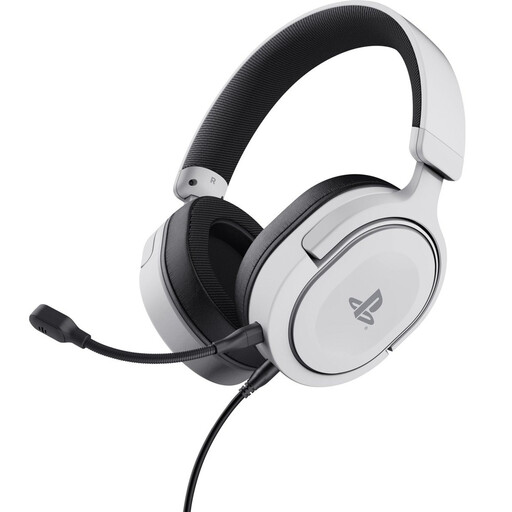
Why this fits the profile: This headset is aimed at PS5 and PS4 users who want a simple connection via the controller and a detachable microphone.
The product description makes it clear that this is a wired stereo model. So don’t expect wireless freedom or true surround sound.
50mm drivers, 3.5mm cable of 1.2 metres, weight of 253 grams and official PS5 licence according to the product information.
We’ve put together a full, up-to-date list of products that fully meet these strict selection criteria and comply with current European safety regulations.
That depends on the connection. A 3.5mm headset usually works via the controller if the device supports it. USB and wireless models may require a specific receiver or software. Also check whether the model is suitable for Xbox Series consoles; compatibility with PlayStation does not automatically mean compatibility with Xbox.
Not necessarily. A wireless headset offers more freedom of movement, but needs to be charged and may have connection limitations. A wired model is ready to use straight away, works without a battery and is often simpler for multiple consoles. Choose based on your fixed setup and the devices you actually use.
The lifespan depends on hinges, cable, ear cushions, battery and daily use. A wired model has no battery that loses capacity, whereas with a wireless model the battery can become a concern over time. Store the headset in a dry place, don’t pull on the cable and use a moderate volume during long gaming sessions. Also check the statutory warranty and the information about safe use with the product you choose.
