
Vandaag of morgen in huis

Kwaliteit gegarandeerd

Welkomstaanbiedingen ontgrendelen: GRATIS bezorging | Tot 80% korting | Gratis 30 dagen JoyPlus-proefperiode
Download de app
A gaming headset needs to do more than simply play sound. During an online match, you want to hear your teammates clearly, make sure your voice comes across properly and avoid discomfort from a tight headband. However, many differences between models only become noticeable after several gaming sessions.
So don’t just look for terms such as “surround sound”, “noise cancellation” or “professional gaming audio”. Pay particular attention to the connection, microphone, fit and controls. Below, you’ll find out which features matter and which models suit different usage scenarios.
A gaming headset with a microphone may use a 3.5mm jack, USB connection, Bluetooth or a 2.4GHz dongle. These connection types are not interchangeable.
A wired gaming headset with a 3.5mm plug will often work through the controller of a PS5, Xbox or Nintendo Switch. Some PCs, however, require separate connections for audio and the microphone. If your computer has two ports, check whether a splitter is included.
With a wireless gaming headset, you need to check whether your console supports the chosen connection. Bluetooth is convenient for phones and laptops, but not every gaming platform supports Bluetooth audio directly. A model with a 2.4GHz receiver may be more practical for PC gaming, but it does require a free USB port.
A model with several microphones or “noise cancelling” may sound appealing, but the actual experience also depends on the microphone’s positioning, the software and your surroundings. According to the product descriptions of certain brands, microphones are designed for clearer conversations. This is a manufacturer’s claim, not a guarantee for every gaming environment.
“Surround sound” can also mean different things. Check whether it refers to physical multi-channel speakers or software-based spatial audio. The Turtle Beach Recon 70 is listed as compatible with technologies such as Windows Sonic, Dolby Atmos, DTS Headphone:X and Sony 3D Audio. Availability and performance may depend on your device, game and settings.
A lightweight headset is not automatically comfortable. Pay attention to the shape of the ear cushions, the adjustability of the headband and the pressure around your ears. Synthetic leather can provide a comfortable seal, while mesh material may offer better ventilation. If you wear glasses, excessive clamping pressure can be particularly irritating.
An in-ear Bluetooth headset is also not the same as an over-ear headset for PC gaming. Earbuds are compact and suitable for everyday use, but they generally offer a different microphone position and level of sound isolation compared with a gaming model with a boom microphone.
Start by choosing your main device:
A flexible or fold-up microphone can be positioned closer to your mouth. A flip-to-mute microphone makes it easy to mute yourself during a conversation. Also check whether the volume controls are located on the cable or earcup.
For streamers and competitive online gamers, clear voice reproduction is more important than simply having a large number of microphones. Look for a mute function, adjustability and whether the microphone can be detached.
A larger driver does not tell you everything about sound quality, but it does provide a technical indication. Many models in this selection use 40mm drivers. Also consider the weight, ear cushion materials and cable length.
A cable measuring 1.2 to 1.5 metres may be sufficient when using a controller. For a desktop PC, extra length may be more practical. Wireless models, on the other hand, require you to manage charging. Check the stated battery life and charging method, but bear in mind that usage time can vary depending on the volume, connection and features such as lighting.

Why it suits this profile: This wired gaming headset uses a 3.5mm connection, making it suitable for PC, Xbox, PlayStation, laptop and mobile devices with the correct connection.
The plug-and-play connection avoids complicated installation. However, check beforehand whether your PC uses a combined jack.
Flexible 360° microphone, volume control and RGB lighting. According to the product information, the USB connection is intended for lighting only.
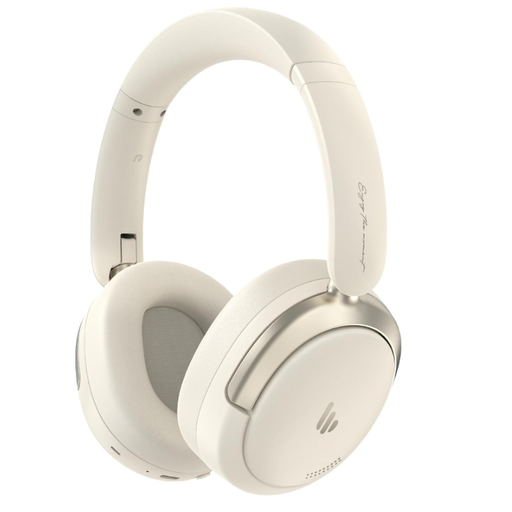
Why it suits this profile: This over-ear model is designed for users who want to use their headset for music, travel and calls as well as gaming.
The Bluetooth and wired USB-C options offer flexibility. However, check whether your gaming device supports Bluetooth or USB audio.
Bluetooth 5.4, 40mm driver, integrated microphone, foldable design and a manufacturer-stated playback time of up to 45 hours.
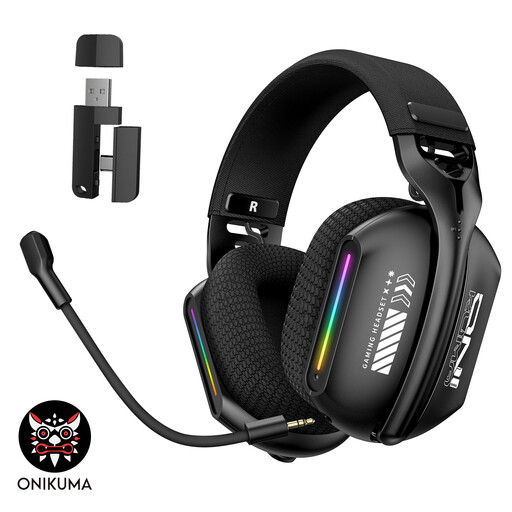
Why it suits this profile: For PC gamers who want to switch between wireless gaming, Bluetooth and wired use, this model offers three connection options.
You are not limited to a single connection type. Before buying, check which dongle, cable and compatibility your platform requires.
2.4GHz, Bluetooth 5.3 and wired mode, plus soft memory foam ear cushions, an adjustable headband and a rotating microphone.
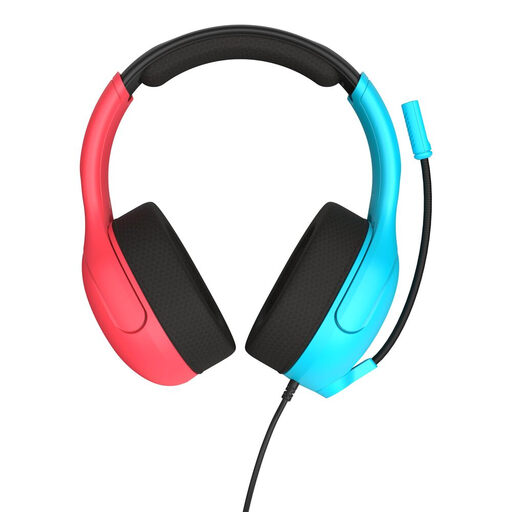
Why it suits this profile: According to the product information, this wired headset is officially licensed for Nintendo Switch, Switch Lite and Switch OLED.
The 3.5mm connection removes the need for Bluetooth or a battery. However, the cable is still something to consider when using the headset in handheld mode.
40mm speakers, flip-to-mute microphone, volume wheel on the earcup and mesh ear cushions. The stated weight is 228 grams.
We’ve put together a complete, up-to-date list of products that fully meet these strict selection criteria and the applicable European safety regulations.
A model with a 4-pole 3.5mm connection is often suitable for a wide range of devices when connected via the controller or console. Always check the product information for the specific model. The Turtle Beach Recon 70 models list compatibility with PS5, Xbox Series X|S, Nintendo Switch, PC and mobile devices. A splitter may be required for PCs with separate audio inputs.
That depends on how you use it. Wireless headsets eliminate cables around your chair and are convenient for PC gaming. However, you need to charge the battery and check compatibility with Bluetooth or the 2.4GHz receiver. A wired gaming headset does not require charging and will generally connect easily via a controller, but the cable can get in the way.
Its lifespan depends on cable use, storage, perspiration, transport and the material used for the ear cushions. Store the headset in a dry place, do not pull on the cable and clean the ear cushions with a soft, dry cloth. Avoid listening at high volume for extended periods. With wireless models, the battery may hold less charge over time; the stated playback time is a product specification, not a guaranteed lifespan.
