
Vandaag of morgen in huis

Kwaliteit gegarandeerd

Welkomstaanbiedingen ontgrendelen: GRATIS bezorging | Tot 80% korting | Gratis 30 dagen JoyPlus-proefperiode
Download de app
A gaming headset needs to do more than play sound. For online multiplayer games, you need a clear microphone, while comfort becomes important when a gaming session runs long. Product pages aren’t always as clear as they could be, though. A wireless gaming headset, for example, may offer several connection options, but not every connection works with every console.
That’s where the Joybuy Product Recommendation Officer can help. We translate marketing terms into specifications you can check, so you can quickly find a model that suits your PC, PlayStation, Xbox or Nintendo Switch.
A 7.1 surround sound headset often uses virtual processing to simulate spatial audio. This can be useful for pinpointing sounds, but performance depends on the software, platform and game. According to the product information, 7.1 on the Razer BlackShark V2 X is activated using software and a supplied code. So the feature won’t necessarily be available on every device you connect it to.
Check the following:
A wireless gaming headset may connect via 2.4 GHz, Bluetooth or both. These connections serve different purposes. A USB receiver is usually intended for a PC or console, while Bluetooth is particularly useful for smartphones and tablets.
Always check the list of compatible platforms. For example, the product information for the ONIKUMA GT806 states that Bluetooth doesn’t connect directly to PS4 or PS5. For those consoles, use 2.4GHz mode or a wired USB-C connection. A model with several connection options gives you flexibility, but only if you use the right mode.
An over-ear gaming headset can be comfortable, but the ear cushions, headband and weight all affect how it feels after several hours. Check the weight and the size of the ear cups. A lightweight headset weighing around 240 to 260 grams may feel less tiring for some users, while a heavier model may put more pressure on your head.
Material matters, too. Faux leather generally creates a good seal, but can feel warmer. Nylon or fabric cushions may feel more breathable. Fit is a personal matter, but an adjustable headband and swivelling ear cups can help distribute pressure more evenly.
A wired gaming headset with a 3.5 mm connection is easy to plug into a controller, laptop or Nintendo Switch. There’s no need to charge it, and the connection is direct. If your PC has separate microphone and headphone ports, check whether you’ll need a splitter.
Wireless models give you more freedom to move around. Compare:
According to its product specifications, the Trust GXT 491 Fayzo works via 2.4GHz, Bluetooth and a cable. Its stated battery life is up to 22 hours. Treat this as a product specification under the stated conditions, not a guarantee for every use.
With a gaming headset with a microphone, practical details matter more than phrases such as ‘crystal clear’. Check the microphone type, its position and how to mute it. A flip-to-mute microphone mutes when you flip it up. A detachable microphone is useful if you also want to use the headset for music.
On-headset volume controls mean you don’t have to switch to the Windows or console menus while playing. Also check whether you can adjust chat and game volume separately; this varies by headset and platform.
Many models use 40 or 50 mm drivers. A larger driver doesn’t automatically mean better sound. Tuning, the housing and software are just as relevant. A stated frequency range, such as 20 Hz to 20 kHz, describes the technical range, but doesn’t tell you on its own what music or game audio will sound like.
Whether you’re looking for a PS5 gaming headset, a PC gaming headset or an Xbox gaming headset, also check which spatial audio features are supported by the platform itself. A headset may be compatible with Windows Sonic, Dolby Atmos or Sony 3D Audio, but you may need to change platform settings or install separate software.

Why it suits this profile: According to the product information, the fixed 3.5mm connection works with PCs, laptops, PlayStation, Xbox and Nintendo Switch. That makes it a straightforward choice if you don’t want to manage a battery or wireless settings.
The specifications clearly state that this is a wired model with no surround sound or active noise cancellation. So you don’t pay for features you don’t need.
50mm drivers, over-ear cushions, a weight of 244 grams and a fixed 2-metre cable.
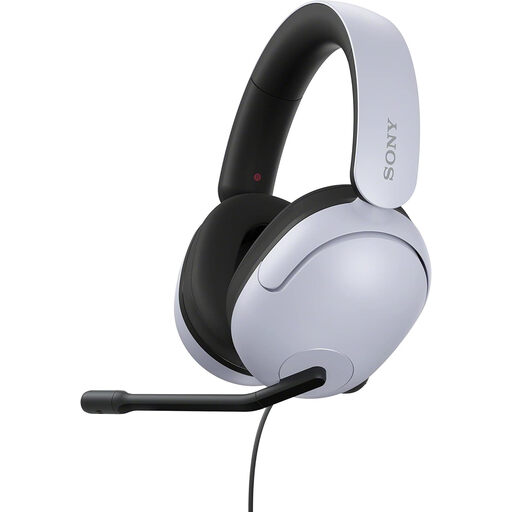
Why it suits this profile: This wired model is aimed at PC and PlayStation users who want to use software settings for spatial audio and don’t need a battery.
The product information states that 360 Spatial Sound is set up on a PC using INZONE Hub software. So it’s clear when software is required.
40mm drivers, a flexible microphone with a mute function, USB connection and compatibility with PS4, PS5 and Windows.

Why it suits this profile: The combination of 2.4GHz, Bluetooth and a cable is handy for gamers who switch between a PC, console and smartphone.
The connection options and supported platforms are listed separately. This lets you check in advance whether the wireless mode you want will work with your device.
Up to 22 hours of stated battery life, 50mm drivers, a detachable microphone and a weight of 290 grams.
We’ve put together a complete, up-to-date list of products that meet these strict selection criteria and current European safety regulations.
It depends on the model. A headset with a 3.5mm connection will often work through the controller or console port, but check the stated compatibility. USB receivers and Bluetooth are more likely to have platform-specific limitations.
Not necessarily. With a wired headset, you generally don’t need to manage a battery, and connecting it is straightforward. Wireless models give you more freedom to move around, but you’ll need to consider battery life, the receiver and compatibility. Choose based on where you play and which devices you use.
Its lifespan depends on how you use the cable, the hinges and ear cushions, and how you store it. Don’t hang a wired headset by its cable, and keep a wireless model somewhere dry and out of direct sunlight. Also avoid keeping the volume high for long periods. This helps protect both the headset and your hearing.
