
Vandaag of morgen in huis

Kwaliteit gegarandeerd

Welkomstaanbiedingen ontgrendelen: GRATIS bezorging | Tot 80% korting | Gratis 30 dagen JoyPlus-proefperiode
Download de app
A gaming headset needs to do more than just play sound. During a long gaming session, you want ear cushions that don't pinch, teammates who can hear you clearly, and a connection that works with your PC, PlayStation, Xbox or Nintendo Switch. Yet many models are difficult to compare because of marketing terms like "surround sound", "noise cancelling" and "wireless".
The following points will help you avoid a bad purchase and choose a model that suits your play style.
A headset with 50mm drivers can deliver powerful sound, but the size alone says nothing about the tuning, clarity or balance between low and high tones. So also check whether the product uses stereo or virtual surround sound. A 7.1 surround sound headset often works with software-based channel simulation and is not the same as seven separate speakers.
A wireless gaming headset can connect via Bluetooth, 2.4GHz or a USB dongle. These options are not interchangeable. Bluetooth is handy for a phone or tablet, while 2.4GHz is often used for low-latency gaming. Always check which connection method is supported when buying a headset for PS5, Xbox or Nintendo Switch.
Also watch out for exceptions. Some models only work on a console via the supplied USB receiver or a cable. Bluetooth does not work directly with every PlayStation model.
An RGB gaming headset gives your desk a striking look, but lighting consumes extra power. On a wireless model, this can reduce battery life. So look at the stated playtime with and without lighting. For example, the ONIKUMA GT806 product description states up to 40 hours via 2.4GHz for gaming and up to 60 hours in music and video mode without lighting. According to the manufacturer, the lighting uses more power.
Choose a wired gaming headset if you don't want to charge a battery and value simple plug-and-play connectivity. A 3.5mm connection often works with PC, laptop, controller and mobile devices, but a PC with separate microphone and audio jacks may need a splitter.
A wireless model offers more freedom of movement. Pay attention to the following points:
A gaming headset with microphone should not only send sound to you, but also transmit your voice clearly. An adjustable microphone is useful for setting the distance from your mouth. A flip-up or detachable microphone is practical if you also want to use the headset for music or on the go.
Also check whether there is a mute button and volume control on the ear cup or cable. This saves time during online multiplayer when you need to quickly turn off your microphone.
An over-ear gaming headset encloses the ear and can partially block out ambient noise. Soft ear cushions, an adjustable headband and swivelling ear cups help you adjust the fit. Weight is also relevant: the Trust GXT 415 Zirox weighs 244 grams according to the product information, while the Trust GXT 491 Fayzo weighs 290 grams.
Pay attention to manufacturer warnings: listening at high volume for long periods can damage your hearing. Start at a low volume and take regular breaks.

Why this fits the profile: This wired headset is aimed at gamers who want to play on multiple devices without charging. The 3.5mm connection works with PC, laptop, PlayStation, Xbox and Nintendo Switch according to the product information.
No confusing battery management: the headset uses a fixed cable and has no wireless mode that needs to be set per platform. The product offers stereo, not virtual 7.1 sound.
244 grams, 50mm drivers, soft over-ear cushions, flip-up microphone and a 2-metre cable.
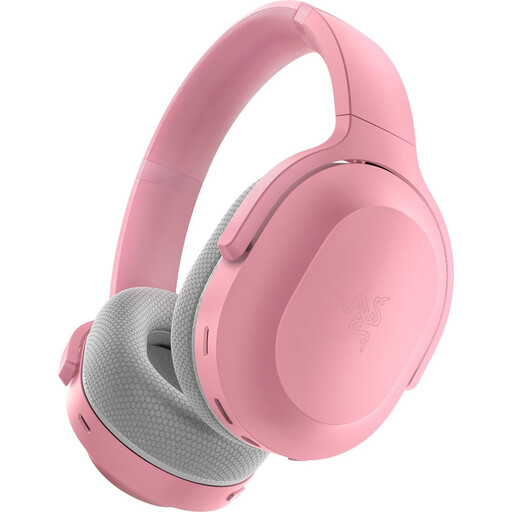
Why this fits the profile: Suitable for anyone who wants to use one headset on PC, PlayStation, Nintendo Switch and Android, and switch between 2.4GHz and Bluetooth.
The two wireless options are clearly distinguished. For devices without a suitable wireless pairing method, you can also use a 3.5mm cable according to the product specifications.
Up to 40 hours battery life according to the product information, Bluetooth 5.2, 50mm drivers and USB-C charging.
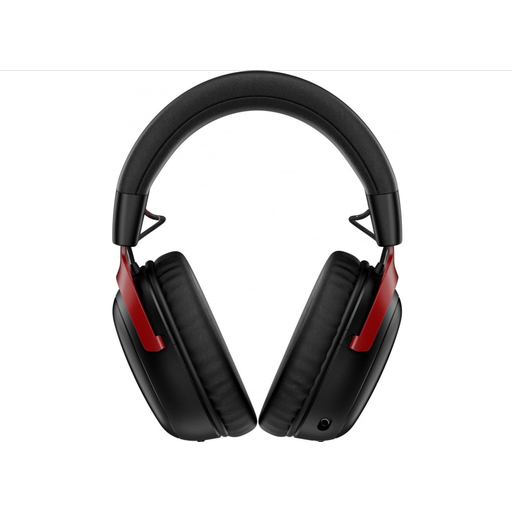
Why this fits the profile: This wireless headset is designed for long gaming sessions and switching between 2.4GHz or Bluetooth. The detachable microphone is handy when you want to use the headset without a microphone.
The battery life is specified per connection mode: up to 120 hours via 2.4GHz and up to 200 hours via Bluetooth according to the product information. The microphone can be removed.
53mm drivers, Bluetooth 5.3, detachable 10mm boom microphone, USB-A and USB-C connections and support for PC, PS5, PS4 and Nintendo Switch.
We've put together a full, up-to-date list of products that fully meet these strict selection criteria and current European safety regulations.
That depends on the connection. A 3.5mm headset often works with multiple devices, but check whether your PC needs a combined port or a splitter. Wireless models usually use a specific USB receiver. Check the compatibility list before ordering.
A wireless model has no running costs during play, but you need to charge the built-in battery regularly. Battery life can decrease when RGB lighting is active. A wired gaming headset has no battery and can therefore be simpler for daily use.
The lifespan depends on use, storage and maintenance. Store the headset in a dry place, don't pull on the cable and don't bend the headband or microphone beyond what is intended. Clean the ear cushions with a soft, dry cloth and follow the manufacturer's safety and maintenance instructions. If you feel pressure or discomfort, take a break and adjust the headband.
