
Vandaag of morgen in huis

Kwaliteit gegarandeerd

Welkomstaanbiedingen ontgrendelen: GRATIS bezorging | Tot 80% korting | Gratis 30 dagen JoyPlus-proefperiode
Download de app
A gaming headset needs to do more than play sound. You want to hear your teammates clearly, make sure they can hear you and wear the headset for longer periods without pressure on your ears. Yet many gamers mainly choose based on terms such as “surround sound”, “wireless” or “noise cancelling”. That can lead to a disappointing purchase.
So pay attention to the connection, microphone, fit and actual compatibility with your device. Below, we compare the key points to consider, along with some popular options.
A wireless gaming headset may work via 2.4 GHz with a USB receiver, Bluetooth or both. Bluetooth is convenient for a smartphone, but a USB receiver may offer different latency and compatibility on some devices. Also check whether your console supports USB audio and whether the receiver can be connected directly.
A wired model means you do not need to recharge it, but it limits your freedom of movement. With a 3.5 mm gaming headset, it is also important to consider whether you will connect the headset to the controller, console, laptop or a PC splitter.
Terms such as 7.1 surround sound refer to virtual processing on many gaming headsets. How it works may depend on the software, platform and game. According to the product information, 7.1 on the Razer BlackShark V2 X is activated using Razer software and a code. The JBL Quantum 300 uses JBL QuantumSURROUND according to the product information only on PC.
So do not just look at the label. Check the conditions too: is software required, does the feature work on PS5 or Xbox, and is stereo still available without installing anything?
A 240-gram headset may feel more comfortable in practice than a heavier model, but weight is not the only factor. Consider the shape of the ear cups, the pressure from the headband, the cushion material and whether your ears fit fully inside the cups.
Synthetic leather cushions can passively reduce outside noise, while mesh or fabric often feels less warm. An over-ear gaming headset is particularly suitable if you play for several hours at a time, but do check the internal dimensions of the ear cups.
First choose your main device:
A product title may mention several platforms, but always check the technical product details and the cables supplied.
A gaming headset with microphone should not only record sound, but also be easy to operate. A flip-to-mute microphone mutes as soon as you flip it upwards. This is useful when you want to say something quickly to someone in the room during a match.
A detachable microphone is more practical if you also use the headset for music or while out and about. For a directional microphone, check the recommended position and see whether there is a mute button on the cable or ear cup.
Many models use 40 or 50 mm drivers. A larger driver alone is no guarantee of better sound. The frequency range, tuning and software also play a part. Specifications such as 20 Hz–20 kHz show the stated range, but do not fully indicate how music, voices or in-game effects will sound.
Also pay attention to the stated sound level. Do not keep the volume high for extended periods and take regular breaks. This is good advice for using any headset, regardless of the brand or price.
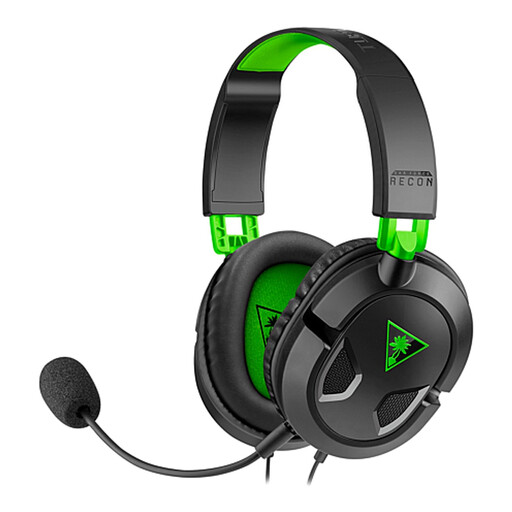
Why it suits this profile: According to the product information, the 3.5 mm connection works with Xbox, PS5, Nintendo Switch, PC, Mac and mobile devices. This makes it a practical entry-level choice for gamers with several devices.
No battery or wireless receiver required. The detachable microphone also means you are not tied to a permanently attached boom microphone.
40 mm drivers, volume control and microphone mute on the cable; stated impedance of 32 Ω.

Why it suits this profile: The combination of 2.4 GHz, Bluetooth and a wired connection offers flexibility for PC, compatible consoles and smartphone use. The product information states a battery life of up to 22 hours.
The headset is not dependent on a single connection type. However, check in advance which features are available on your console.
50 mm drivers, virtual 7.1 processing according to the product description, detachable microphone and USB-C charging.

Why it suits this profile: This wired model is aimed at players looking for a lightweight headset with a 3.5 mm connection for PC, PlayStation, Xbox, Nintendo Switch and mobile devices.
No battery that can run out during a session. The 240-gram weight and memory foam ear cushions are also relevant for extended use.
50 mm drivers, cardioid microphone, 3.5 mm cable and a stated weight of 240 grams.
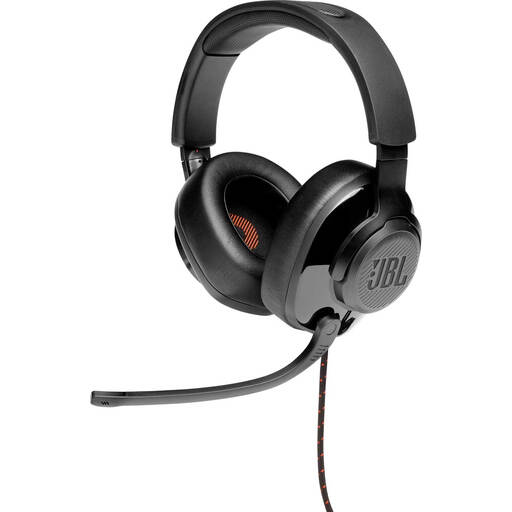
Why it suits this profile: According to the product information, this headset is aimed at PC use with software, but it can also be connected via 3.5 mm to PlayStation, Xbox, Nintendo Switch, mobile devices, Mac and VR devices.
The product information distinguishes between PC functions and general 3.5 mm compatibility. This tells you in advance what the software features are intended for.
50 mm drivers, flip-up microphone, memory foam ear cushions and supplied USB audio adapter.
We have put together a complete, up-to-date list of products that fully meet these strict selection criteria and the applicable European safety regulations.
It depends on how you use it. Wireless models offer freedom of movement, but you need to charge the battery and check the receiver’s compatibility. A wired headset works immediately, does not require a battery and is often easy to connect via 3.5 mm. Either option can work for a permanent PC setup; for handheld use, a cable may be more practical.
Its lifespan mainly depends on strain on the cable, hinges, ear cushions and everyday use. Store the headset in a dry place, do not pull on the cable and clean the cushions with a soft, dry cloth. With intensive use, replaceable or detachable parts can extend its practical lifespan.
Not necessarily. Virtual surround sound can present direction and distance differently, but preferences vary between players and games. Check whether the feature works on your platform and whether software is required. A good microphone, comfortable fit and reliable connection are just as important for online team play.
