
Vandaag of morgen in huis

Kwaliteit gegarandeerd

Welkomstaanbiedingen ontgrendelen: GRATIS bezorging | Tot 80% korting | Gratis 30 dagen JoyPlus-proefperiode
Download de app
A gaming headset needs to do more than just play game audio. You want to hear your teammates clearly, deliver your voice without distortion, and play for hours without pressure on your ears. Even so, a quick purchase isn’t always wise. Marketing terms like “surround sound”, “noise cancelling” and “wireless” only mean something once you know how the headset connects and which features are actually included in the specifications.
A surround sound headset doesn’t automatically have multiple physical speakers per ear cup. It’s often virtual surround sound delivered through software. So check whether the feature works on your platform and whether a programme, account or activation code is required. With the Razer BlackShark V2 X, for example, 7.1 surround sound is mentioned via software. Its performance can therefore depend on the PC settings you use.
A wireless gaming headset can connect via Bluetooth, 2.4 GHz with a USB dongle, or both. These technologies aren’t interchangeable. For instance, the product information for the ONIKUMA GT806 states that Bluetooth doesn’t work directly with PS4, PS5 or PC; that’s what the 2.4GHz mode is for. So check which receiver and port your console has before you buy.
An RGB gaming headset may look appealing, but lighting affects battery life on wireless models. According to the product description for the ONIKUMA GT806, the lighting consumes roughly twice as much power. The Razer Barracuda X Chroma lists a battery life of up to 70 hours with the lighting switched off. Treat such figures as stated maximums; the actual result depends on volume, connection and settings.
A wired gaming headset with a 3.5mm connection often works directly with a controller, laptop or handheld. Just be aware of the difference between a single combined connection and a PC with separate audio and microphone jacks. The Corsair HS55 comes with a Y-adapter for such PC configurations.
A wireless model gives you more freedom of movement, but check:
With a gaming headset with microphone, the placement and controls matter more than just the term “noise reduction”. A flip-to-mute microphone, like the one on the Corsair HS55 and Logitech G335, mutes the mic when you flip it up. That’s handy during voice chat.
Also pay attention to the microphone type. A cardioid microphone mainly picks up sound from the front, while an omnidirectional model can pick up sound from all around. Manufacturer claims about clear voice reproduction come from the brand; so also judge whether the microphone stays well positioned in front of your mouth and whether you can easily mute it.
For a comfortable gaming headset, weight, headband and ear cushions can be compared objectively. According to the product specifications, the Logitech G335 weighs 240 grams and the Razer BlackShark V2 X weighs 240 grams. The Corsair HS55 weighs 273 grams. That doesn’t tell you everything about comfort, because clamping force, ear cup shape and ventilation also count.
Check whether the ear cups fully cover your ears. Faux leather can seal sound better, but warm ears can become uncomfortable more quickly during long sessions. Fabric or breathable cushions may feel more pleasant, but they don’t isolate in the same way.
If you’re looking for a headset for PC and console, don’t just look at the product name. Check the official platform list:
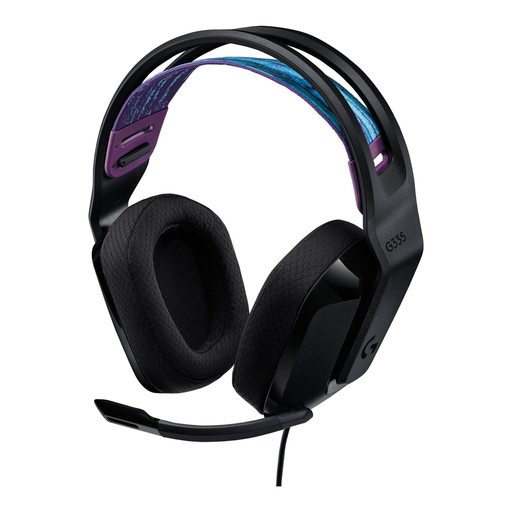
Why this fits the profile: The plug-and-play 3.5mm connection is straightforward for PC, PlayStation, Xbox and Nintendo Switch. According to the specifications, this model weighs 240 grams.
No battery or wireless receiver is needed. The connection and controls remain straightforward.
240 grams, memory foam ear cushions, volume control on the ear cup and microphone mute by flipping up.

Why this fits the profile: This wired model combines USB-C, USB-A and 3.5mm connectivity with a metal frame and memory foam ear cushions.
The included connection options make compatibility verifiable rather than relying on Bluetooth alone.
53mm drivers, detachable microphone, DTS Headphone:X 2.0 as a virtual surround feature and a weight of 308 grams.
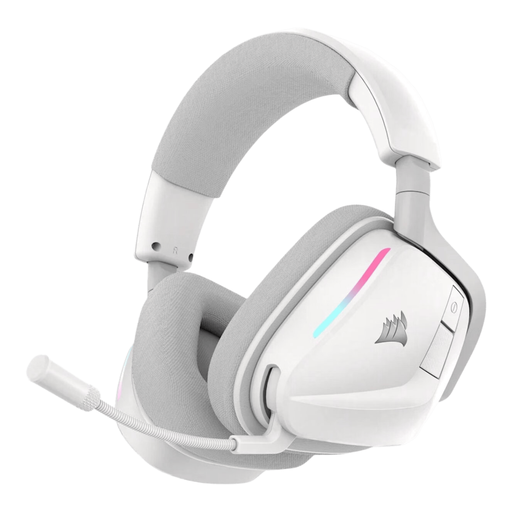
Why this fits the profile: Suitable for long gaming sessions thanks to the stated battery life of up to 70 hours and dual wireless connection via 2.4GHz and Bluetooth 5.3.
The connection options and battery details are clearly stated. Bear in mind that RGB lighting can reduce battery life.
50mm drivers, USB-C fast charging, customisable RGB lighting and a microphone with stated noise reduction.
We’ve put together a full, up-to-date list of products that fully meet these strict selection criteria and current European safety regulations.
That varies by model. A USB dongle with a 2.4GHz connection often works with PC and PlayStation, but Xbox has its own compatibility requirements. So always check the stated platform list. Bluetooth alone isn’t enough to prove compatibility with a console.
The lifespan depends on cable strain, hinges, ear cushions, battery use and storage. A wired model has no battery that loses capacity, but the 3.5mm plug and cable can wear out. With wireless models, careful charging and keeping them dry are important. Replaceable or detachable microphones and cables can be practical if a part gets damaged.
No. Instead, compare the weight, the shape of the ear cushions, the headband and the available connections. A lighter wired model may be more comfortable for some users than a heavier wireless model with extra features. Choose first on fit and compatibility, then on lighting, virtual surround sound or software features.
