
Console gamers who use team chat
If you play online, it’s worth checking in advance whether game audio and the microphone work with your PS5 or Xbox. Compatibility information from PlayStation and Xbox is specific to each model.


First, choose a headset whose game audio and microphone both work with the console or PC you play on; using a big screen doesn’t change that compatibility requirement. Then choose between a cable connected to a compatible controller and a wireless connection, weighing team chat, comfort and freedom of movement against pairing, extra equipment and charging.
If you play online, it’s worth checking in advance whether game audio and the microphone work with your PS5 or Xbox. Compatibility information from PlayStation and Xbox is specific to each model.
If you want to pinpoint sounds during matches and hear your teammates clearly, look for reviews of the specific model. Tweakers assessed sound positioning on the models it tested; those findings don’t automatically apply to other versions.
If you play for long periods, fit, ear cushions and controls may be your priorities. Tweakers noted warm ears and a fit that wasn’t particularly secure on some tested models; comfort is still a personal matter.
First, check the connection to your console. Then consider how much you value team chat, comfort and freedom of movement.
Choose this if: you sit close enough to your controller and would rather not charge a headset battery. The PS5 DualSense has a 3.5mm headset jack.
Trade-off: the cable runs to your controller; a connection to your TV doesn’t guarantee that team chat will work.
Choose this if: you mainly play on one system. On PS5, PULSE Elite uses the included PlayStation Link USB adapter; the Xbox Wireless Headset connects directly to Xbox Series X|S and Xbox One.
Trade-off: the pairing method varies by console, and wireless models need charging. Battery life figures are provided by the manufacturer and don’t guarantee how long you’ll be able to play.
Choose this if: you switch between Xbox, PlayStation and PC, and the exact headset version supports those platforms. According to SteelSeries, the SteelSeries Arctis Nova 7X Wireless has an Xbox-compatible dongle.
Trade-off: check the model version and dongle; according to SteelSeries, the Nova 7 and 7P don’t have the same Xbox compatibility as the 7X.
| What to consider | What should you check? | Who is this important for? |
|---|---|---|
| Console compatibility | For the exact version, check the connection, included adapter and microphone support on your console. | If I play on a big screen with my PS5 or Xbox, I want to know whether both game audio and the microphone work with that console. Around 31% of consumers put compatibility first. |
| Team chat and game audio | Check the microphone controls and mute function; look for reviews of voice clarity and sound positioning for the specific model. | During a match, I want to hear my teammates clearly and pick up important in-game sounds. Around 25% of consumers give team chat and audio cues top priority. |
| Comfort | Consider fit, ear cushions and adjustability; reviews can offer guidance, but they can’t guarantee that a headset will fit you well. | If I play for longer sessions, I want my headset to feel comfortable and not get too warm. Around 25% of consumers rank comfort above other reasons to buy. |
| Freedom of movement and power | Check where the headset connects, which adapter it needs and whether the battery life suits how you use it. | If I want to move freely while playing, I’d rather not have a cable running to my controller, but I’m happy to factor in pairing and charging. Around 19% of consumers choose freedom of movement as their main reason to buy. |
SteelSeries distinguishes the 7X, which has an Xbox-compatible dongle, from the Nova 7 and 7P. The model name alone isn’t enough to confirm compatibility.
If you play on Xbox, check the full model name and the included dongle.
An audio connection to a TV isn’t the same as a verified headset connection to your console or controller; microphone use may require separate settings.
Check both audio output and microphone input on your own gaming system.
Battery life figures are specific to each model and provided by the manufacturer. Fit and sound quality can also vary between models.
Read the conditions attached to the battery life figure and check reviews of the specific model to weigh up features and comfort.
A review of the HyperX Cloud III Wireless doesn’t automatically apply to the Cloud III S Wireless; they are different models.
Before buying, compare the full model name and its specifications.
PULSE Elite is a wireless option for PS5, supplied with a PlayStation Link USB adapter.
The Xbox Wireless Headset is designed for direct wireless use with Xbox Series X|S and Xbox One.
The Arctis Nova 7X Wireless is a multi-platform version for players who switch between Xbox, PlayStation and PC.
According to HyperX, the tested Cloud III Wireless works with PS5 and PC, among other platforms, but not Xbox.
The Astro A50 X is designed for a setup with Xbox, PS5 and PC, using a base station.
This Joybuy selection includes wired models for connecting to a compatible controller, as well as wireless headsets for Xbox or several listed platforms. Check that both game audio and the microphone work with your console for the specific version; Switch models aren’t automatically compatible with PS5 or Xbox.
 Image unavailable
A wired option for Nintendo Switch, Switch Lite and Switch OLED.
3.5mm connection, flip-to-mute microphone, on-earcup volume control, 40mm drivers and mesh ear cushions.
 Image unavailable
A wired option for the listed PlayStation, Xbox and Switch platforms; check the connection on your system’s controller.
3.5mm connection, flip-to-mute boom microphone, volume wheel and 40mm speakers. Listed compatibility includes PC, PS5, Switch 2 and Xbox Series X|S.
 Image unavailable
For wireless Xbox gaming, connecting the headset via the listed USB receiver.
The description lists Xbox Series X|S, Xbox One, PC, Switch 2 and mobile devices. This model uses a USB receiver for Xbox; Bluetooth is listed for PC, Switch and mobile devices. Flip the microphone up to mute it, and use the QuickSwitch button to switch connections.
 Image unavailable
A wireless option if you want to use the consoles and PC listed in the description; check the connection for the system you plan to use.
The listed platforms are Xbox Series X|S, Xbox One, PS5, PS4, PC, Switch 2, Steam Deck and mobile. The description lists 2.4GHz and Bluetooth, QuickSwitch, 50mm speakers and separate controls for game and chat volume.
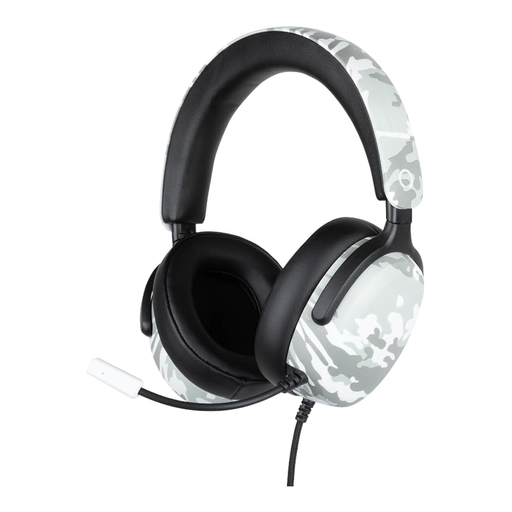 Image unavailable
A wired option for the listed PS5, Switch 2 and Xbox Series X|S platforms.
3.5mm connection with a 1.5m cable, 40mm speakers, flexible microphone and volume wheel.
Start with the console, PC or controller you play on, and check both game audio and the microphone there. For example, the DualSense has a 3.5mm headset jack, while PULSE Elite uses the included PlayStation Link adapter on PS5. A TV connection doesn’t guarantee that team chat will work.
On PS5, open Settings, then Sound, to check the audio output. In the Control Centre, under Mic, you can set the input device and microphone level, among other things; the options available depend on the connected device.
Microsoft describes pairing by using the headset’s power button and the pairing button on the Xbox console. Also check that the headset is sufficiently charged. Pairing with a phone via Bluetooth is a separate connection method.
For online purchases, ACM ConsuWijzer states that you have 14 days from delivery to change your mind; some exceptions apply. If a product is faulty, the seller is responsible for the statutory guarantee, which includes repair or replacement. An additional manufacturer’s guarantee doesn’t replace that responsibility.
According to the Dutch Authority for Digital Infrastructure, electrical and electronic headsets sold in the Netherlands must carry the correct CE marking. Radio equipment must also meet European requirements under the Radio Equipment Directive. Check the marking on the product being offered; a general claim doesn’t prove that a specific item meets the requirements.