
Vandaag of morgen in huis

Kwaliteit gegarandeerd

Welkomstaanbiedingen ontgrendelen: GRATIS bezorging | Tot 80% korting | Gratis 30 dagen JoyPlus-proefperiode
Download de app
A gaming headset needs to do more than look the part. You want to hear game audio clearly, communicate intelligibly and play for hours without the headset becoming uncomfortable. However, there are several pitfalls that can make a purchase less suitable than expected. For example, a larger driver diameter does not automatically mean better sound quality, while “wireless” can refer to different types of connection.
In this buying guide, we explain what to look for in a wireless gaming headset, wired gaming headset or gaming headset with microphone. We then match several models to different user profiles.
For many gaming models, the term 7.1 surround sound headset refers to virtual surround sound. This is generated through software or by the console, and is not the same as having seven physical speakers in each earcup. So check:
For example, the Logitech G432 lists DTS Headphone:X and 7.1 audio, but the product information states that you need to install Logitech G HUB software to use the surround function. The Razer BlackShark V2 X also requires software to activate 7.1 Surround Sound.
A Bluetooth gaming headset will not necessarily connect directly to every console. According to the product description, the ONIKUMA GT806 supports Bluetooth 5.4, 2.4 GHz and a wired Type-C mode. However, Bluetooth is not intended for direct connection to PS5, PS4 or PC with this model; an additional adapter is required. The 2.4GHz connection or cable is therefore the practical choice.
When choosing a wireless gaming headset, pay attention to:
RGB lighting may suit your setup, but it has no effect on microphone clarity or wearing comfort. Pay particular attention to the weight, the shape of the headband and the materials used for the ear cushions. An over-ear gaming headset should fully enclose your ears without pressing too tightly.
Also consider the fit if you wear glasses. A firmly clamping headband or heat-retaining faux-leather cushions may feel less comfortable during long sessions. Product information about comfort is a useful starting point, but the experience varies from person to person.
A wired headset with a 3.5mm jack is often easy to connect to a controller, laptop, PC or mobile phone. It does not require a battery, and the connection remains direct. The Trust GXT 415 Zirox, for example, uses a fixed 2-metre cable and is described as suitable for PC, laptop, PlayStation, Xbox and Nintendo Switch.
A wireless model gives you greater freedom of movement, but requires a few additional checks. A USB dongle may be needed for a PC or console, while Bluetooth may be intended mainly for smartphones and tablets. For a headset for PC and console, a model with several connection options is useful, but always read the platform specifications for each mode.
Drivers measuring 40, 50 or 53mm indicate the size of the speaker components. On their own, they do not tell you how natural, clear or powerful the sound will be. Also look at:
According to its product specifications, the HyperX Cloud III S uses 53mm drivers and supports stereo, 2.4GHz and Bluetooth. The stated battery life is up to 120 hours via 2.4GHz and up to 200 hours via Bluetooth. These figures depend on usage.
A noise-cancelling headset may refer to passive isolation from surrounding noise, while microphone noise reduction attempts to reduce background noise during speech. These are different functions. Check whether the microphone is detachable, foldable or flip-to-mute.
A mute indicator or physical mute button helps prevent you from accidentally remaining audible during a group call. For streamers and online teams, the microphone’s position and the ability to monitor the microphone signal are at least as practical as any marketing term.

Why it suits this profile: The fixed 3.5mm connection makes this wired gaming headset a straightforward choice for first-time buyers and use across different platforms.
There is no battery or wireless adapter to worry about. The product information also clearly states that this model uses stereo sound and does not have a virtual 7.1 system.
50mm drivers, over-ear ear cushions, a 2-metre cable and a foldable microphone with mute function.

Why it suits this profile: This over-ear gaming headset combines memory foam, a detachable microphone and multiple cable adapters for PC, PlayStation, Xbox and Switch.
The connection is not limited to one type of cable: USB-C, USB-A and 3.5mm are included. DTS Headphone:X is virtual and, according to the product information, intended for spatial audio.
53mm drivers, memory foam, detachable microphone and support for multiple platforms.

Why it suits this profile: For long gaming sessions, streaming and switching between devices, this model offers 2.4GHz connectivity and Bluetooth.
The product information distinguishes battery life by mode: up to 120 hours via 2.4GHz and 200 hours via Bluetooth. This makes it easier to compare the claim with your own usage.
2.4GHz and Bluetooth 5.3, detachable microphone, 53mm drivers and memory foam in the headband and ear cushions.
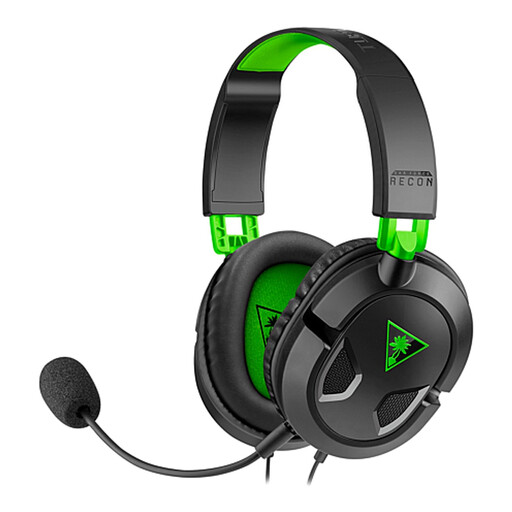
Why it suits this profile: A direct 3.5mm connection works with Xbox and PlayStation controllers, PC, Mac, Nintendo Switch and mobile devices with a suitable port.
There is no need to manage Bluetooth pairing or battery levels. The headset uses stereo audio via the cable and has a detachable microphone.
40mm speakers, volume control and microphone mute on the cable, lightweight design and broad 3.5mm compatibility.
We have put together a complete, up-to-date list of products that fully meet these strict selection criteria and the applicable European safety regulations.
That depends on the connection. A 3.5mm headset will usually work with devices that have a suitable combined audio and microphone port. With USB or wireless models, you need to check whether the receiver and software support your platform. With Xbox, pay particular attention to controller compatibility, and with Nintendo Switch, check the game mode being used.
Lifespan depends on usage, storage and construction. With wireless models, the battery is an additional factor to consider. A wired gaming headset does not have a battery, but the cable, plug and microphone can wear out. Store the headset in a dry place, do not pull on the cable and clean the ear cushions with a soft, dry cloth. Only replace components if the manufacturer supports this.
As well as the purchase price, you should consider charging and the possible replacement of the battery in the long term. A wired headset uses no power and remains available as long as the device has a suitable connection. With wireless gaming, you gain freedom of movement and sometimes Bluetooth connectivity in return. So choose based on where you play, rather than on the product name alone.
