
Vandaag of morgen in huis

Kwaliteit gegarandeerd

Welkomstaanbiedingen ontgrendelen: GRATIS bezorging | Tot 80% korting | Gratis 30 dagen JoyPlus-proefperiode
Download de app
A gaming headset needs to do more than just play sound. During a long gaming session, you don’t want tight ear cushions, a cable that’s too short or a microphone that makes it hard for your teammates to hear you. Yet many models look similar on paper. Terms such as “surround sound”, “noise cancellation” and “premium comfort” can set expectations that aren’t right for every use.
With this buying guide, you can compare a wireless gaming headset, wired models and headsets with a microphone based on features you can check. That way, you can choose the right one for your PC, PlayStation, Xbox or Nintendo Switch.
A headset labelled as surround sound won’t automatically deliver more immersive audio on every device. Check whether it uses virtual surround sound, which platforms support the feature and whether you need software. For example, the HyperX Cloud III lists DTS Headphone:X 2.0 as a virtual technology. The Corsair HS80 RGB USB lists Dolby Audio 7.1 for PC in its product specifications.
A standard stereo headset can also be a good choice if you mainly play casual games, listen to music or want a simple connection.
A wireless gaming headset gives you more freedom to move, but it needs a battery. Look out for the difference between Bluetooth and a 2.4GHz USB connection. Bluetooth is handy for mobile devices, while a USB receiver is often designed to connect directly to a PC or console. Make sure the receiver works with your platform, too.
A wired gaming headset doesn’t need charging and can work with a wide range of devices via 3.5 mm. However, you’ll need to consider cable length and how to manage the cable.
An over-ear design can feel comfortable, but fit, weight and materials matter just as much. PU leather can provide a good seal, while breathable fabric may feel more comfortable for some users during long sessions. Also check whether the headband is adjustable and whether the microphone can be detached or folded away.
For a PC gaming headset, USB is handy if you want digital audio, controls or virtual surround features. A 3.5 mm connection is more flexible across multiple devices. According to the product information, the Trust GXT 415 Zirox has a fixed 2-metre cable and works with PC, laptop, PlayStation, Xbox and Nintendo Switch.
For a PS5 gaming headset, a 3.5 mm connection to the controller is convenient. The Trust GXT 498W Forta is officially licensed for PS5 and also works with PS4. If you’re looking for an Xbox gaming headset, check specifically whether the console supports USB, 3.5 mm or the supplied adapter. For a Nintendo Switch gaming headset, a direct 3.5 mm connection is often the simplest option.
A gaming headset with a microphone needs more than just a microphone: it should also have a handy mute function and a microphone that can be positioned close to your mouth. A flip-up microphone is quick to mute, while a detachable one is useful if you also use the headset without voice chat.
Also look for volume controls on the ear cup. That way, you won’t have to navigate menus during a match.
For long sessions, weight and pressure distribution matter more than driver size alone. The Trust GXT 415 Zirox weighs 244 grams according to its specifications. The HyperX Cloud III weighs 308 grams and uses memory foam in the headband and ear cushions.
Battery life is a practical consideration for a wireless model. The Trust GXT 491W Fayzo lists up to 22 hours of playback. This is the stated maximum battery life; actual results may vary depending on volume, connection and usage.

Why it suits this type of user: This wired gaming headset connects via 3.5 mm to PC, PlayStation, Xbox and Nintendo Switch. There’s no battery to charge, and the cable is 2 metres long.
The product information clearly states that it offers stereo sound, not a virtual 7.1 feature. That means you won’t pay for surround sound you don’t need.
244 grams, 50 mm drivers, foldable microphone and on-ear-cup controls.

Why it suits this type of user: This model combines USB-C, USB-A and 3.5 mm connections with compatibility for PC, PS5, Xbox, Switch, Mac and mobile devices.
The connections and compatible platforms are clearly listed. The virtual DTS feature is identified as such, rather than being presented as physical surround sound.
53 mm drivers, memory foam, detachable microphone, mute LED and DTS Headphone:X 2.0.
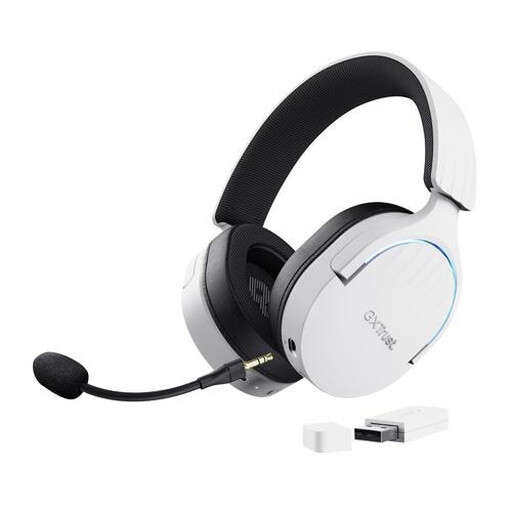
Why it suits this type of user: The combination of 2.4GHz, Bluetooth and a cable gives you flexibility. The stated battery life is up to 22 hours.
The connections and battery life are specified. However, check in advance that your device supports the supplied USB receiver.
2.4GHz and Bluetooth, 50 mm drivers, virtual 7.1 feature and detachable microphone.
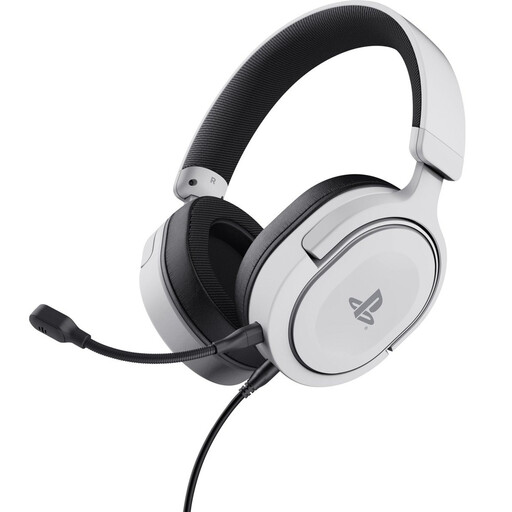
Why it suits this type of user: The 3.5 mm cable connects to the PS5 controller. According to the product description, this model is officially licensed for PS5 and also works with PS4.
The connection, weight of 253 grams and stereo design are clearly stated. So don’t expect wireless operation or physical surround channels.
50 mm drivers, detachable microphone, soft ear cushions and on-ear-cup controls.
We’ve put together a full, up-to-date list of products that meet these strict selection criteria and current European safety regulations.
A wired model is a practical choice if you don’t want to charge a battery and are looking for a simple, stable connection. A wireless gaming headset is better suited to anyone who values freedom of movement. For wireless models, always check the battery life, connection type and compatibility with your platform.
How long it lasts depends on how you use and store it, and how much strain you put on the cable, hinges and microphone. Keep the headset dry, avoid pulling on the cable and don’t listen at high volume for extended periods. A model with a detachable microphone and a replaceable or sturdy cable may be more practical if you use your headset intensively.
Not every connection works with every device. A 3.5 mm model is often compatible with a wide range of devices, but PCs with separate microphone and headphone ports may need a splitter. USB and wireless models are more likely to have platform-specific limitations. So check the product’s compatibility list before you buy.
