
Vandaag of morgen in huis

Kwaliteit gegarandeerd

Welkomstaanbiedingen ontgrendelen: GRATIS bezorging | Tot 80% korting | Gratis 30 dagen JoyPlus-proefperiode
Download de app
A gaming headset might seem straightforward to choose at first glance. Yet many shoppers fall for terms like “7.1 surround”, “noise cancelling” or “professional sound quality” without checking what these features actually mean in practice. Even a headset with a good price can be awkward if the cable is too short, the connection doesn’t fit your device, or the microphone becomes irritating after a few weeks.
So pay particular attention to three common pitfalls:
A wired gaming headset with a 3.5 mm jack is practical when you play on multiple devices. You can plug it into the controller of a PlayStation or Xbox, a laptop, Nintendo Switch or mobile phone. For a PC with separate audio and microphone ports, check whether a splitter or extension cable is included.
A USB gaming headset processes sound via the USB connection. This can offer extra features, such as software-based equaliser settings or virtual surround sound. However, the connection is less universal. A USB model might work with PC and PlayStation, for example, but not with Xbox. According to the product information, the Edifier G2II is supported on PC, Mac and PS4, but not on Xbox.
Wireless gaming gives you more freedom of movement, but requires attention to battery life, charging method, wireless standard and compatibility. A wireless gaming headset is therefore not automatically more practical for every player.
Most affordable models use stereo sound, labelled as 2.0. This means sound is reproduced on the left and right. For many games, chat and music, that’s sufficient.
With a surround sound headset, it’s often virtual 7.1 or 3D audio. According to the product specification, the Logitech G432 uses DTS Headphone:X and a USB DAC for surround reproduction. The Logitech G HUB software is needed to activate this feature. The Trust GXT 498P Forta is a stereo headset, but the product description mentions support for 3D audio on PS5 when enabled in the console settings.
So pay attention to the difference between:
A larger driver, such as 50 mm, doesn’t on its own tell you how a headset sounds. It’s one technical specification alongside frequency range, tuning, software and fit.
A gaming headset with microphone is suitable for team chat, Discord and online meetings. Check whether the microphone is fixed, flip-up, flexible or detachable. A flip-up microphone is quick to mute; a detachable model is more convenient if you also use the headset outside of gaming.
For long sessions, over-ear cushions, an adjustable headband and a reasonably low weight are practical. According to the product specification, the Logitech G G335 weighs 240 grams and has an elastic headband with memory foam ear cushions. The Trust GXT 415 Zirox weighs 244 grams and uses a fixed 2-metre cable. Bear in mind that synthetic leather can feel warmer than breathable fabric.
Turn the volume down before you start and take regular breaks. Listening at high volume for long periods can cause hearing damage, as also stated in the safety information for the products mentioned.

Why this fits the profile: This model uses a 3.5 mm connection and, according to the product information, works with PC, laptop, PlayStation, Xbox and Nintendo Switch. That means no separate wireless transmitter or charging station is needed.
The fixed 2-metre cable eliminates battery management, and the product information clearly states that this is a stereo headset without virtual 7.1 surround.
244 grams, over-ear cushions, 50 mm drivers, flip-up microphone and volume control on the ear cup.

Why this fits the profile: According to the product specification, the headset offers USB-C, USB-A and 3.5 mm connections and is compatible with PC, PS5, Xbox, Switch, Mac and mobile devices, among others.
The compatibility and included adapters are clearly stated. DTS Headphone:X is a virtual feature and must be used on supported devices.
Memory foam in headband and ear cushions, detachable microphone, 53 mm drivers and mute indicator.
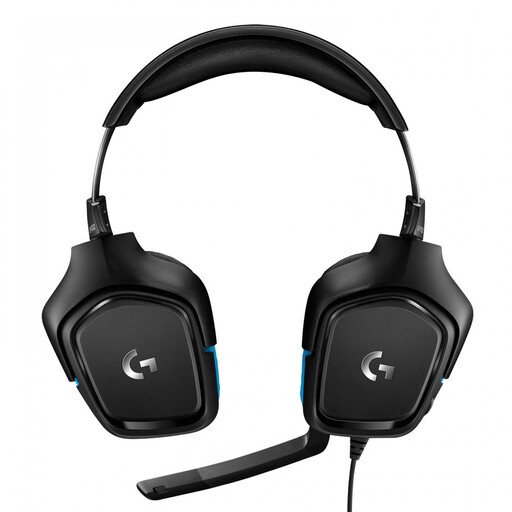
Why this fits the profile: This model is aimed at players who want a wired headset with USB DAC and virtual surround features. According to the product information, it works with PC, Mac, PS4, Xbox One, Switch and more.
The specifications distinguish between the 3.5 mm connection and USB DAC. For 7.1 surround, Logitech G HUB software is required, so you know what installation is needed.
50 mm drivers, flip-to-mute microphone, volume control and support for virtual DTS Headphone:X audio.
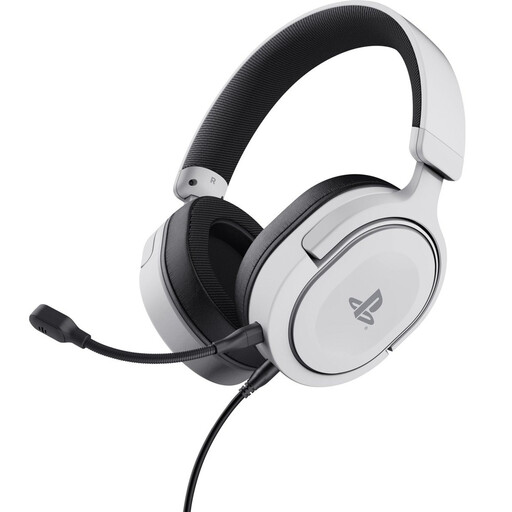
Why this fits the profile: This officially licensed PS5 headset also works with PS4 according to the product specification, and uses a detachable 3.5 mm cable for connection to the controller.
The product description states that it is stereo with 3D audio on PS5, not true surround reproduction. This makes expectations clear.
50 mm drivers, detachable microphone, soft ear cushions, swivelling ear cups and a weight of 253 grams.
We’ve put together a full, up-to-date list of products that fully meet these strict selection criteria and comply with current European safety regulations.
Usually yes, when the device has a combined 3.5 mm jack. On consoles, you typically plug the headset into the controller. Always check the compatibility information and any included adapter for Xbox models and PCs with separate microphone and headphone ports.
A wireless model has no cable to the controller, but does need to be charged regularly. The running costs depend on the type of battery and its lifespan. A wired headset has no battery and can be used straight away, but the cable may wear out over time if it is frequently kinked or pulled tight.
The lifespan depends on use, storage and maintenance. Store the headset in a dry place, don’t pull on the cable, and clean the ear cushions gently according to the manual. When buying, also look for replaceable parts, such as a detachable cable or microphone. In the European Union, consumers are entitled to a minimum legal warranty period of two years, in addition to any additional rights under Dutch law.
