
Story-driven solo player
You want to follow dialogue and atmospheric sounds, and choose features that suit the way you play rather than paying for extra communication options you won’t use.


For historical adventure games in a home office, a headset that makes dialogue easy to listen to and stays comfortable during your gaming sessions is a sensible place to start. Choose a wired headset if you usually stay at your desk and don’t want to manage a battery, or go wireless if freedom of movement matters more. Either way, check the connection and support for your device. Features don’t necessarily work on every platform: Logitech, for example, states that the G432’s DTS Headphone:X 2.0 surround sound and EQ presets are only available on Windows with G HUB.
You want to follow dialogue and atmospheric sounds, and choose features that suit the way you play rather than paying for extra communication options you won’t use.
You play for extended sessions at the same desk. As well as sound, consider the fit and ear cushions. Comfort is personal and depends in part on the shape of your head and ears.
You combine gaming with calls or other devices, so you’ll want to weigh up microphone controls, sound in the room and the available connections.
| What to consider | What should you look for? | Who is this more important for? |
|---|---|---|
| Dialogue and ambient sound | Assess the audio on your platform and check whether any software features work with it. | If I want to follow dialogue and atmosphere in a story game, I look first at the sound and available settings. Around 25% of consumers rank sound as their top priority when choosing. |
| Fit for long sessions | Look at adjustability, room around your ears and the cushion material; try the headset on yourself if possible. | For longer gaming sessions, I want a headset that feels comfortable, not just one that’s technically compatible. Around 25% of consumers put long-term wearing comfort first. |
| Connection and compatibility | Check your device’s ports, the full model variant and support for the features you want. | If I play on a specific PC or console, I want to know in advance whether the connection and features work with it. Around 20% of consumers give compatibility top priority. |
| Calls and sound in your workspace | Decide whether you need microphone muting or want to hear less background noise yourself. | If I make calls while gaming or am bothered by noise in the room, I choose features that address that issue. Around 15% of consumers prioritise calls or background noise. |
| Purchase and running costs | Compare the current total price and what’s included in the box; consider any extra warranty separately from your statutory rights. | If I mainly want the features I’ll actually use, I weigh up any extras against my needs and budget. Around 15% of consumers make cost their top priority when choosing. |
For the Logitech G432, Logitech says DTS Headphone:X 2.0 and EQ presets are only available on Windows with G HUB.
Check which software and features are actually supported for each model and device.
The HyperX Cloud III Wired and Cloud III Wireless have different connections. The original SteelSeries Arctis Nova 7X Wireless is also a different version from the Nova 7X Wireless Gen 2.
Compare the full model name, connection, included receiver and support for your device.
Microphone features are designed to improve the sound of your voice for others; active noise cancellation is designed to reduce noise for the wearer. Having one feature doesn’t automatically mean you get the other.
Decide whether you want people on your calls to hear less room noise, or want to hear less background noise yourself.
The Dutch government distinguishes between statutory and additional warranties. If a product is faulty, your point of contact is the seller.
Check what extra rights any warranty cover on offer provides, and consider your statutory rights separately.
The Cloud III Wired and Cloud III Wireless are separate models. Check the connection and device support for each version.
The original Arctis Nova 7X Wireless is worth considering if you also want to hear audio from your phone while gaming.
The wired G432 is worth a look if your device supports a compatible 3.5mm connection or the USB DAC included in the box.
The Quantum 910X Wireless is worth looking into if wireless console use and active noise cancellation are relevant to your needs.
This selection focuses on wired gaming headsets for a desk setup, including models with a 3.5mm connection and versions specified for particular consoles. Before buying, check the connection and platform support for the exact variant.
 No image available
A wired PS5 headset; the product name lists 50mm drivers. Check that the 3.5mm connection is compatible with your device.
 No image available
A wired option for a desk setup. Check which connection and audio features your device supports.
 No image available
A wired 3.5mm option for the Nintendo Switch models named. Check that the connection is compatible with your device and version.
 No image available
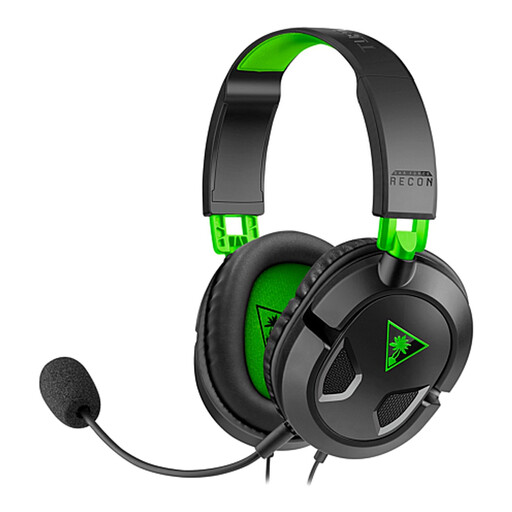
A wired option for the devices named in the product title, including Xbox and PS5. Check that your device has a compatible 3.5mm connection.
 No image available
A wired 3.5mm option for the devices named in the product title. Check platform support for your specific version.
No. Don’t choose based on the surround sound label alone. Consider how dialogue and ambient sound come across to you, and check whether the feature is available on your platform. According to Logitech, DTS Headphone:X 2.0 and the EQ presets on the Logitech G432 only work on Windows with G HUB.
It depends on the model. PlayStation explains that supported wireless headsets connect via a USB adapter. For a headset from another manufacturer, check the instructions and make sure the exact variant supports PS5.
The World Health Organization recommends keeping the volume low and taking regular listening breaks. It suggests a practical setting of no more than 60% of your device’s volume; your sound exposure also depends on volume, duration and usage.
No. According to the Dutch government, buyers are entitled to a product that works properly, and Dutch statutory warranties don’t have a fixed two-year term. If a product is faulty, your point of contact is the seller; additional warranty cover doesn’t replace this right.
For a distance purchase, the Dutch government says you’ll often have a 14-day cooling-off period. Check the applicable returns policy before trying it on; the precise rules can vary depending on the circumstances.