
Vandaag of morgen in huis

Kwaliteit gegarandeerd

Welkomstaanbiedingen ontgrendelen: GRATIS bezorging | Tot 80% korting | Gratis 30 dagen JoyPlus-proefperiode
Download de app
A gaming headset needs to do more than simply play sound. You want to hear your teammates, make sure your voice comes across clearly and stay comfortable during longer gaming sessions. However, product pages are not always as clear as they could be. Terms such as “surround sound”, “noise cancelling” and “long battery life” can mean different things.
As a Joybuy Product Recommendation Officer, I therefore focus on verifiable specifications and practical use. Below, you can read about common pitfalls, which features really matter and which models suit different user profiles.
A surround sound headset may use virtual spatial audio through software, but that does not automatically mean every device supports this feature. With the Razer BlackShark V2 X, 7.1 surround sound depends on software and an activation code. With the Sony INZONE H3, 360 Spatial Sound for Gaming is linked to the INZONE Hub on a Windows PC.
On a console, the headset may therefore function primarily as a stereo headset, depending on the platform’s settings and support. So do not just check the marketing term; also check where and how the feature is activated.
A wireless headset or Bluetooth headset is convenient without a cable, but it needs a battery. Check the stated gaming or listening time, the charging connection and the devices you can connect to. Bluetooth is practical for mobile use, but not every Bluetooth headset works directly with every console for game audio and chat.
For long gaming sessions without interruptions, a wired gaming headset may be simpler. It draws power from the connected device and does not need charging.
Pay attention to the microphone type and controls. A flip-to-mute microphone mutes when you flip the microphone upwards. Other models have a fixed, foldable or detachable microphone. Also check whether the connection is four-pole if you want to use both audio and the microphone through a single 3.5mm connection.
For a PS5 gaming headset, Xbox gaming headset or PC gaming headset, the connection is crucial. A 3.5mm jack usually works via a controller, laptop or combined audio connection. On a PC with separate audio and microphone connections, a splitter may be required. The Razer BlackShark V2 X, for example, comes with support for PC, Mac, PlayStation, Xbox, Nintendo Switch and mobile devices via 3.5mm.
For Xbox, also check whether the model is suitable for your controller generation. With Nintendo Switch, the headset can be connected directly to the console or controller, depending on how you use it.
For a comfortable gaming headset, weight, headband and ear cushions are more important than the driver size alone. An over-ear headset fits around your ears and can passively reduce surrounding noise. On-ear models, such as the Sony WH-CH520, rest on your ears and are often more compact for use on the go.
Weights vary: according to the product specifications, the Sony WH-CH520 weighs 147 grams, the Razer BlackShark V2 X weighs 240 grams and the Sony INZONE H3 weighs 299 grams. A lower weight can be more comfortable during long sessions, but the fit and pressure on your head remain personal preferences.
Look at the microphone position, mute controls and cable length. A 1.2 to 2-metre cable gives you more freedom of movement at a PC, but can get in the way more easily when you are out and about. Also check whether lighting via USB only receives power. According to the product information, the USB connection on the ONIKUMA K8 is intended for the LED lighting; audio runs through the 3.5mm connection.
Software features can offer additional options, but they make installation less straightforward. If you want plug-and-play convenience, a wired model without mandatory PC software may be a better choice.

Why it suits this profile: A wired model with a 3.5mm connection for PC, laptop, PlayStation, Xbox and Nintendo Switch, with no battery or complicated installation.
The specifications clearly state that this is stereo audio, not virtual surround sound. The fixed cable also eliminates charging problems.
244 grams, over-ear ear cushions, 50mm drivers, foldable microphone and controls on the earcup.
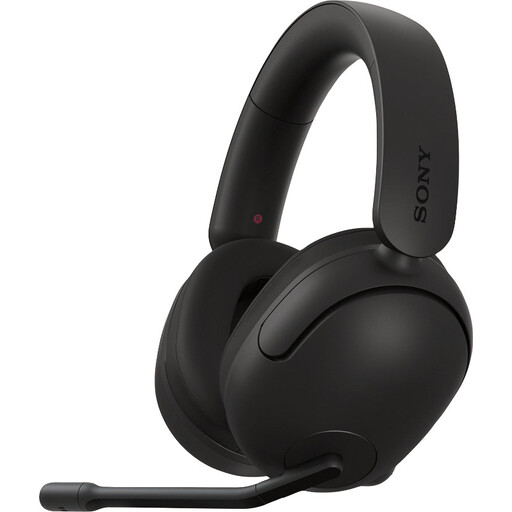
Why it suits this profile: Designed for PC and PS5 gamers who want to use software settings and spatial audio.
The product information states that 360 Spatial Sound is activated through the INZONE Hub on Windows. This makes it clear when software is required.
40mm drivers, unidirectional microphone, 3.5mm connection with USB audio box and a weight of 299 grams.

Why it suits this profile: Suitable for players looking for a lightweight headset with a microphone and broad platform support.
The 3.5mm connection works without a wireless battery. The 7.1 feature is not presented as standard on every platform; it requires Razer software and activation.
240 grams, 50mm TriForce drivers, cardioid microphone and compatibility with PC, Mac, PlayStation, Xbox, Switch and mobile devices.
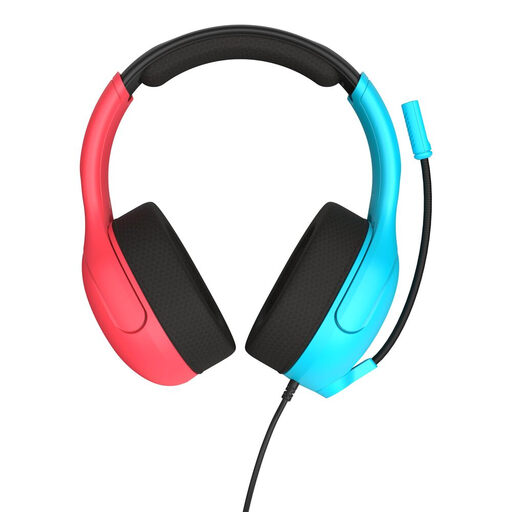
Why it suits this profile: A practical choice for Nintendo Switch, Switch Lite, Switch OLED, PC and mobile devices with a 3.5mm connection.
The product description specifies the connection and supported devices. You do not need to manage Bluetooth pairing or battery status.
40mm speakers, flip-to-mute microphone, volume roller and a weight of 228 grams.
We have put together a complete, up-to-date list of products that fully meet these strict selection criteria and the applicable European safety regulations.
That depends on the connection and the specific model. A headset with a 3.5mm jack often works through the controller or the Switch’s headphone connection. With Xbox, always check the product listing and your controller model. Support for one platform does not automatically mean that all features are available on other devices.
A wired gaming headset does not need a battery and can provide a simple connection. A wireless headset gives you more freedom of movement, but it needs charging and may require additional connection steps. For gaming in a fixed location, wired is often practical; for music, travel and mobile use, Bluetooth may be more convenient.
The lifespan depends on cable strain, hinges, ear cushions and daily use. Store your headset in a dry place, do not pull on the cable and keep the volume at a suitable level. In the EU, consumers are covered by the statutory guarantee of conformity; some product listings also mention a manufacturer’s warranty of two years or longer. Always check the terms and conditions for the product.
