
Vandaag of morgen in huis

Kwaliteit gegarandeerd

Welkomstaanbiedingen ontgrendelen: GRATIS bezorging | Tot 80% korting | Gratis 30 dagen JoyPlus-proefperiode
Download de app
A gaming headset needs to do more than just play sound. You want to hear your teammates clearly, mute the microphone quickly, and wear the headset comfortably for hours on end. Yet it’s tricky to compare models fairly. Manufacturers use terms like “surround sound”, “noise cancellation” and “pro-gaming” in different ways.
The right choice depends on your platform, connections, comfort and how you game. Below, you’ll find out which features you can actually check, and which popular models suit different types of gamer.
A headset with “7.1” or “3D audio” often uses virtual processing. The sound is adjusted by software to simulate direction and distance. That can be useful in certain games, but the result depends on the software, the platform and your personal preference.
So check:
For example, the Logitech G432 lists 7.1 audio and DTS Headphone:X, with the product description stating that the software is needed to access the surround function. The Trust GXT 489W Fayzo, on the other hand, is a stereo headset without a virtual 7.1 mode.
A wired gaming headset doesn’t need a battery and can offer a stable connection. However, a cable can get in the way or be too short for your setup. Don’t just look at the connector – also consider the cable length and where the connection point is.
A 3.5mm connection often works with a controller, laptop or mobile device. On a PC with separate headphone and microphone jacks, you may need a splitter or extension cable. A USB connection can support extra features, but isn’t always suitable for a console controller.
A gaming headset with microphone may have a noise filter, flip-to-mute function or detachable microphone. These are features you can check. However, actual clarity also depends on the microphone position, the software used and background noise.
Look out for:
First, make a list of the devices you want to use the headset with. A headset for PC can work via USB, 3.5mm or both. For a headset for PS5, a 3.5mm connection on the controller is often the simplest option. For Xbox, check whether the headset is compatible with your console generation and controller.
For a headset for Nintendo Switch, a 3.5mm connection is usually most practical in handheld mode. A wireless model can offer extra flexibility, but check whether the included dongle and Bluetooth mode are supported by the Switch.
An over-ear gaming headset encloses the ear and can partially block out ambient noise. Pay attention to the ear cushion materials, the adjustability of the headband and the weight. For comparison:
A lower weight isn’t automatically more comfortable. The shape of the ear cups, the pressure of the headband and heat build-up also play a role. If you often play for several hours at a time, soft memory foam cushions and an adjustable headband can make a real difference.
A wireless gaming headset avoids cable clutter, but needs a battery and charging time. Check the stated battery life, the type of connection and whether you can continue playing while wired.
The Razer Barracuda X offers 2.4 GHz, Bluetooth 5.2 and a wired connection, according to the product data. The stated battery life is up to 50 hours. The HyperX Cloud III S Wireless supports 2.4 GHz and Bluetooth 5.3, with a stated usage time of up to 120 hours via 2.4 GHz and up to 200 hours via Bluetooth. These are manufacturer specifications; actual usage time may vary depending on volume, connection and settings.
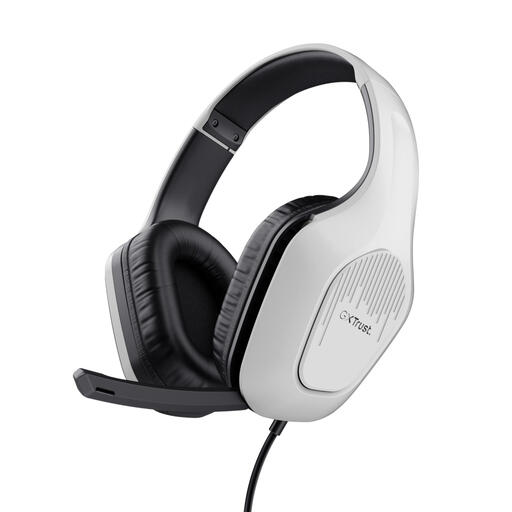
Why it fits this profile: The Zirox is aimed at users who want a simple wired gaming headset for PC, laptop and consoles without a battery or complex setup.
The 3.5mm connection requires no charging and the model uses stereo audio rather than a vague surround claim. The microphone can be folded away and volume is controlled on the ear cup.
50mm drivers, a 2-metre cable, a weight of 244 grams and compatibility with PC, laptop, PlayStation, Xbox and Nintendo Switch.
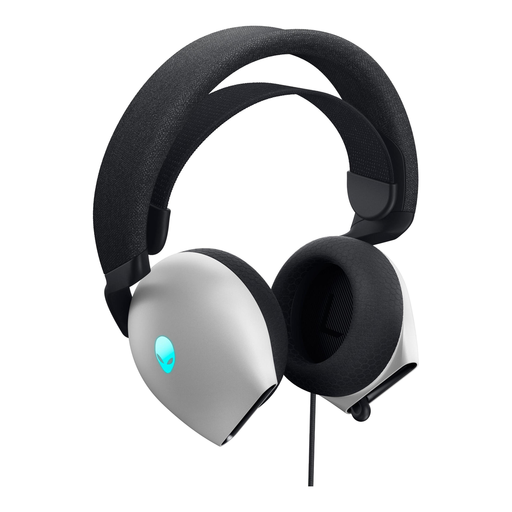
Why it fits this profile: This model suits PC gamers looking for a wired headset with USB and 3.5mm connections, lighting and extra audio features.
The connection options are clearly stated: USB 2.0 and 3.5mm. The manufacturer lists support for Dolby Atmos and AI-driven microphone noise cancellation; check in advance which features are available on your PC.
40mm drivers, a 200cm cable, memory foam ear cushions, a foldable microphone and a stated weight of 337 grams.

Why it fits this profile: This model is designed for players who regularly switch between PC, mobile use and compatible consoles, and don’t want a fixed cable.
The headset supports both 2.4 GHz and Bluetooth 5.3. This means you’re not limited to one wireless standard. However, do factor in charging time and check whether your device is on the compatibility list.
53mm drivers, detachable microphone, memory foam pads and a manufacturer-stated battery life of up to 120 hours via 2.4 GHz.
We’ve put together a full, up-to-date list of products that fully meet these strict selection criteria and comply with current European safety regulations.
A wired headset is practical if you don’t want to charge a battery and need a direct connection. A wireless model offers more freedom of movement, but requires charging and may depend on Bluetooth or a wireless dongle. Choose based on your gaming setup and devices, not just on looks.
It varies by model. A headset with a 3.5mm connection often works via the controller or handheld port, but check the platform list. The Trust GXT 489W Fayzo lists compatibility with PC, laptop, PS4, PS5, Xbox and Switch. For extra features like virtual surround sound, a specific software or USB connection may be needed.
The lifespan depends on use, storage and handling. A detachable cable or microphone can be handy if a part needs replacing. Store the headset in a dry place, don’t pull on the cable and keep the volume at a moderate level. According to the product information provided, the models mentioned come with at least the statutory two-year warranty under EU consumer law; additional rights may apply under national law.
