Choose a headset with audio and microphone connections that work with your gaming platform. Then test in a game you play to see whether movement cues are clear enough. A wired headset suits a fixed workstation and doesn’t need charging, while a wireless one can give you more freedom to move. Neither the connection type nor a surround-sound label proves better positional audio on its own.
Who should consider this choice?
Players practising with movement sounds
If you want to pick out footsteps and other cues in a competitive game, test positional audio in the game you actually play. RTINGS, Razer and SteelSeries highlight audio reproduction and settings as factors to consider, but a surround-sound label won’t tell you how the cues will sound in your game.
Players who spend long sessions at their desk
Fit, ear cushions and controls all matter when you’re practising or working for long periods. RTINGS and manufacturers Razer, HyperX and Logitech G highlight comfort features, but the materials or weight listed won’t tell you how a headset will fit your head.
Gamers who use the same space for work
If you also make calls, check how to mute the microphone and which connection your work device supports. SteelSeries, HyperX and Logitech G describe models with different connection options or ways to switch between connections.
What should you look for when choosing?
Wired
Choose this option if: you mainly practise at a fixed workstation, don’t want to charge your headset and have a compatible connection.
Bear in mind: the cable limits your freedom to move. Check which audio and microphone features work with each device.
Wireless
Choose this option if: you want to get up from your desk without being tethered by a cable or use the headset for calls too.
Bear in mind: the right dongle, headset variant and battery life all matter. Being able to switch between connections doesn’t automatically mean you can hear two audio sources at once.
| What to consider |
What should you look for? |
Who is this important for? |
| Movement cues |
Check whether EQ or surround sound works on your platform, then compare settings in a familiar practice scenario at a controlled volume. |
If I want to judge movement in my game more accurately, I want to compare settings in the game itself. Around 29% of consumers rank movement cues as their top buying priority. |
| Comfort during long sessions |
Look at adjustability and ear-cushion material. If possible, try the fit during a session similar to the way you’ll use the headset. |
During long practice or work sessions, I mainly want to know whether the headset feels comfortable on my head. Around 23% of consumers put lasting comfort first. |
| Team chat and muting |
Check the microphone connection, where the mute button is and how the microphone works with your chat device. |
If I want to be able to mute quickly while gaming or working, I look at the controls and microphone connection. For around 18% of consumers, team chat is their top buying priority. |
| Connections and switching |
Make a note of your devices, available ports, the exact headset variant and the features you want for each device. |
If I want to use the same headset with different devices, I want to know in advance which connections and features each one supports. Around 18% of consumers put compatibility first. |
| Cost and features you’ll use |
Compare the purchase price with the features that actually work on your device, and decide which features you need. |
If I’m mainly watching my spending, I don’t want to choose based on features I can’t use. Around 12% of consumers rank cost above their other buying priorities. |
Common mistakes
-
Assuming a surround-sound or preset claim proves better performance
Features can vary between headsets, platforms and games. Razer states that the BlackShark V2 X’s 7.1 feature is only available on Windows 11. That doesn’t prove it will make movement cues easier for every player to hear.
Check platform support and compare settings with the same movement sounds at a controlled volume.
-
Assuming every wireless variant works with Xbox
According to SteelSeries, Xbox compatibility is built into the relevant headset variant and can’t be added with a different dongle.
Before buying, check the full model name and that variant’s console compatibility.
-
Confusing microphone noise cancellation with noise isolation for you
A directional microphone and earcups that block out surrounding noise serve different purposes. So a microphone description won’t tell you how much sound from the room you’ll hear yourself.
Assess voice recording and the room noise you can hear separately.
Brands to compare
Razer
The wired BlackShark V2 X is an option for a fixed workstation with a compatible 3.5mm connection.
- Razer specifies closed-back earcups, a cardioid microphone and a weight of 240 g for this model.
- According to Razer, the 7.1 feature is only available on Windows 11. These specifications don’t prove a personal fit or better positional audio.
HyperX
The wired Cloud III is worth comparing if you value different connection options and a mute indicator.
- HyperX lists 3.5 mm, USB-C and USB-A connections, a 10 mm microphone and a mute indicator for the Cloud III.
- Check which connection and additional audio feature work on your platform. Claims about comfort and audio quality come from the manufacturer.
SteelSeries
The Arctis Nova 5 range is worth considering if you want to switch between game audio and Bluetooth calls while using the headset.
- SteelSeries lists a 2.4GHz gaming connection, switching to Bluetooth and a stated battery life of 60 hours for the Nova 5.
- Console compatibility varies by model. According to SteelSeries, Xbox compatibility can’t be added later with a different dongle.
Logitech G
The PRO X 2 LIGHTSPEED is a wireless option to compare if you want several types of connection.
- Logitech G lists LIGHTSPEED, Bluetooth, 3.5 mm, interchangeable ear-cushion types and up to 50 hours of battery life.
- These are specifications and claims for the PRO X 2; they don’t prove that it will sound better in your game or stay comfortable for longer.
Gaming headsets at Joybuy
This selection includes wired and wireless gaming headsets for use at a fixed workstation, with a focus on game audio, team chat and connections.
 No image available
Turtle Beach Recon 70, wired, Green Camo
An option for a fixed gaming set-up with a compatible 3.5mm connection. Flip the microphone up to mute it.
3.5mm connection; compatibility is listed for PC, PS5, Switch 2 and Xbox Series X|S.
View at Joybuy
 No image available
Turtle Beach Stealth 500 Xbox, wireless, Black
A wireless option for cable-free gaming. Flip the microphone up to mute it.
The product information lists a 2.4GHz dongle for Xbox and a QuickSwitch button for switching between connections. Compatibility is also listed for Xbox One, PC, Switch 2 and mobile devices.
View at Joybuy
 No image available
HyperX Cloud III S Wireless
A wireless option to compare if you want to use game audio and team chat without being tied to a cable.
The product information lists 2.4 GHz and Bluetooth. DTS Spatial Audio is listed for PC. The stated battery life is up to 120 hours via 2.4 GHz and up to 200 hours via Bluetooth. The microphone is detachable and, according to the product information, has a mute indicator.
View at Joybuy
 No image available
Razer BlackShark V2 X 7.1, wired
A wired option for a fixed gaming set-up with a compatible 3.5mm connection and a microphone mute control.
Razer lists a cardioid microphone and a weight of 240 g. According to Razer, the 7.1 feature only works on Windows 11. The surround-sound label doesn’t prove that movement cues will be easier to hear in your game.
View at Joybuy
 No image available
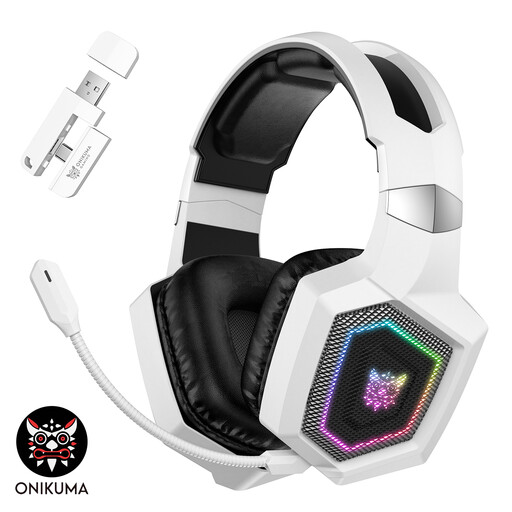
ONIKUMA GT806, White
A wireless option to compare if you want freedom to move while gaming and can connect the headset to your device.
The product information lists 2.4 GHz, Bluetooth and a wired mode. According to that information, Bluetooth won’t connect directly to PS5, PS4 or PC; 2.4 GHz or the Type-C cable is listed for those devices.
View at Joybuy
Frequently asked questions
Should I choose a headset with virtual 7.1 surround sound to hear movement better?
No, not just because of that label. Check whether the feature works on your system and compare it with other settings in a game you play. Razer states that the BlackShark V2 X’s 7.1 feature is only available on Windows 11.
How do I connect a headset for both game audio and team chat?
First, check which audio and microphone connections your device supports. HyperX lists 3.5 mm, USB-C and USB-A for the wired Cloud III. For a wireless headset, also check that the dongle is compatible with the exact variant and your platform.
How can I use a headset safely during long practice sessions?
Keep the volume at a controlled level and take breaks. The World Health Organization gives the example that safe listening is possible for up to 40 hours a week at 80 dB and four hours a week at 90 dB. This advice relates to exposure and isn’t a measurement of the sound level of any of these headsets.
What are my rights when buying online in the Netherlands?
According to ACM ConsuWijzer, online purchases generally come with a statutory 14-day cooling-off period after delivery, with some exceptions. The Netherlands Authority for Consumers and Markets also states that the seller is responsible for the statutory guarantee if a product doesn’t meet what consumers may reasonably expect. Check the terms of the specific purchase; a manufacturer’s warranty doesn’t replace these rights.


