
Vandaag of morgen in huis

Kwaliteit gegarandeerd

Welkomstaanbiedingen ontgrendelen: GRATIS bezorging | Tot 80% korting | Gratis 30 dagen JoyPlus-proefperiode
Download de app
A gaming headset needs to do more than play sound. During a long session, you don’t want pressure on your ears, your voice needs to come through clearly in team chat, and the connection needs to work with your PC, console or phone. Yet many product descriptions focus mainly on eye-catching terms such as “surround”, “low latency” and RGB lighting.
As a Joybuy Product Recommendation Officer, I filter that information down to practical points. That way, you can avoid paying for features you won’t use or buying a headset that doesn’t work properly with your platform.
A 7.1 surround sound headset often uses virtual audio processing. This can create a sense of space, but the results depend on the software, game and platform. So check whether the feature works with your device. For example, 7.1 on the Razer BlackShark V2 X requires software and an activation code. It may work differently on consoles than it does on a PC.
A wireless gaming headset can connect via Bluetooth, 2.4 GHz or both. Bluetooth is handy for a smartphone, but not every model supports a direct Bluetooth connection to PS5, PS4 or PC. For example, the ONIKUMA GT806 notes that certain devices may require a USB adapter. For low-latency gaming, the included 2.4GHz dongle is often the best option.
Pay attention to battery-life claims, too. “Up to 70 hours” usually refers to specific conditions, such as having the lights switched off. The GT806, for example, gives different battery-life figures for listening to music with the lights off and gaming via 2.4GHz.
A comfortable over-ear gaming headset should fit securely without squeezing. Consider the weight, the shape and material of the ear cushions, and how adjustable the headband is. Faux-leather cushions can help block out some external noise, while fabric cushions often feel different during long sessions. A lighter headset can help, but fit is still a personal choice.
Choose a wired gaming headset if you want to play straight away without having to charge it. A 3.5mm connection often works with PC, PlayStation, Xbox, Nintendo Switch and mobile devices, but check whether your PC needs a splitter for separate microphone and headphone ports.
A wireless model gives you more freedom to move around. When choosing one, check:
A Bluetooth gaming headset is particularly handy for your phone, tablet and everyday use. For competitive gaming, a 2.4GHz connection is often a better choice because of its stated low latency.
A gaming headset with a microphone may have a fixed, flip-up or detachable mic. A cardioid microphone mainly picks up your voice from the front, while an omnidirectional model picks up sound from all around the microphone. Neither will completely silence a noisy room.
Look out for practical features such as:
Larger drivers, such as 50 mm ones, don’t tell you on their own what a headset will sound like. Frequency range, tuning and software also play a part. A noise-cancelling headset may passively reduce ambient noise with closed-back ear cushions. Active noise cancellation is a separate feature and isn’t available on every gaming model.
RGB lighting doesn’t affect performance. If you’re choosing an RGB gaming headset, it’s worth checking how much the lighting affects battery life. It’s also a good idea to see whether the lighting effects can only be adjusted through PC software.

Why it suits this profile: A wired connection keeps things simple: no battery and no wireless pairing. According to the product information, the 3.5mm connection works with PC, Mac, PlayStation, Xbox, Nintendo Switch and mobile devices.
You don’t need to worry about battery life or Bluetooth compatibility. Just check whether you need the included splitter for your PC.
50mm drivers, stated virtual 7.1 functionality, memory foam ear cushions and a weight of 240 grams.
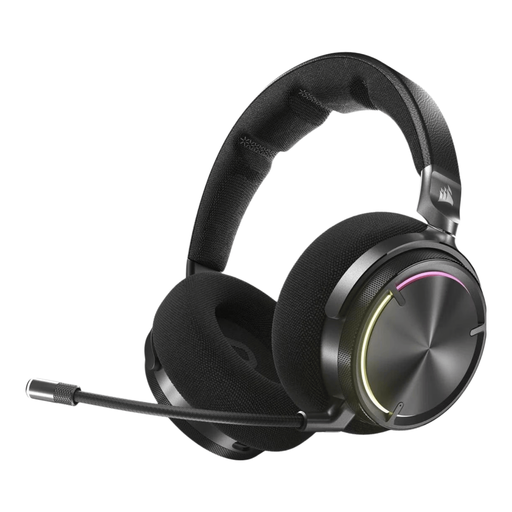
Why it suits this profile: According to the product specifications, this model combines RF wireless and Bluetooth with active noise cancellation, Dolby Atmos support and 50mm drivers.
The dual wireless connection options are clearly specified. Bear in mind the stated weight of 417 grams and battery life of up to 30 hours.
Active noise cancellation, virtual spatial audio, RF plus Bluetooth, and an integrated microphone.

Why it suits this profile: For long gaming sessions, the combination of memory foam, a detachable microphone and wireless connectivity is practical. The product specifications state up to 120 hours via 2.4GHz and up to 200 hours via Bluetooth.
Battery life is specified separately for each connection type. Check in advance whether your device supports the USB dongle or Bluetooth mode.
53mm drivers, DTS Spatial Audio for PC, Bluetooth 5.3, 2.4GHz, and compatibility with PC, PlayStation, Switch and mobile devices.
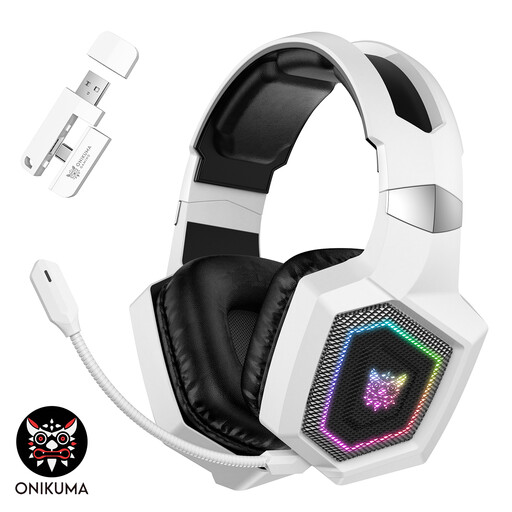
Why it suits this profile: According to the product description, the GT806 offers three modes: 2.4GHz, Bluetooth and wired. This makes it a good fit for gamers who switch between consoles, PCs and mobile devices.
The product information distinguishes between Bluetooth and 2.4GHz. Use the right dongle for console and PC gaming, and bear in mind that RGB uses extra power.
50mm drivers, detachable microphone, RGB lighting, Bluetooth 5.4 and stated battery life of up to 40 hours via 2.4GHz with the lights off.
We’ve put together a full, up-to-date list of products that meet these strict selection criteria and current European safety regulations.
It depends on the connection method. A 2.4GHz headset with a compatible USB dongle often connects more easily than Bluetooth. Always check that PS5 is explicitly listed as compatible. Some models don’t support a direct Bluetooth connection to PS5.
Its lifespan depends on cable strain, hinges, ear cushions, battery use and storage. Keep your headset dry, don’t pull on the cable, and charge models with lithium batteries using the recommended cable. Don’t replace a damaged battery yourself. Keep the volume at a safe level and take regular breaks.
Not necessarily. A wired headset with a 3.5mm connection may be all you need for gaming and team chat. Extra costs usually go towards wireless features, software, spatial audio, materials, active noise cancellation and battery life. So start by choosing the features you’ll actually use.
