Start with the device you play on, not the size of your screen: check whether your controller has a compatible headset socket, or whether your console or PC supports the wireless receiver. Then prioritise clear dialogue and comfort. Wireless features or an advanced microphone are mainly worth considering if you’ll use them while playing.
Who is this buying guide for?
Playing on a console from the sofa
You play on a big screen and first want to know whether the headset works with your console via the controller, a USB receiver or another supported connection. HyperX and Turtle Beach describe different connection options and platform variants.
Following dialogue above all
You mainly play for the story and want to follow spoken dialogue comfortably during longer sessions. Fit and easy-to-reach volume controls are worth considering.
Mixing game audio with phone audio
You may also want to hear audio from your phone while playing. Check whether a headset supports simultaneous playback or only lets you switch between sources; SteelSeries and Turtle Beach describe different features in this area.
What should you look for when buying?
Wired via 3.5 mm
A good fit if: you play close to a controller or another device with a compatible 3.5 mm headset socket and don’t want to charge a battery.
Bear in mind: the cable limits how far you can move; also check whether your device’s socket supports the microphone function you want.
Wireless with a USB receiver
A good fit if: you sit further from your gaming device and don’t want a cable running to your controller, provided the receiver and headset variant work with your device.
Bear in mind: you’ll need to choose the right platform variant and charge the headset.
Game and phone audio at the same time
A good fit if: you want to hear audio from your phone while following the story; SteelSeries describes this feature for the Arctis Nova 7 via 2.4 GHz and Bluetooth.
Bear in mind: according to SteelSeries, the microphone can’t send your voice to both sources at the same time.
| What to consider |
What to look for |
Who should pay particular attention? |
| Connection to your gaming device |
Work out which device runs the game, then check the controller port, supported USB receiver and headset variant. |
If I play from the sofa, I first want to know whether the headset works with my own console. Around 36% of consumers prioritise connectivity. |
| Clear dialogue |
Look for easy-to-reach volume controls and test dialogue at your usual listening volume. |
If I’m following a story, I want to hear dialogue comfortably without extra features I won’t use. Around 29% of consumers prioritise voices. |
| Comfort during longer sessions |
Check the ear cushion material and adjustability; these features don’t guarantee a comfortable fit for everyone. |
If I play for longer periods, I want my headset to feel comfortable. Around 21% of consumers mainly choose based on comfort. |
| Voice chat and a second audio source |
Check whether audio plays simultaneously or whether you have to switch between sources, and which source the microphone sends audio to. |
If I want to chat or hear phone audio while playing, the headset needs to support that combination. Around 14% of consumers prioritise this need. |
Common buying mistakes
-
Assuming Bluetooth means you can connect directly to a PS5
PlayStation states that a Bluetooth audio device isn’t compatible with the direct PS5 audio connection described for error code CE-109531-9. So having Bluetooth doesn’t automatically mean you can connect this way.
Check the headset’s specific connection method for your console, such as a supported USB adapter.
You may need a different supported connection or headset.
-
Assuming platform variants and receivers are interchangeable
Turtle Beach states that certain Stealth 600 Gen 3 receivers are tied to their platform version. The Xbox receiver isn’t interchangeable with the PC or PlayStation version, even if they’re the same colour.
Make a note of the full headset variant and check compatibility before choosing a headset or replacement receiver.
Choosing the wrong receiver or losing it could make finding a replacement more difficult.
-
Confusing simultaneous audio with simultaneous microphone use
With the Arctis Nova 7, you can hear game audio and Bluetooth audio at the same time, according to SteelSeries, but the microphone doesn’t send your voice to both sources simultaneously.
Decide in advance whether you only want to hear both sources or also speak on both devices at the same time.
Brands to consider
HyperX
The wired Cloud III is worth comparing if you play using a suitable controller or device connection.
- For this wired model, HyperX lists 3.5 mm, USB-C and USB-A connections, on-earcup controls and memory foam.
- Check which connection and features work with each platform; these features don’t automatically apply to wireless Cloud III models.
Turtle Beach
The Stealth 600 Gen 3 is worth considering if you’re looking at a wireless receiver, Bluetooth or a microphone.
- Turtle Beach describes 2.4 GHz wireless, Bluetooth and QuickSwitch for this model.
- Platform versions differ; the manufacturer says the Xbox receiver isn’t interchangeable with the PC or PlayStation receiver.
SteelSeries
The Arctis Nova 7 range is an option if you want to hear game audio and phone audio at the same time.
- SteelSeries describes simultaneous 2.4 GHz and Bluetooth audio for the Arctis Nova 7.
- According to SteelSeries, the microphone can’t send your voice to both sources at the same time. Also check the generation and platform variant.
Logitech G
The PRO X 2 LIGHTSPEED is worth considering if you want to switch between devices and are looking at different connection options.
- For this model, Logitech G lists LIGHTSPEED, Bluetooth and a wired 3.5 mm connection, plus two types of ear cushions.
- These features don’t prove that every connection mode works with every console or supports simultaneous audio.
Joybuy products
This selection includes wired gaming headsets with a 3.5 mm connection and wireless models with a USB receiver.
 Image unavailable
Trust GXT 498W Forta gaming headset for PS5, white
Suitable for playing with a controller that has a compatible 3.5 mm headset socket; the product name states that it’s officially licensed for PS5.
Wired, over-ear design with 50 mm drivers. The cable is listed as 1.2 m long.
View at Joybuy
 Image unavailable
Corsair VOID RGB V2 Wireless gaming headset, white
Suitable for gaming without a cable to the controller when your device supports the USB-A receiver.
The product information lists a 2.4 GHz connection via a USB-A receiver and Bluetooth. The receiver is required for the listed 2.4 GHz gaming connection.
View at Joybuy
 Image unavailable
JBL Quantum 300 wired over-ear gaming headset, black
Suitable for playing on a device with a compatible 3.5 mm connection; according to the product information, the microphone can be flipped up to mute it.
According to the product information, QuantumSURROUND is only available on PC.
View at Joybuy
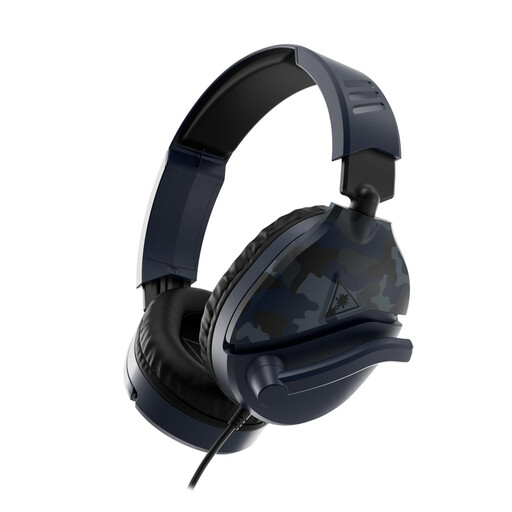 Image unavailable
Turtle Beach Recon 70 wired gaming headset, Blue Camo
Suitable for playing with a controller or another device with a compatible 3.5 mm headset socket.
The product information lists 40 mm speakers, on-earcup volume controls and a flip-up microphone.
View at Joybuy
 Image unavailable
Razer Barracuda X wireless headset, white
Suitable for wireless gaming via the USB-C dongle; the product information lists Bluetooth as a second audio source and switching between 2.4 GHz and Bluetooth.
According to the product information, Bluetooth doesn’t connect directly to PS4 or PS5; the USB-C dongle is specified for gaming.
View at Joybuy
Frequently asked questions
Can I connect a standard Bluetooth headset directly to a PS5?
Don’t assume you can: PlayStation states that a Bluetooth audio device isn’t compatible with the PS5 when error code CE-109531-9 appears. For supported wireless headsets, PlayStation describes connecting via a USB adapter; check the connection method for the specific model.
Can I hear my game and phone at the same time through one headset?
It depends on the model. SteelSeries describes simultaneous game audio via 2.4 GHz and phone audio via Bluetooth for the Arctis Nova 7, but according to SteelSeries, the microphone doesn’t send your voice to both sources at the same time. Turtle Beach describes QuickSwitch on the Stealth 600 Gen 3 as switching between sources.
What should I look out for when connecting and using a headset?
Connect the cable or receiver to the device running the game, select the correct audio output on that device, then test the game audio and microphone, if applicable. The WHO and ITU outline features and advice for safe listening while gaming in their standards.
Am I always limited to a two-year warranty on a headset in the Netherlands?
No. The Dutch government states that statutory warranty in the Netherlands has no fixed duration and depends on what you can reasonably expect from the product. If there’s a fault, contact the retailer; a manufacturer’s warranty or an additional warranty you’ve bought doesn’t replace your statutory rights.
Can I try out a headset bought online and send it back?
For eligible online consumer purchases, ACM ConsuWijzer states that you’ll generally have a statutory 14-day cooling-off period after delivery. You can unpack and try out a product within the applicable conditions; check the returns information for your specific order before buying.


