
Vandaag of morgen in huis

Kwaliteit gegarandeerd

Welkomstaanbiedingen ontgrendelen: GRATIS bezorging | Tot 80% korting | Gratis 30 dagen JoyPlus-proefperiode
Download de app
A good gaming headset can be the difference between winning and losing. You'll hear footsteps you would otherwise miss and communicate clearly with your team. But the market is flooded with models promising expensive features that add little practical value. Before you invest, it's crucial to know what to look for and which pitfalls to avoid.
As a Joybuy Product Recommendation Officer, I'll help you cut through the marketing jargon. We won't just look at the headset itself, but also at the gear that complements your audio experience. After all, what good is perfect sound if your mouse or keyboard lets you down?
Many gamers blindly focus on specs that sound impressive but are disappointing in practice. These are the two main areas where things often go wrong:
surround sound headset technology. While this sounds appealing, it's often a software gimmick that you can also get with free programs on any stereo headphones. The audio quality of the drivers themselves is far more important than a virtual trick.RGB headset looks great, but if the ear cushions start to irritate after an hour or the headband is too tight, it's useless. Comfort during long gaming sessions is crucial but is often overlooked in favour of an eye-catching design.An immersive gaming experience depends on more than just sound. The combination of what you hear (headset), how you react (mouse), and how you move (keyboard) determines your success.
A gaming headset for pc or console is your primary sense in the game, but your mouse and keyboard are your hands. Make sure these elements are in sync.
The choice between a wired and a wireless gaming headset is personal, but the underlying technology is essential. For wireless models, a 2.4 GHz connection via a USB dongle is the standard for low latency (delay). Bluetooth is convenient for mobile use, but for serious gaming on a PC or console, it can introduce too much lag. This same principle applies to your mouse. A wireless mouse with a stable 2.4 GHz connection gives you freedom of movement without sacrificing response time.
Once your headset alerts you to an opponent's position, you need to react instantly and accurately. This is where your mouse and keyboard come in.
A gaming headset with microphone is indispensable for team-based games. Look for features like noise-cancelling. This filters out background noise, such as the clicking of your keyboard, so your teammates only hear your voice. A detachable or retractable mic offers added flexibility.
While the perfect headset is a personal choice, other peripherals can directly improve your performance. Here are some popular choices tailored to different types of gamers.
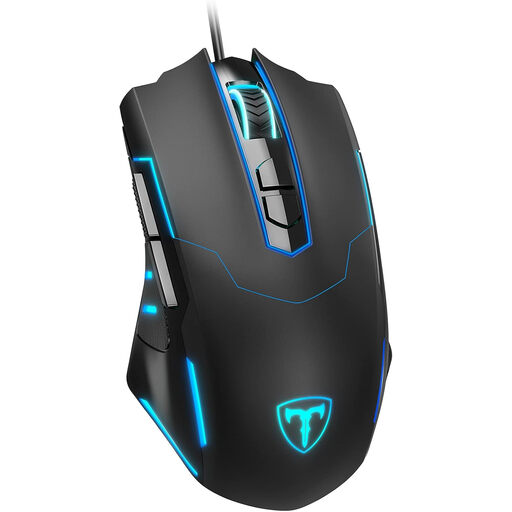
Why This Fits Their Persona: Perfect for those looking for a reliable and affordable upgrade. This mouse offers essential gaming features without a high price tag, giving you an immediate advantage over a standard office mouse.
Avoids the pitfall of a slow, inaccurate standard mouse that negates the audio advantages of your headset. You can now react instantly to what you hear.
High precision with adjustable 7200 DPI and 7 programmable buttons for a fraction of the price of premium models.
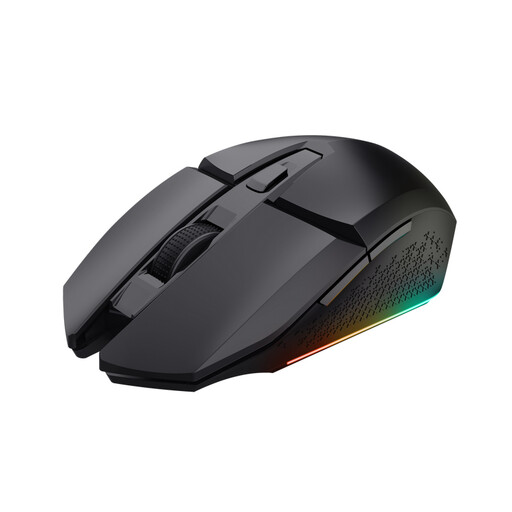
Why This Fits Their Persona: Ideal for gamers who hate cables and want maximum freedom of movement. This mouse is suitable for both left- and right-handed players who demand a clean desk and unrestricted motion.
Solves the problem of cable snag, a common frustration that can break your focus at crucial moments. Combine this with a wireless headset for ultimate freedom.
Wireless RF connection for low latency and a 4800 DPI optical sensor for accurate precision. The rechargeable battery ensures long gaming sessions.
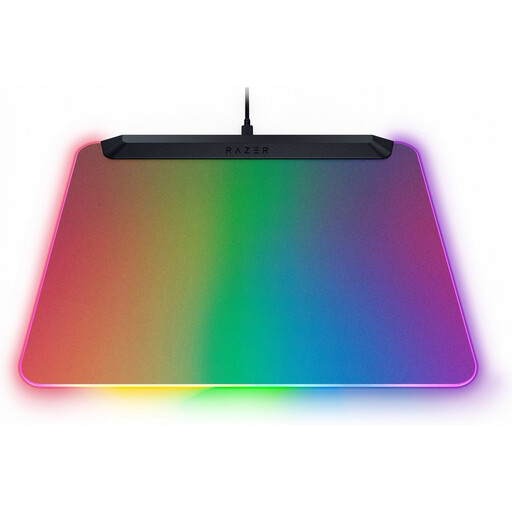
Why This Fits Their Persona: For the gamer to whom aesthetics are just as important as performance. This mouse pad visually completes your setup and syncs with other RGB devices for an impressive light show.
Goes beyond just looks. The micro-etched surface ensures optimal tracking, improving your mouse's performance and giving you an upgrade that is not only beautiful but also functional.
Fully illuminated surface with 15 customisable Razer Chroma RGB lighting zones. The integrated USB 2.0 port is convenient for your wireless mouse receiver.
A complete gaming setup is more than just a headset. Discover our range of gaming accessories that meet the demands of both performance and style.
Modern wireless gaming mice that use a 2.4 GHz RF connection have a latency that is virtually indistinguishable from their wired counterparts. For most gamers, including competitive players, there is no longer a noticeable performance difference. It comes down to a preference for freedom of movement versus never having to charge your mouse.
A mechanical keyboard provides tactile and often audible feedback with every keystroke. This ensures faster and more reliable input registration, which is essential in fast-paced games. Additionally, mechanical switches typically last much longer than the rubber domes in standard keyboards.
Functionally, RGB lighting adds nothing to your performance. It is purely aesthetic. However, for many gamers, it is an important part of the experience. Personalising your setup with an RGB headset, mouse, and keyboard can enhance the atmosphere and give your gaming environment a unique look. Software from brands like Razer (Chroma) or Corsair (iCUE) often allows you to synchronise the lighting across different devices.
