What should you look for?
Start with your device and the connection. Then compare the microphone controls, fit and any wireless features that suit your gaming night.
| What to consider |
What should you check? |
Who is this important for? |
| Connection and device |
Check that the connection and microphone work with your PC or console for the exact model. Also see whether it needs a wireless receiver. |
I want to be sure that audio and team chat will work on my gaming device before the evening. Around 36% of consumers prioritise device compatibility. |
| Team chat in a busy room |
Look for an easy-to-reach mute button and check how you can position the microphone. Microphone controls and sound isolation for your ears are two different things. |
If guests are sitting nearby, I want to be able to talk to teammates online and mute my microphone quickly. Around 29% of consumers prioritise clear team chat. |
| Fit during long sessions |
Check how adjustable the headband is and what materials the headband and ear cushions are made from. If possible, try the headset with glasses or any other accessories you wear while playing. |
I want to be able to wear the headset throughout the evening without the fit becoming a distraction. Around 21% of consumers prioritise comfort during long gaming sessions. |
| Freedom of movement and a second audio source |
Check whether the headset needs a receiver and whether the exact model supports game and phone audio at the same time. Two audio sources don’t automatically mean the microphone transmits to both. |
If I want to get up while gaming or hear my phone, I’m looking for a wireless setup that suits me. Around 14% of consumers prioritise freedom of movement or phone audio. |
Joybuy products for wired and wireless setups
This selection includes wired and wireless gaming headsets, including options with a second audio source.
 No image available
Turtle Beach Stealth 600 Gen 3 Xbox, purple
A wireless option if you want freedom of movement during your gaming night and to mute your microphone quickly.
The product description lists 2.4 GHz and Bluetooth, a flip-to-mute microphone and up to 80 hours of battery life.
View at Joybuy
 No image available
Turtle Beach Recon 70, Green Camo
A wired option if you want a mute function on your headset and don’t need a wireless connection.
The product description lists a 3.5 mm connection, volume controls on the ear cup and a flip-up microphone that mutes when raised.
View at Joybuy
 No image available
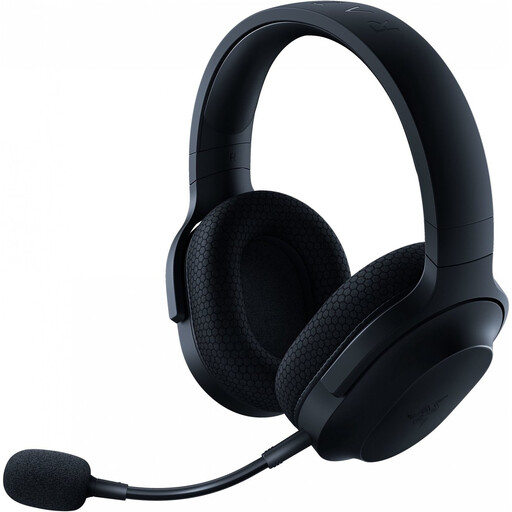
Razer Barracuda X Wireless Headset, black
A wireless option to consider if you want to compare a USB-C dongle with Bluetooth audio.
The product description lists 2.4 GHz via a USB-C dongle, Bluetooth, a detachable microphone and up to 50 hours of battery life.
View at Joybuy
 No image available
HyperX Cloud III Gaming Headset, Black/Red
A wired option if you want to compare the connection options and a clear microphone mute function.
The product description lists 3.5 mm, USB-A and USB-C, an LED mute indicator and memory foam in the headband and ear cushions.
View at Joybuy
 No image available
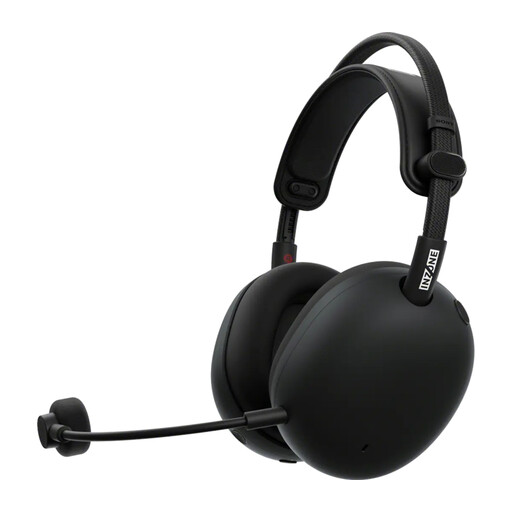
Sony PlayStation INZONE H9 II, black
A wireless option if you also want to hear phone audio while gaming.
The product description lists game audio via a USB-C dongle and simultaneous Bluetooth audio, a flexible microphone and up to 30 hours of battery life.
View at Joybuy
Frequently asked questions
Can I connect a regular Bluetooth headset wirelessly to an Xbox console?
Don’t assume so: Bluetooth on a headset doesn’t guarantee this connection. Xbox Support describes the Xbox Wireless Headset as connecting directly to Xbox Series X|S and Xbox One, with Bluetooth for devices including PCs and mobile devices. Check compatibility for the exact model you’re considering.
How do I prepare a wireless headset for gaming night?
Charge the headset beforehand and check that you have the required receiver. PlayStation Support specifies that the supplied PlayStation Link USB adapter for the PULSE Elite should be plugged into a USB-A port on the PS5; follow the manufacturer’s instructions for other models.
How can I listen safely during a long session?
Keep the volume moderate and take breaks. The World Health Organization points out that volume, listening time and frequency of exposure all matter. Its example of 80 dB for up to 40 hours a week is general guidance on listening habits, not a recommended setting for a specific gaming headset.
What are my rights if a headset I bought online doesn’t work properly?
The Government of the Netherlands says you should contact the seller if you have a problem with a product; your statutory guarantee applies alongside any commercial service packages. Many distance purchases come with a 14-day cooling-off period. Check the terms for your specific purchase, and distinguish between the cooling-off period and a remedy for a faulty product.
What product rules apply to a wireless headset sold in the Netherlands?
The European Commission describes the Radio Equipment Directive as the framework for radio equipment placed on the EU market, with requirements including safety and electromagnetic compatibility. According to Your Europe, CE marking is only required when applicable harmonised EU rules say so; the marking itself is not an independent certification. This does not establish the conformity of an individual model.


