
Vandaag of morgen in huis

Kwaliteit gegarandeerd

Welkomstaanbiedingen ontgrendelen: GRATIS bezorging | Tot 80% korting | Gratis 30 dagen JoyPlus-proefperiode
Download de app
A gaming headset may seem easy to choose at first glance. However, marketing terms such as “surround sound”, “noise cancelling” and “long battery life” can give an incomplete picture. A headset may sound great but still be impractical because of a short cable, a mediocre microphone or limited compatibility with your console.
For gamers in the Netherlands, three pitfalls are particularly important:
That is why a good choice starts not with lighting or appearance, but with the connection, microphone, comfort and compatibility.
A wired gaming headset with a 3.5mm jack is practical for a controller, laptop, smartphone or Nintendo Switch. Do check whether your device uses a combined audio and microphone connection. Some PCs require separate ports.
A USB headset usually works via plug-and-play on a PC. The Logitech PC 960, for example, uses a USB cable and has an in-line remote for volume control and muting the microphone. Sony lists the INZONE H3 as compatible with PlayStation 4, PlayStation 5 and Windows. When using it with a PS5, check whether you connect the headset directly to the controller or through the supplied USB audio solution.
Compatibility is particularly important for Xbox. A 3.5mm headset connected directly to the Xbox controller is often simpler than a model that only works via USB or a wireless dongle. The same applies to a headset for Nintendo Switch: a 3.5mm connection is convenient in handheld mode.
Anyone who plays online regularly needs more than just speakers. Look for:
A gaming headset with microphone is not automatically suitable for streaming. The product information should clearly state the microphone type and controls. The Turtle Beach Recon 50 has a detachable microphone and mute and volume controls on the cable. The Recon 70 uses a flip-to-mute microphone: folding it upwards mutes the microphone, according to the product specifications.
A comfortable over-ear headset should fully enclose your ears without feeling too tight. Pay attention to the weight, the shape of the headband and the material used for the ear cushions. Faux leather may feel soft, while mesh or nylon can feel different during extended use.
The Sony INZONE H3 is listed as weighing approximately 260 to 299 grams, depending on the product specification provided. The Turtle Beach Airlite Fit has a listed weight of 228 grams and jersey mesh ear cushions. Figures like these provide a useful basis for comparison, but fit remains a personal matter.
Also consider the cable. A long cable gives you more freedom of movement, but it can get in the way. With wireless models, you should also check how charging, Bluetooth and the 2.4GHz dongle are used.
A surround sound headset often uses software to simulate spatial audio. According to Sony, the INZONE H3 supports 360 Spatial Sound for gaming and virtual 7.1 sound through INZONE Hub software. Its performance and available features may therefore depend on the connection and platform.
For the Razer Barracuda, Razer lists two wireless options: 2.4GHz and Bluetooth 5.2. The stated battery life is up to 40 hours. This is a manufacturer specification; actual battery life may vary depending on volume, connection and settings.
The term noise cancelling gaming headset requires extra attention. The Razer Barracuda is described as having built-in microphones with noise reduction, while the technical information also mentions passive noise cancelling. This does not automatically mean that ambient noise will disappear completely. Always compare the exact product description and check whether it refers to microphone noise reduction, passive isolation or active noise cancellation.

Why it suits this profile: According to the product information, this wired headset uses a 3.5mm connection and is suitable for PC, laptop, Mac, phone and Xbox.
The connection, volume control and mute function are clearly described. According to the product information, the USB connection is intended solely for the LED lighting.
Flexible 360° microphone, over-ear design and RGB lighting with a separate USB power supply.
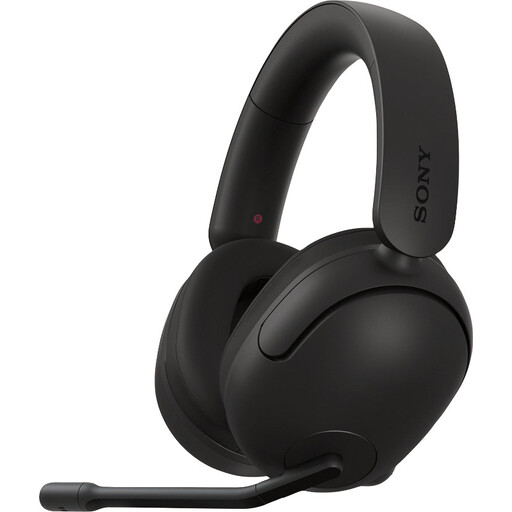
Why it suits this profile: Designed for PC and PlayStation users who want to use software settings and virtual spatial audio.
The product specifications explicitly mention PC, PS4 and PS5. According to Sony, the INZONE Hub software is required for certain spatial audio features.
40mm drivers, flip-up microphone, nylon ear cushions and USB audio according to the product description.
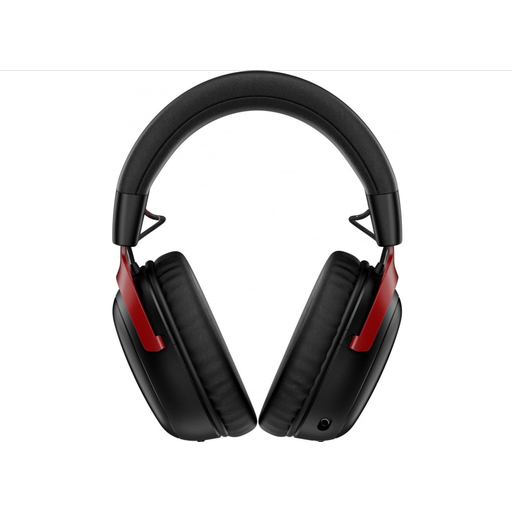
Why it suits this profile: Suitable for users who want to switch between 2.4GHz and Bluetooth and use the headset across multiple platforms.
The connections and compatible devices are clearly listed. The microphone is detachable, so you are not tied to a single use case.
According to the manufacturer, up to 120 hours via 2.4GHz and up to 200 hours via Bluetooth; it also features 53mm drivers and USB-A and USB-C connections.
We have put together a complete, up-to-date list of products that fully meet these strict selection criteria and the applicable European safety regulations.
That depends on the connection. A model with a 3.5mm jack is often versatile for controllers, laptops, mobile devices and Nintendo Switch. USB models are particularly practical for PC, but check support for your console beforehand. For Xbox, specifically check whether the headset works directly with the controller.
Not necessarily. A wireless gaming headset gives you greater freedom of movement, but it needs charging and may use different connection modes. A wired headset does not need a battery and is often ready to use straight away. Choose wireless if freedom of movement is important; choose wired if simplicity and continuous availability are your priorities.
Its lifespan depends on cable use, hinges, ear cushions and storage. Store your headset in a dry place, do not pull on the cable and clean the ear cushions with a soft, dry cloth. Keep the volume at a comfortable level and take regular breaks. When buying, also check the warranty and whether replacement parts are available, such as a detachable microphone or separate cable.
