If you mainly play solo and your device has a compatible connection, a wired headset is a sensible place to start: you won’t need to charge it, but the cable will need to fit around your small desk. Go wireless if the cable gets in the way, and check that the connection works with your gaming device and that you’re happy with how the headset charges. Megekko Academy notes that stereo sound isn’t automatically less suitable for gaming, so don’t choose a headset based on a surround sound label alone.
Who is this guide for?
Solo player who follows the dialogue
You want to pick up speech and ambient sounds in detective games. Focus on how the sound works on your gaming platform rather than relying on a surround sound label. Megekko Academy explains that stereo isn’t automatically less suitable for gaming.
Player with a crowded desk
You’re weighing up whether a cable will get in the way of your mouse and keyboard, or whether a wireless receiver and charging are a better fit. Your choice will also depend on the connections available on your gaming device.
Player who enjoys long sessions
You prioritise fit, adjustability and ear cushions over extra audio modes. Check that the headset feels comfortable with your ears and any glasses you wear; a stated weight doesn’t guarantee a personal fit.
What should you look for when buying?
Wired via 3.5 mm
Choose this if: you play in one place, your device has a compatible connection and you don’t want to charge your headset.
The trade-off: position the cable so it doesn’t get in the way of your mouse, keyboard or chair; weight alone doesn’t tell you how well it will fit you.
Wireless with a USB receiver
Choose this if: a cable restricts your movement and your gaming device supports the required wireless connection.
The trade-off: you’ll need space for the receiver and will have to charge the headset; also check that the version is compatible with your platform.
| What to consider |
What should you check? |
Who is this important for? |
| Dialogue and subtle sounds |
Check the sound settings on your platform and, if possible, how speech and ambient sounds come across to you. |
If you mainly play solo, you’ll want to follow spoken clues clearly. Around 29% of consumers put story audio first. |
| Desk space for cables |
Decide where the cable or wireless receiver will go and check that it works with your device. |
If space for your mouse and keyboard is limited, a cable can get in the way. Around 29% of consumers prioritise keeping their desk clear. |
| Comfort during long sessions |
Consider adjustability, the ear cushion material and pressure around your ears or glasses. |
If you play for long periods, you’ll want the headset to stay comfortable. Around 28% of consumers make wearing comfort their top priority. |
| Connection and playing together |
Check the connection on your gaming device and consider whether you need a microphone you can mute. |
If you want to make sure audio and any chat features work with your device, checking first can prevent a mismatch. Around 14% of consumers prioritise compatibility or chat. |
Common pitfalls
-
Assuming ‘7.1’ guarantees better gaming audio
A surround sound label doesn’t prove that dialogue or clues will sound better in every detective adventure. Razer says that the BlackShark V2 X’s virtual 7.1 feature is only available on Windows 11.
Check your game, platform and sound settings before giving surround sound software too much weight.
A software feature may not be available on your platform or may add little for the way you play.
-
Assuming wireless means a tidy desk with no extra considerations
Wireless removes the audio cable from your desk, but you’ll still need to consider connection compatibility, space for the receiver and charging.
Check the required connection and platform version, and think about where you’ll charge the headset.
The receiver takes up a port, and the headset will need charging from time to time.
-
Assuming a low stated weight guarantees comfort
Even with a 240 g headset, comfort depends on the fit, headband and ear cushions. Logitech gives this weight for the G335; it doesn’t tell you how the headset will fit every head.
For longer sessions, consider adjustability and fit, especially if you wear glasses.
Brands to compare
These examples apply to the models and product ranges mentioned; brand names alone don’t tell you whether a product is available or suitable for every gaming device.
Logitech G
The G335 is a wired option with a 3.5 mm connection, suited to anyone looking for a simple set-up and an adjustable headband.
- Logitech lists the G335 as weighing 240 g, with fabric ear cushions and a flip-to-mute microphone.
- The cable can get in the way on a small desk; its stated weight doesn’t guarantee a personal fit.
SteelSeries
The Arctis Nova 5 Wireless is an option for anyone looking for a wireless gaming connection and the ability to switch to Bluetooth.
- SteelSeries lists 2.4 GHz audio, Bluetooth 5.3 and a stated battery life of 60 hours for this model.
- Battery life is a manufacturer’s claim, not an independent test result. Switching between connections doesn’t mean both audio streams play at the same time.
Razer
The BlackShark V2 X is a wired 3.5 mm option with a microphone and closed-back ear cups.
- Razer specifies a weight of 240 g and a cardioid microphone for this model.
- According to Razer, the virtual 7.1 feature is only available on Windows 11; treat sound claims as manufacturer claims.
HyperX
The Cloud Stinger 2 Core is a wired headset with on-headset controls and a flip-up microphone.
- HyperX lists closed-back ear cups and 40 mm drivers for this model.
- The product information consulted lists PC compatibility; check support for your console separately.
Gaming headsets at Joybuy
This selection includes wired and wireless gaming headsets to compare against the space available on your desk, your gaming device’s connection and whether you’d rather charge a headset or use a cable.
 No image available
Razer Barracuda X Wireless Headset, White
A wireless headset to consider if a cable gets in the way on your small desk.
Check that the connection works with your gaming device and remember that you’ll need to charge it.
View at Joybuy
No image available
HyperX Cloud III S Wireless Gaming Headset, Black
A wireless option to compare if you want to keep desk space clear and value comfort during longer sessions.
The product name states up to 200 hours via Bluetooth and up to 120 hours via 2.4 GHz; check which connection your device supports and remember that you’ll need to charge it.
View at Joybuy
 No image available
JBL Quantum 120 Wired Multiplatform Gaming Headset, Black
A wired gaming headset to consider if you usually play in one place.
Check that the connection is suitable for your gaming device and consider how the cable will run across your desk.
View at Joybuy
 No image available
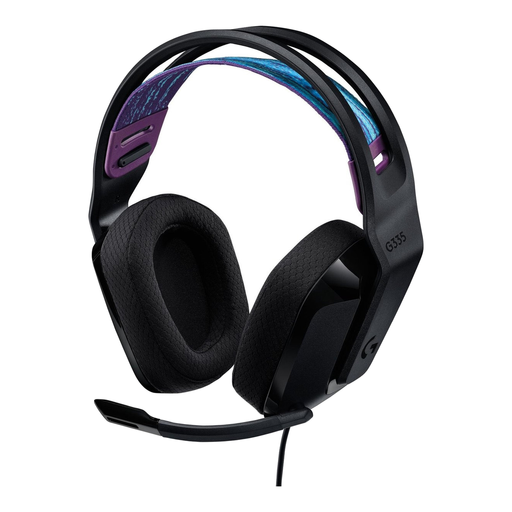
Logitech G G335 Gaming Headset
A wired option for a fixed gaming set-up if your device has a compatible 3.5 mm connection.
Logitech lists the G335 as weighing 240 g. You’ll need to position the cable so it doesn’t get in the way of your mouse or chair; weight alone says nothing about how it will fit you.
View at Joybuy
 No image available
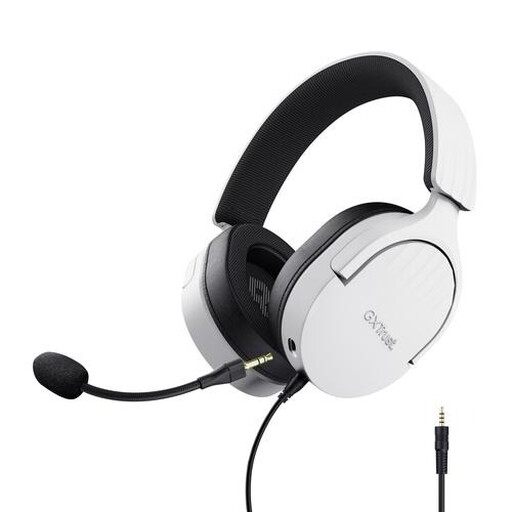
Trust GXT 489W Fayzo Gaming Headset, White
A wired headset to consider if you play in one place and don’t need a wireless connection.
Check that the connection suits your device and consider how the cable will run across your small desk.
View at Joybuy
Frequently asked questions
Do I need virtual 7.1 surround sound for a detective game?
No, not necessarily. Stereo can distinguish between left and right; the effect and availability of virtual surround sound also depend on the headset, software, game and platform. According to Razer, the BlackShark V2 X’s 7.1 feature is only available on Windows 11.
How do I connect a wired headset?
Check that your gaming device supports the connection used by your chosen headset. The Logitech G335 uses a 3.5 mm connection; position the cable so it stays clear of your mouse’s movement area.
How can I keep a headset comfortable during long sessions?
Adjust the headband and ear cups to suit you, and keep the listening volume at a sensible level. The World Health Organization (WHO) warns that video games can expose you to dangerously loud listening levels.
What if a headset I bought online isn’t right for me or breaks too soon?
For an online purchase in the Netherlands, ACM ConsuWijzer says you’ll generally have 14 days from delivery to change your mind, subject to exceptions that you should check for your specific purchase. This is separate from your legal rights if a product is faulty: if used normally, the seller must provide an appropriate remedy free of charge.


