Start with the device you play on, then choose a microphone that’s easy to mute and a fit that suits longer sessions. A wired headset means you won’t need to charge it; a wireless one gives you more freedom to move, but you’ll need the right receiver and to keep an eye on battery life. If you use multiple gaming platforms, check the exact model variant: according to SteelSeries, only the 7X among the Nova 7 models discussed here supports wireless Xbox.
Who is this choice relevant to?
Co-op player who communicates often
Wants to mute the microphone quickly while playing, and pays attention to its position and controls. HyperX and Razer describe models with a microphone and mute functions; these product features don’t tell you how clearly your voice will come across in your own space.
Player who switches between devices
Uses, for example, a PC alongside a PlayStation or Xbox, so checks the connection, receiver and exact headset variant. SteelSeries distinguishes between the different Nova 7 series variants in terms of Xbox support.
Player with long sessions at their desk
Checks the adjustability and ear cushions, then decides whether a cable or charging better suits the way they play. Features such as the materials and adjustability don’t guarantee that a headset will be comfortable for everyone.
What should you consider when choosing?
First, check that the headset works with your gaming device and chat connection. Then choose between the convenience of a wired headset and the freedom of a wireless one, and consider the microphone controls and fit.
| What to consider |
What should you check? |
Who is this important for? |
| Team chat and muting |
Check whether the microphone is adjustable and whether you can reach the mute control while playing. Also check for a mute indicator if you want to see its status. |
If I want to communicate quickly during co-op or temporarily mute my microphone, I look for controls I can use without opening a game menu. Around 31% of consumers give team chat top priority. |
| Device compatibility |
Make a note of your gaming platforms and check the exact model variant, connection and included receiver. |
If you switch between, for example, a PC, PlayStation and Xbox, you’ll want to know in advance whether both game audio and chat work on each device. Around 25% of consumers put compatibility first. |
| Fit for long sessions |
Check the headband adjustment and ear cushion material, and try the fit where possible. |
If I play at my desk for long periods, I want a headset that fits well and stays comfortable. Around 25% of consumers choose fit as their main consideration. |
| Wireless or wired |
For wireless use, check the receiver, supported devices and charging method. Find out whether simultaneous audio also means the microphone can transmit to both sources. |
If you want to move around without a cable or listen to phone audio alongside game sound, weigh up the freedom to move against charging and how the audio sources work together. Around 19% of consumers prioritise this trade-off. |
Common buying mistakes
-
Assuming all Arctis Nova 7 variants work with the same platforms
According to SteelSeries, only the 7X is compatible with Xbox among the Nova 7, 7P and 7X models discussed here.
Check the full model name and receiver support before choosing a wireless headset for Xbox.
-
Confusing hearing two audio sources at once with talking to both at once
SteelSeries describes the Nova 7 as playing game audio via 2.4 GHz and Bluetooth audio simultaneously, but the microphone doesn’t transmit to both sources at once.
Before buying, check which source you use for team chat and what happens to the microphone when you answer a Bluetooth call.
-
Assuming the stated battery life is the same as your session time
Logitech’s stated G733 battery life is based on 50% volume and the lighting switched off.
Compare battery figures with the stated conditions of use, and remember to charge your headset if you play wirelessly.
-
Confusing the manufacturer’s warranty with your full legal guarantee
ACM ConsuWijzer distinguishes between the legal guarantee and any manufacturer’s warranty; they are separate.
Keep your proof of purchase and contact the seller if a product develops a fault too soon.
Brands to consider
HyperX
The wired Cloud III is an option for desk use and for anyone who plays on different gaming platforms.
- HyperX lists 3.5 mm, USB-A and USB-C connections, a microphone, on-earcup controls and a mute indicator.
- It’s a wired headset. Check which connection on your device supports both audio and the microphone.
SteelSeries
The Arctis Nova 7 family is worth considering if you want to play wirelessly and choose the right PC, PlayStation or Xbox variant.
- SteelSeries describes simultaneous 2.4 GHz and Bluetooth audio for the Nova 7.
- The microphone doesn’t transmit to both sources at once. According to SteelSeries, only the 7X supports Xbox among the Nova 7, 7P and 7X models discussed here.
PlayStation
The PULSE Elite is worth a look if you mainly play on PS5 and want to use PlayStation Link.
- PlayStation lists a retractable microphone, PlayStation Link, simultaneous Bluetooth audio and up to 30 hours of battery life.
- The accompanying adapter is needed for the PS5 connection described. The maximum battery life is PlayStation’s stated figure, not a guarantee of how long it will last with every setting.
Razer
The wired BlackShark V2 X is worth considering if an adjustable microphone and 3.5 mm connection suit your setup.
- Razer describes a bendable cardioid microphone and closed earcups for passive isolation.
- This doesn’t independently establish how much background noise will be reduced during your chat. Don’t confuse the 3.5 mm version with the separate USB version.
Logitech G
The G733 is an option for wireless gaming, with an adjustable headband and software-based personalisation.
- Logitech states that the battery lasts over 29 hours at 50% volume with the lighting switched off.
- That battery figure applies under the stated conditions. G HUB is required for advanced features.
Gaming headsets at Joybuy
This selection includes wired headsets with a 3.5 mm connection and wireless models for platforms including PC and PlayStation. Check the connection, compatibility and microphone controls for each headset to make sure they suit your setup.
 No image available
Turtle Beach Recon 70, Green Camo
A wired option if you want to flip the microphone up to mute it during co-op.
3.5 mm connection; the product name lists PC, PS5, Switch 2 and Xbox Series X|S.
Wired, so there’s no cable-free way to use it.
View at Joybuy
 No image available
HyperX Cloud III S Wireless
A wireless option if you’re looking for a detachable microphone with a mute button and mute indicator.
The product name lists PC, PS5, PS4, Switch and mobile; the description mentions 2.4 GHz, Bluetooth, USB-A and USB-C.
Stated battery life is up to 120 hours via 2.4 GHz and up to 200 hours via Bluetooth.
View at Joybuy
 No image available
Razer BlackShark V2 X 7.1 Wired
A wired option if you’re looking for a microphone mute switch and a 3.5 mm connection.
The description lists a cardioid microphone and volume control.
Wired via 3.5 mm; this model doesn’t offer a cable-free way to use it.
View at Joybuy
 No image available
HyperX Cloud III, Black
A wired option if you want a mute button and a visible mute status.
The product name lists PC, PS5 and Xbox Series X|S; the description mentions 3.5 mm, USB-A and USB-C.
The description lists a detachable microphone.
View at Joybuy
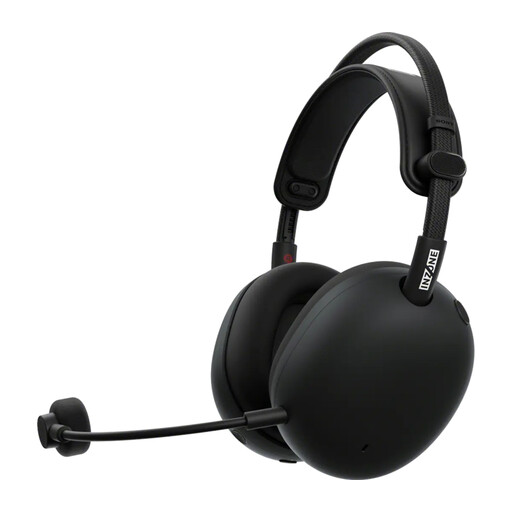 No image available
Sony PlayStation INZONE H9 II, Black
A wireless option if you also want to use Bluetooth to listen to phone audio while gaming.
The description lists 2.4 GHz via USB-C, Bluetooth and use with PC and PS5.
The stated maximum battery life is 30 hours.
View at Joybuy
Frequently asked questions
Can I use any wireless headset with PS5 or Xbox?
No. Check support for the exact headset variant and receiver. According to SteelSeries, only the 7X in the Nova 7 series discussed here is compatible with Xbox; for other headsets, check the manufacturer’s instructions.
Can I listen to audio from my phone while gaming?
For the Arctis Nova 7, SteelSeries describes simultaneous game audio via 2.4 GHz and Bluetooth audio. The microphone doesn’t transmit to both sources at once; during a Bluetooth call, the microphone is used for that call.
How do I connect a supported wireless PlayStation headset?
According to PlayStation, connect the accompanying USB adapter to the PS5, then switch on the headset. If you have a headset from another manufacturer, follow its connection instructions.
How should I assess a stated battery life?
Always check the conditions given for the battery life and remember to charge your headset. For example, Logitech’s stated G733 battery life is based on 50% volume and the lighting switched off.


