
Vandaag of morgen in huis

Kwaliteit gegarandeerd

Welkomstaanbiedingen ontgrendelen: GRATIS bezorging | Tot 80% korting | Gratis 30 dagen JoyPlus-proefperiode
Download de app
A gaming headset needs to do more than play sound. You want to pinpoint opponents, hear your teammates and play comfortably for hours. Yet many people buy based on terms such as ‘7.1’, ‘noise cancelling’ or ‘wireless’ without checking exactly how those features work with their PC, PlayStation, Xbox or Nintendo Switch.
The main pitfalls are usually practical:
A wired gaming headset with a 3.5mm connection is usually easy to connect to devices with a combined headphone socket. If your PC has separate audio and microphone sockets, you’ll need a splitter. Check the cable length too: 1.3 to 1.8 metres works well at a desk, but may be too short if you sit further away from a console.
A wireless gaming headset usually connects via a 2.4GHz USB dongle, Bluetooth or both. 2.4GHz is designed for a direct connection with low latency. Bluetooth is handy for smartphones, tablets and everyday use, but compatibility with PlayStation and Xbox varies by model. So don’t just look for ‘multi-platform headset’: check which connection method is supported for each device.
If you play online, a clear gaming headset with microphone is more useful than extra lighting effects. Check the microphone type, mute function and location of the controls. A flip-up microphone is practical, while a detachable one is handy if you also use the headset on the go.
For streaming or meetings, a separate streaming microphone may be a better choice. A USB model with tap-to-mute is easy to connect to a PC or Mac. A microphone stand or boom arm keeps the microphone at a fixed distance and frees up space on your desk.
Consider the weight, shape of the ear cups and cushion material. Memory foam can reduce pressure around your ears, but faux leather may feel warmer than fabric. A comfortable gaming headset should also be easy to adjust and not clamp too tightly.
A 40mm or 50mm driver doesn’t, on its own, tell you how music or game audio will sound. It is, however, a technical specification you can check. Also look at the difference between stereo and virtual surround sound. With a 7.1 surround sound headset, the spatial effect is often generated by software. Check that activation, software and platform are suitable for how you plan to use it.

Why it suits this profile: The 3.5mm connection makes this headset suitable for PC, Mac, PlayStation, Xbox, Nintendo Switch and mobile devices, depending on the socket available.
There’s no wireless connection or charging routine to manage. The stated 7.1 effect requires Razer software and an activation code, so check in advance whether you’ll mainly be playing on Windows.
50mm drivers, a weight of 240 grams, memory foam ear cushions and a cardioid microphone, according to the product specifications.

Why it suits this profile: This wired headset combines several connection options with a detachable microphone and virtual DTS Headphone:X audio for compatible setups.
The packaging lists USB-C, USB-A and 3.5mm connectivity. That makes it less likely you’ll need an extra adapter for a particular device, but do check which cables are included.
53mm drivers, memory foam in the headband and ear cushions, a noise-cancelling microphone, and support for PC, PlayStation, Xbox, Switch, Mac and mobile devices.
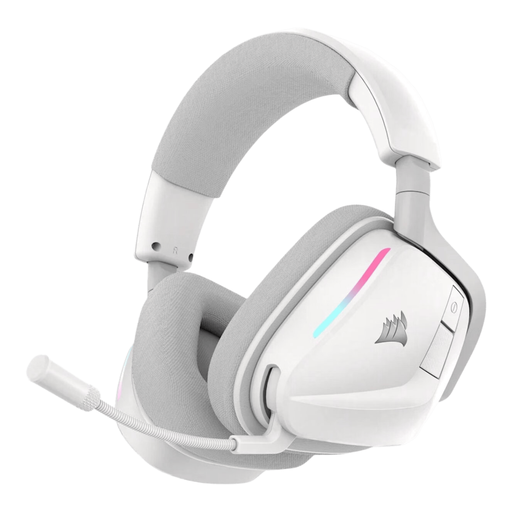
Why it suits this profile: This wireless gaming headset is designed for extended use, with 2.4GHz and Bluetooth 5.3, physical controls and a stated battery life of up to 70 hours in 2.4GHz mode.
The product information distinguishes between 2.4GHz and Bluetooth. Check in advance that the USB-A receiver is compatible with your console or PC, and bear in mind that extra features may require software.
50mm drivers, Bluetooth 5.3, a 2.4GHz connection, USB-C fast charging and a flip-up microphone with stated noise reduction.
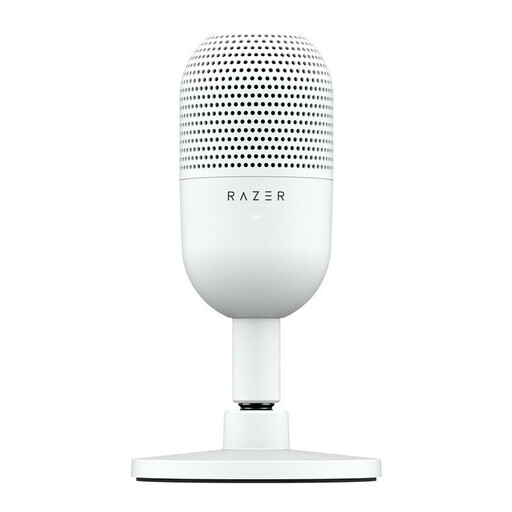
Why it suits this profile: If you already have a comfortable headset but want better voice recordings, you can place a separate USB microphone beside your keyboard.
You’re not reliant on a headset microphone arm. The supercardioid pickup pattern and tap-to-mute button are listed in the product specifications; the final sound quality also depends on microphone placement and room acoustics.
USB plug-and-play, a compact design, compatibility with PC and Mac, and a physical tap-to-mute control.
We’ve put together a complete, up-to-date list of products that meet these strict selection criteria and the applicable European safety regulations.
That depends on the connection. A 3.5mm headset is often compatible with a wide range of devices, but check whether your PC has a combined socket or needs a splitter. For a wireless model, check that the included USB dongle works with your PlayStation, Xbox or Nintendo Switch. Bluetooth support alone doesn’t guarantee direct compatibility with a console.
The electricity costs are usually low, but you’ll need to charge the battery regularly. Check the stated battery life, charging connection and any fast-charging feature. A wired gaming headset doesn’t have a battery and stays connected while you use it, but the cable can wear out if you pull on it or sit on it.
Lifespan depends on how you use and store it, as well as the strain on the cable or battery. Clean the ear cushions with a soft cloth, store the headset somewhere dry and avoid pulling on the cables. The battery in wireless models may hold less charge after extended use. Check the warranty and your statutory rights when you buy; many consumer products in the EU come with a minimum two-year legal guarantee, although the precise rules depend on the product and circumstances.
