
Vandaag of morgen in huis

Kwaliteit gegarandeerd

Welkomstaanbiedingen ontgrendelen: GRATIS bezorging | Tot 80% korting | Gratis 30 dagen JoyPlus-proefperiode
Download de app
A gaming headset with a microphone might seem easy to choose at first. But terms such as “surround sound”, “noise isolation” and “professional communication” can give you an incomplete picture. The connection might not suit your console, the microphone may not sound as clear as you expect, or the ear cushions may become uncomfortable during long sessions.
Use these practical points to compare a gaming headset based on what really matters at home: connectivity, microphone quality, comfort and compatibility.
A 7.1 surround sound headset doesn’t always have separate speaker channels. Often, the surround sound is virtual and calculated using software. This can help you pinpoint sounds, but the feature may only work on a specific platform or after you install a programme.
So check:
According to the product description, 360 Spatial Sound on the Sony INZONE H3 is activated via INZONE Hub software on a Windows PC. Stereo sound is still available through the 3.5mm connection, but software features are limited.
A wired gaming headset with a 3.5mm jack often works with a controller, laptop, PC or Nintendo Switch. However, connections can vary. For example, a PC with separate microphone and audio ports may need a splitter. With consoles, you’ll usually connect the headset to the controller rather than directly to the console.
Look out for the differences between:
A headset that feels comfortable in a shop can start to put pressure on your head or ears after a few hours. Don’t just look at its appearance: consider its weight, the shape of the ear cups and the cushion material.
For a comfortable gaming headset, look for:
Bear in mind that product information sometimes gives the weight including packaging. Always check the product specifications on the product page.
For online multiplayer games, the microphone is just as important as the speakers. A gaming headset with a microphone may have an adjustable, detachable or flip-up microphone.
A headset with a flip-to-mute microphone is handy when you need to mute yourself quickly. According to the product information, Turtle Beach models mute the microphone when you flip the boom arm up. If the microphone is detachable, check that it fits securely and won’t get in the way when you’re just listening to music.
A unidirectional or cardioid microphone focuses mainly on sound coming from the direction of your mouth. This can help reduce background noise, but how clearly you’re heard also depends on microphone placement, software and the acoustics of the room.
Start by choosing the device you play on most:
A headset may technically work across several platforms, while some features are only available on PC. Keep this in mind when comparing models.
The driver diameter, for example 40 mm or 50 mm, doesn’t tell you on its own how a headset will sound. A larger driver doesn’t automatically mean more detail. The frequency range shows which frequencies the headset is specified to reproduce, but it says little about the balance between bass, mid-range and treble.
For gaming, these features are particularly useful:
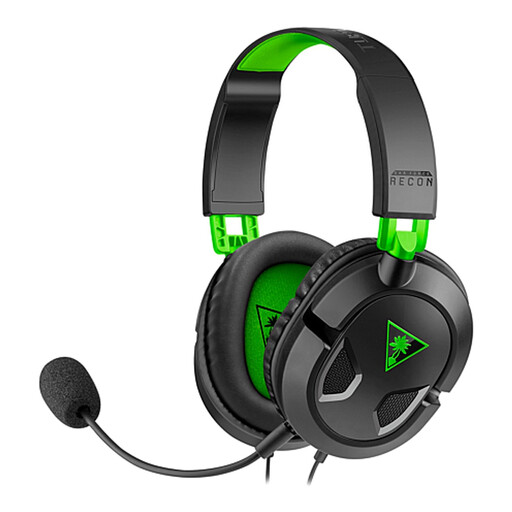
Why it suits this profile: This wired model has a 3.5mm connection and, according to the product specifications, works with Xbox, PlayStation, Nintendo Switch, PC, Mac and mobile devices.
The connection is simple and the microphone is detachable. That means you don’t pay for a battery or features you may not use.
40mm drivers, detachable microphone and in-line volume control with a mute button.
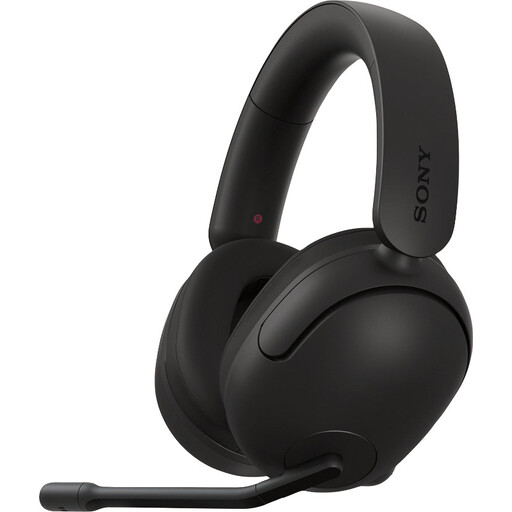
Why it suits this profile: Designed for players who game on a Windows PC or PlayStation and want to use software-based spatial audio.
The product information clearly states that 360 Spatial Sound is set up via INZONE Hub on Windows. You can factor in the software requirement before you buy.
40mm drivers, virtual surround sound via software, adjustable microphone with mute function and a stated weight of 299 grams.
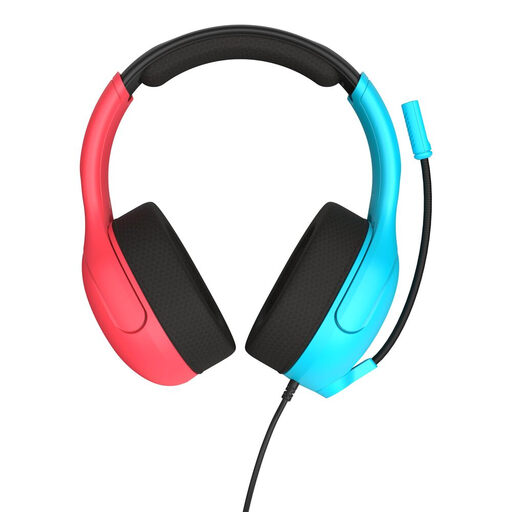
Why it suits this profile: A sensible choice for Nintendo Switch players looking for a lightweight headset with simple controls and a flip-to-mute microphone.
The 3.5mm connection and volume control keep things simple. The product information explicitly lists compatibility with Switch, PC and mobile devices.
40mm speakers, jersey-mesh ear cushions, flip-to-mute microphone and a stated weight of 228 grams.
We’ve put together a complete, up-to-date list of products that meet these strict selection criteria and the applicable European safety regulations.
It depends on how you use it. A wired gaming headset doesn’t need a battery and can work as soon as you plug it in. That’s handy for long sessions. A wireless model gives you more freedom to move around, but needs charging and may require a USB dongle or specific compatibility.
A model with a 3.5mm jack will often work with several devices, but always check the product listing. Pay particular attention to microphone support, your controller’s connection and whether you’ll need splitter cables for your PC. “Multiplatform” doesn’t automatically mean that every feature works on every device.
Its lifespan depends on how you handle the cable, hinges and ear cushions, as well as how you store it. Don’t pull the headset out of your device by the cable. Keep it dry and clean the ear cushions with a soft cloth. If you use your headset a lot, replaceable ear cushions or a detachable microphone are handy, as they’re easier to maintain or replace.
