
Vandaag of morgen in huis

Kwaliteit gegarandeerd

Welkomstaanbiedingen ontgrendelen: GRATIS bezorging | Tot 80% korting | Gratis 30 dagen JoyPlus-proefperiode
Download de app
A gaming headset needs to do more than play game audio. You want to hear your teammates clearly, sound clear yourself and play for hours without pressure on your ears. Yet many purchasing decisions are based on terms such as “surround”, “low latency” or “noise cancelling”, without making it clear what you will actually get in practice.
The main pitfalls are:
A wired gaming headset with a 3.5mm jack is generally easy to connect to a controller, laptop, PC, PlayStation, Xbox or Nintendo Switch. However, check whether your PC has a single combined connection or separate ports for audio and microphone.
A wireless gaming headset usually works via Bluetooth, a 2.4GHz USB receiver or both. Pay attention to the differences:
So, when choosing a gaming headset for PS5 or a gaming headset for Xbox, the product listing is more important than simply seeing the word “wireless”. Check which mode is compatible with your device.
An over-ear gaming headset fully surrounds your ears. This can help to passively block out surrounding noise, but the ear cushions may become warm. Therefore, pay attention to:
A comfortable gaming headset is not automatically suitable for everyone. Check the dimensions, materials and returns policy before expecting it to be suitable for extended use.
With a gaming headset with microphone, the microphone’s positioning, noise reduction and mute controls are more important in practice than marketing language. A flip-to-mute or detachable microphone is useful when gaming without voice chat.
Terms such as “surround sound headset”, “7.1 gaming headset” and “spatial audio” often refer to virtual processing. According to the product description, the Logitech G432 offers DTS Headphone:X via software, while the Trust GXT 498W Forta delivers stereo sound with 3D audio on PS5. These are different solutions and do not directly guarantee better results in every game.

Why it suits this profile: The 3.5mm connection and 244-gram weight make this a straightforward choice for PC, laptop, PlayStation, Xbox and Nintendo Switch.
The product specification clearly states stereo audio and no virtual 7.1 function. You therefore do not pay for a surround feature you do not need.
50mm drivers, over-ear ear cushions, volume control and a foldable microphone.

Why it suits this profile: The combination of 2.4GHz, Bluetooth, memory foam and a detachable microphone suits gamers who switch between PC, PS5, Switch and mobile devices.
The different connection options make it clear that wireless does not mean Bluetooth only. For gaming, you can use 2.4GHz mode when required by the platform.
According to the product information, up to 120 hours of battery life via 2.4GHz, 53mm drivers and DTS Spatial Audio on PC.
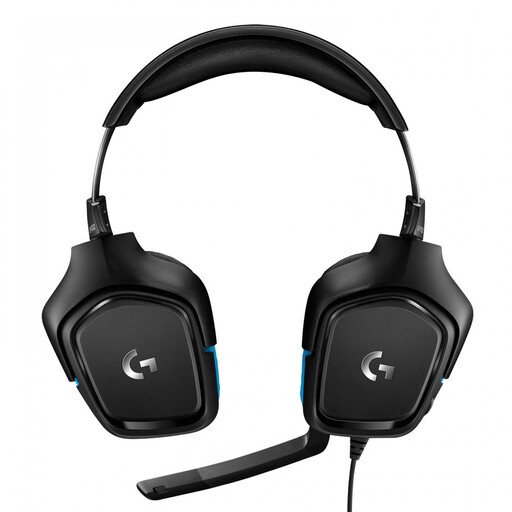
Why it suits this profile: For PC gamers specifically looking for spatial audio and software settings, this is a wired option with a USB DAC.
The product information states that Logitech G HUB is required for 7.1. This makes it clear in advance that the feature does not work through the 3.5mm connection alone.
50mm drivers, flip-to-mute microphone, USB DAC and support for PC, Mac, PlayStation 4, Xbox One and Nintendo Switch according to the product details.
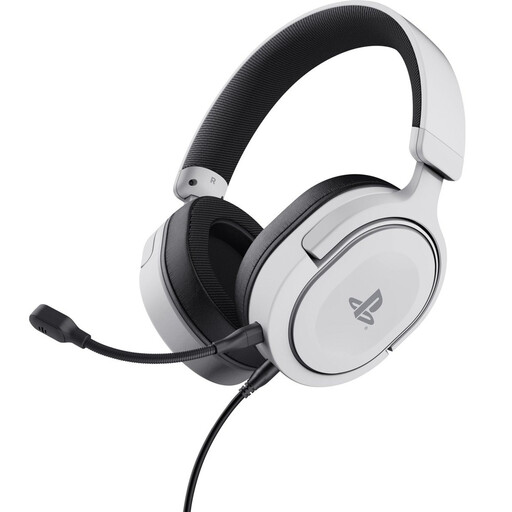
Why it suits this profile: This wired headset is officially licensed for PS5 and, according to the product information, also works with PS4 via the detachable 3.5mm cable.
The specification distinguishes between stereo and 3D audio on PS5. It therefore makes no claim to offer genuine surround sound.
50mm drivers, detachable microphone, controls on the earcup and a weight of 253 grams.
We have put together a complete, up-to-date list of products that fully meet these strict selection criteria and the applicable European safety regulations.
A model with a 3.5mm connection often works across multiple platforms, but check the ports and cables supplied. PCs with separate audio and microphone ports may require a splitter. Wireless models sometimes require a specific USB receiver.
In addition to the purchase price, you need to consider charging and the fact that the battery may hold less charge over time. A wired gaming headset does not need a battery. With wireless models, the stated battery life also depends on the connection, lighting, volume and usage mode.
Its lifespan depends on cable use, hinges, headband, microphone and ear cushions. Store your headset in a dry place, do not pull on the cable and clean the cushions with a soft, dry cloth. In the European Union, consumers are entitled to a minimum two-year statutory guarantee of conformity; additional terms may vary by product and situation. Use the headset at a safe volume and take regular breaks.
