
Vandaag of morgen in huis

Kwaliteit gegarandeerd

Welkomstaanbiedingen ontgrendelen: GRATIS bezorging | Tot 80% korting | Gratis 30 dagen JoyPlus-proefperiode
Download de app
A gaming headset needs to do more than play sound. You want to hear your teammates clearly, pinpoint important sounds in a game and avoid discomfort after a long session. Yet many specifications are less straightforward than they seem.
Pay particular attention to these three common pitfalls:
A wired gaming headset usually has a 3.5mm jack, a USB connection or both. A 3.5mm connection is practical for devices with a headset port, including many controllers and mobile devices. USB can provide additional features such as software equaliser settings, RGB lighting or virtual surround sound.
Check the following before buying:
A USB gaming headset is often easy to connect to a PC, but it will not automatically work with every console. According to the product specifications, the Trust GXT 490 Fayzo connects via USB to PC, PlayStation 4 and PlayStation 5. The white variant also lists compatibility with Xbox and Nintendo Switch. Always check the connection and the latest compatibility information on the product page.
Do not look only at the drivers’ diameter. A larger driver does not automatically provide a better listening experience. More important is the combination of driver size, frequency range, impedance and software support.
A 7.1 surround sound headset often uses virtual audio channels. This can help you pinpoint sounds, but the result varies depending on the game, device and software. According to the product information, DTS Headphone:X on the Logitech G432 is linked to use with the included USB DAC and Logitech G HUB software. The Corsair HS80 RGB USB lists Dolby Audio 7.1 True Surround Sound for PC.
Also consider the difference between stereo and surround sound. Stereo is often sufficient for music, chat and many games. Surround sound may be worthwhile if you mainly play competitive games where direction is important.
A headset with a noise-cancelling microphone reduces background noise at the microphone’s end. This does not mean that the headset blocks out all the sound around you. It is therefore important to understand the difference between:
For comfort, memory foam ear cushions, an adjustable headband and a suitable weight are all practical considerations. A model weighing 250 to 300 grams may feel lighter than a headset weighing more than 350 grams, but fit is still a personal matter. Also check that the ear cups fully surround your ears if you are specifically looking for a comfortable over-ear gaming headset.
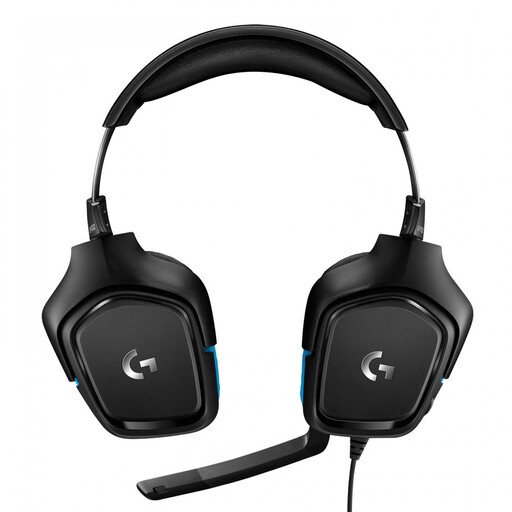
Why it suits this profile: According to the product specifications, this wired gaming headset offers a 3.5mm connection and USB DAC, with support for PC, Mac, PlayStation 4, Xbox One and Nintendo Switch.
The dual connection options make it clearer when to use the USB DAC or 3.5mm jack. According to the product information, surround sound is linked to Logitech G HUB, so check the software requirements in advance.
50mm drivers, flip-to-mute microphone, headset-mounted volume control and a weight of 259 grams.

Why it suits this profile: The combination of memory foam ear cushions, a metal frame, USB-A, USB-C and 3.5mm connections suits gamers who want to use one headset with multiple devices.
The detachable microphone and multiple connectors reduce the risk of using the wrong connection. DTS Headphone:X 2.0 is virtual surround technology; check which features are available on your platform.
53mm drivers, noise-cancelling microphone, virtual surround sound and compatibility with PC, PlayStation, Xbox, Switch, Mac and mobile devices.
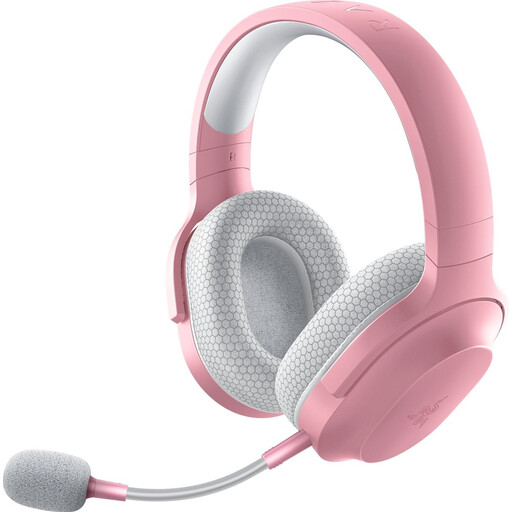
Why it suits this profile: This wireless gaming headset is designed for use with PC, PlayStation, Nintendo Switch, Android and smartphones, offering 2.4GHz radio, Bluetooth and a wired option.
The included USB-C dongle, USB-A adapter and 3.5mm cable provide more connection options. The stated 50-hour battery life is a product specification; usage and volume can affect the actual runtime.
250 grams, 40mm drivers, Bluetooth 5.2, 2.4GHz connectivity and a detachable microphone.
Make a quick checklist before ordering:
RGB lighting is mainly a style choice. It does not change the sound quality. An RGB gaming headset can complement an existing setup, but prioritise connections, microphone quality and fit when you need to weigh up different features.
We have put together a complete, up-to-date list of products that fully meet these strict selection criteria and the applicable European safety regulations.
No. Operation depends on the USB port, software support and the console’s compatibility. Check whether the specific model is listed as compatible with your PlayStation, Xbox or Nintendo Switch. With some headsets, additional features work only on PC.
That depends on how you use it. A wired gaming headset does not need charging and can connect via 3.5mm or USB. A wireless model gives you greater freedom of movement, but requires a battery and may need a USB dongle. For wireless models, check the battery life, charging port and available connections.
Its lifespan depends on daily use, storage and how you handle the cable or battery. Do not pull on the cable, store the headset in a dry place and avoid playing at high volumes unnecessarily. With a wireless model, battery capacity decreases over time. A detachable microphone, replaceable cable or sturdy frame can be useful if you want to use the headset for a long time.
