
Vandaag of morgen in huis

Kwaliteit gegarandeerd

Welkomstaanbiedingen ontgrendelen: GRATIS bezorging | Tot 80% korting | Gratis 30 dagen JoyPlus-proefperiode
Download de app
A gaming headset needs to do more than play game audio. You want to hear your teammates, make yourself understood and play for hours without pressure around your ears. Yet product names and marketing terms don’t always tell you whether a headset is the right choice. A wireless gaming headset, for example, may use different types of connection, and not every connection works with every console.
In this buying guide from the Joybuy Product Recommendation Officer, you’ll find practical advice on what to look for in a gaming headset for PC, PlayStation, Xbox, Nintendo Switch or mobile use.
A 7.1 gaming headset or surround sound headset may sound appealing, but always check which devices support the feature. Virtual surround sound may depend on software, a USB connection or a specific platform. On some models, for example, the feature only works on Windows.
A headset with a standard 3.5mm connection can play stereo audio on many devices. This is simple and widely compatible, but it doesn’t automatically mean that all software features are available on PS5, Xbox or Nintendo Switch.
A Bluetooth gaming headset is handy for smartphones, tablets and music. However, Bluetooth may be less suitable for competitive gaming if you notice audio lag. Manufacturers generally position a 2.4GHz USB dongle as the connection for low-latency gaming. Just make sure the dongle fits your PC or console.
Also check the battery life. Manufacturers often quote maximum playtime under specific conditions. Lighting, volume and certain wireless modes can affect how long the headset lasts in real-world use.
A low weight is useful, but it’s not the only factor that determines whether a headset feels comfortable. Also consider:
A comfortable gaming headset for long sessions should fit well without constantly pressing against your ears or glasses. Faux leather cushions can block out more sound, while fabric cushions often feel different during extended use. The right choice depends on your preferences and gaming environment.
Before buying, check that the headset works with your devices:
A detachable microphone is practical if you also want to use the headset on the go. A fixed microphone, on the other hand, means there’s no part to lose.
When choosing a gaming headset with a microphone, don’t focus only on terms such as “noise cancelling”. Look at the type of microphone, its directionality and its controls. A unidirectional or cardioid microphone is designed to pick up sound mainly from the front. A flip-to-mute function makes it quick and easy to see when the microphone is muted.
Claims about clear communication come from the manufacturer’s product information. Treat them as a product promise, and check that the headset has the microphone connection and settings you need for your platform.
Drivers measuring 40, 50 or 53mm don’t, by themselves, tell you how a headset will sound. They do give you an idea of the size of the speaker units. More important when choosing are the connection, sound tuning, ear cushion design and software.
A closed-back over-ear headset usually blocks out more surrounding noise than an open-back design. This can be useful in a busy household, but you’ll also hear less of what’s going on around you. Avoid listening at high volumes for extended periods; prolonged exposure to loud sound can damage your hearing.
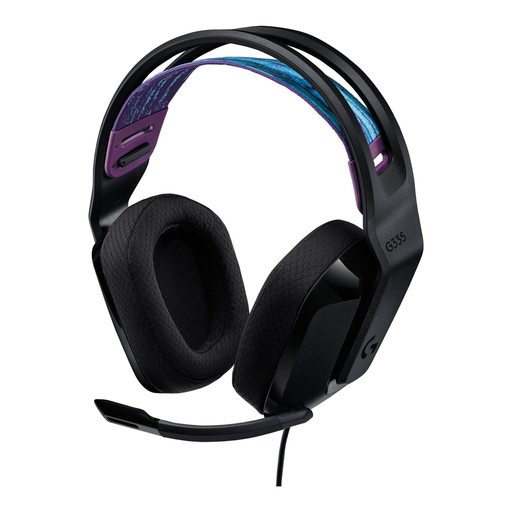
Why it suits this user: The wired 3.5mm connection makes setup simple for PC, PlayStation, Xbox and Nintendo Switch. Its listed weight is 240 grams.
There’s no battery to charge or wireless mode to pair. Flip the microphone up to mute it.
240 grams, memory foam ear cushions, 3.5mm plug and volume control on the earcup.
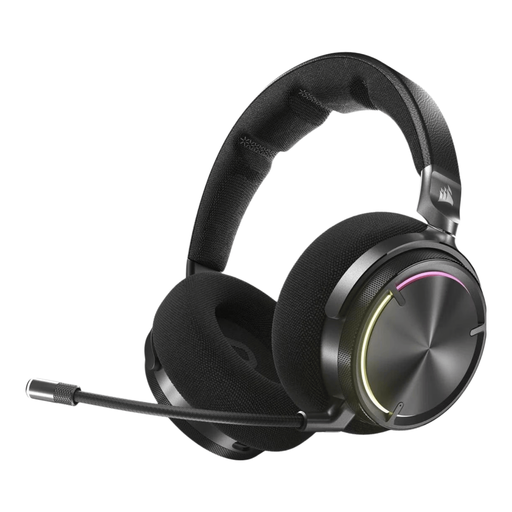
Why it suits this user: According to the product details, this model combines RF wireless with Bluetooth, active noise cancellation and Dolby Atmos support on compatible devices.
The product description lists the wireless modes separately, so you can check in advance which connection suits your PC, PS4, PS5 or mobile device.
50mm graphene drivers, USB-C charging, built-in microphone and a listed battery life of up to 30 hours.

Why it suits this user: The combination of 2.4GHz and Bluetooth is designed for players who switch between gaming and mobile use and plan long sessions.
The listed battery life is specified for each wireless mode: up to 120 hours via 2.4GHz and up to 200 hours via Bluetooth. Check the conditions for these figures.
53mm drivers, detachable microphone, memory foam ear cushions and compatibility with PC, PS5, PS4, Switch and mobile devices according to the product details.
We’ve put together a complete, up-to-date list of products that meet these strict selection criteria and current European safety regulations.
It depends on the model. Check whether the headset is explicitly listed as compatible with PS5 or Xbox, and whether the included USB dongle is supported. Bluetooth doesn’t work in the same way on every console. A 3.5mm connection via the controller is often a simple alternative.
Lifespan depends on the materials, hinges, strain on the cable, battery use and maintenance. Keep the headset dry, avoid pulling on the cable and charge a wireless model with a suitable USB-C cable. Replacing a built-in battery can be more difficult than with a wired model.
Not necessarily. Virtual 7.1 or surround sound can present spatial information differently, but the results vary by game, platform and software. So compare the microphone, comfort, connection and settings that are actually available on your device too.
