
Vandaag of morgen in huis

Kwaliteit gegarandeerd

Welkomstaanbiedingen ontgrendelen: GRATIS bezorging | Tot 80% korting | Gratis 30 dagen JoyPlus-proefperiode
Download de app
A gaming headset needs to do more than simply play sound. During a long session, you do not want tight ear cushions, cable noise or teammates struggling to hear you. Yet many product pages make it difficult to compare models fairly. A low price may look appealing, while important details about connectivity, the microphone or platform compatibility are missing.
Joybuy Product Recommendation Officer helps you reduce market information to verifiable points. That way, you avoid paying for features you will not use.
A 7.1 surround sound headset often uses virtual channels through software. The effect can vary depending on the game, device and settings. So check whether the feature only works on PC or whether it also supports a console. Some models require additional software or an activation code.
A wired headset with virtual surround sound may be appealing to PC gamers, but support is not always the same on PlayStation or Xbox. So do not look only at the term “7.1”; also check the compatible platforms and required connection.
A wireless gaming headset may work via 2.4 GHz, Bluetooth or both. These connections are not interchangeable. For example, the product information for the ONIKUMA GT806 states that Bluetooth does not connect directly to PS4, PS5 or PC; a USB Bluetooth adapter is required. According to the description, the included 2.4GHz transmitter is intended for devices including PC and PlayStation.
A Bluetooth gaming headset is particularly practical for a phone, tablet or laptop. For consoles, a USB dongle or cable is often the more suitable solution. Also check whether an Xbox model genuinely supports Xbox; the Edifier G2II, for example, is listed as unsuitable for Xbox.
RGB lighting does not improve speech clarity. When choosing a headset with microphone, pay attention to the microphone type, its position and whether it can be muted. A detachable microphone is useful if you also want to use the headset on the go. A flip-up microphone, on the other hand, lets you mute yourself quickly.
Terms such as “noise-cancelling microphone” come from the brand’s product description. Do not regard this as a guarantee that all background noise will disappear. Sounds from a mechanical keyboard, fan or other people in the household may still be audible. The distance from your mouth and the settings in Discord or on the console remain important.
First, choose your main device:
A multi-platform gaming headset is particularly valuable when the packaging or technical specifications clearly state which devices are supported. “Compatible with multiple platforms” is too vague on its own.
For long gaming sessions, over-ear ear cushions, an adjustable headband and a reasonably low weight are important considerations. A comfortable over-ear headset should fully enclose your ears without putting too much pressure on your temples. Also consider the material: faux leather can provide a good seal, while mesh or fabric often feels more breathable.
Weight is only one indication. The shape of the headband, the size of the ear cups and the clamping force all determine how comfortable a model feels. A headset weighing approximately 240 to 310 grams may be suitable for extended use, but fit is always personal.
With a wireless model, compare battery life with the mode being used. The product information for the ONIKUMA GT806 states up to 40 hours of gaming via 2.4 GHz without lighting, and up to 60 hours for music and video without lighting. The Razer Barracuda X Chroma is listed with up to 70 hours without RGB lighting. Lighting can reduce battery life.
Also check whether the volume can be adjusted on the ear cup, whether the microphone can be muted instantly and whether you can continue playing while charging. With a wired gaming headset, there is no need to charge it, but you do have to deal with cables and sometimes a splitter for separate PC audio and microphone ports.
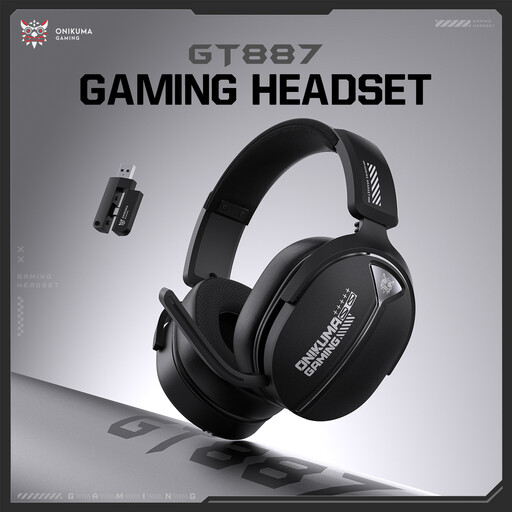
Why it suits this profile: According to the product listing, this wireless model has a frequency range of 20Hz–20kHz, physical buttons on the ear cups and a volume wheel. This makes it straightforward to operate for everyday use.
The specifications mention specific controls and a frequency range instead of relying solely on marketing terms about surround sound or RGB.
Wireless operation; volume wheel; physical buttons; suitable for straightforward everyday gaming.

Why it suits this profile: The product information lists memory foam in the headband and ear cushions, a detachable microphone, USB-C, USB-A and 3.5mm connections. The headset is listed for PC, PS5, Xbox, Switch, Mac and mobile devices.
The different connection options reduce the risk of needing a separate adapter later for another device.
53mm drivers according to the product specification; DTS Headphone:X 2.0; broad compatibility; detachable microphone.
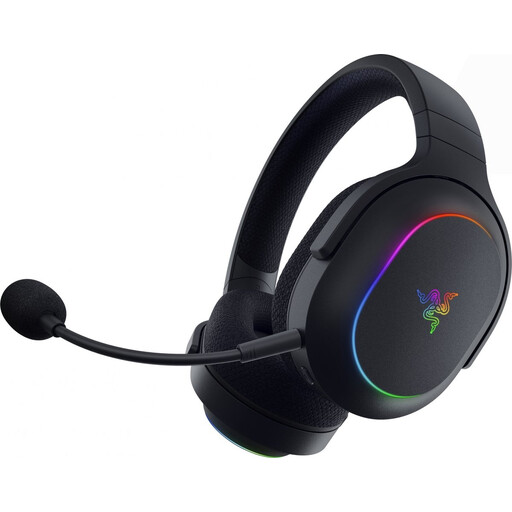
Why it suits this profile: According to the product details, this model combines 2.4GHz wireless with Bluetooth, a detachable microphone and RGB lighting. The stated battery life is up to 70 hours without lighting.
The two wireless modes make it clearer how to use the headset: 2.4GHz for gaming and Bluetooth for mobile devices.
Stated battery life of up to 70 hours without lighting; 2.4GHz and Bluetooth; detachable microphone; compatible with PC, PlayStation, Switch and mobile devices.
We have put together a complete, up-to-date list of products that fully meet these strict selection criteria and the applicable European safety regulations.
That varies by model. Check whether the headset has a suitable USB dongle, 3.5mm cable or official console support. Bluetooth does not connect directly to every console. For Xbox, specifically look for Xbox Series X/S or Xbox One in the compatibility list.
Lifespan depends on usage, cable strain, battery care and the quality of the ear cushions. With a wireless model, the built-in battery may gradually hold less charge. A wired gaming headset does not have a battery, but the cable and connector are vulnerable points. Keep the headset dry, do not pull on the cable and clean the ear cushions with a soft cloth.
In addition to the purchase price, you use electricity to charge it. This consumption is generally limited, but you still need to consider a USB cable, charging sessions and possibly an extra adapter. A wired model has no charging costs, while a wireless model offers greater freedom of movement. Above all, choose the connection that suits your gaming space and devices.
