
Vandaag of morgen in huis

Kwaliteit gegarandeerd

Welkomstaanbiedingen ontgrendelen: GRATIS bezorging | Tot 80% korting | Gratis 30 dagen JoyPlus-proefperiode
Download de app
Buying a gaming headset seems simple until you have to choose between wired and wireless, 7.1 audio, Bluetooth and different connection types. Marketing terms don’t always tell you how a headset will perform in your situation, either. A model with lots of features can be awkward to use if it isn’t compatible with your console or doesn’t feel comfortable to wear.
The most common buying mistakes stem from three pitfalls:
A wired gaming headset with a 3.5 mm connection is often a practical choice for a controller, laptop or Nintendo Switch. Check whether your PC has a single combined port or separate audio and microphone ports. Some models require a splitter or extension cable.
A USB headset may offer extra software features, such as virtual surround sound or RGB lighting. The Razer Kraken V4 X uses USB-C and USB-A and is listed in the product information as compatible with PCs, consoles and mobile devices. Before buying, check that your device has the USB port you need.
With a wireless gaming headset, consider the type of connection. A 2.4GHz dongle is mainly designed for low-latency gaming, while Bluetooth is handy for smartphones and everyday use. Not every Xbox, PlayStation or Switch supports the same wireless features.
A 40, 50 or 53 mm driver tells you mainly about the size of the speaker, not necessarily the sound quality. Also consider:
Brands may make their own claims about spatial audio or microphone performance. Treat these as product information from the brand, and compare them with specifications you can verify.
A comfortable gaming headset needs more than soft ear cushions. Check the weight, adjustability, shape of the ear cups and materials, too. An over-ear gaming headset usually covers your ears well, but may feel warmer.
A headset with a microphone is handy for voice chat, but consider the type of microphone. A detachable microphone is practical if you also use the headset on the go. A flip-up microphone stays attached to the headset, but can quickly be moved out of the way. Also check whether there’s a physical mute button on the ear cup.

Why it suits this profile: The Zirox uses a 3.5 mm connection and is listed in the product information as suitable for PC, laptop, PlayStation, Xbox and Nintendo Switch. That makes it a straightforward choice if you want to get started without worrying about charging.
No battery or wireless pairing needed. The fixed 2-metre cable also reduces the risk of not having enough reach.
244 grams, 50 mm drivers, over-ear cushions and a flip-up microphone.

Why it suits this profile: This model combines 2.4GHz wireless with Bluetooth and, according to the product specifications, comes with USB-A and USB-C connections. It’s a good fit for gamers who switch between a PC, console and mobile devices.
The different connection options make it less likely that you’ll need a separate headset for every use. Check which dongle is included and what’s supported on each platform.
53 mm drivers, detachable 10 mm microphone, DTS Spatial Audio for PC and a quoted battery life of up to 120 hours over 2.4GHz.
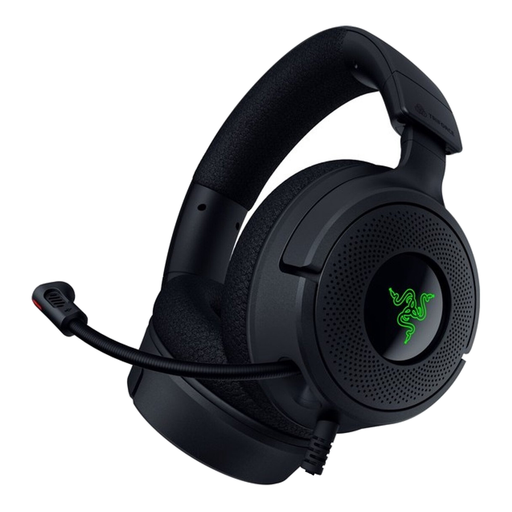
Why it suits this profile: This wired model is designed for gamers who want to combine USB connectivity, virtual 7.1 audio and advanced microphone features with a low weight.
The USB-C and USB-A options make it clearer how to connect than a model with just one fixed port. The 7.1 feature is virtual and may require software or a compatible device.
300 grams, 40 mm TriForce drivers, flip-up cardioid microphone and RGB lighting.
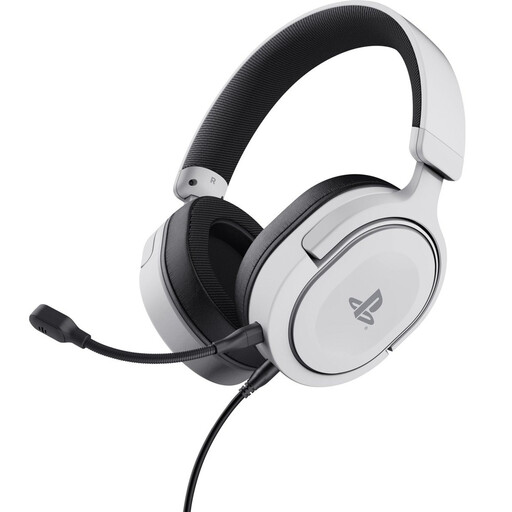
Why it suits this profile: This over-ear headset is officially licensed for PS5 and uses a detachable 3.5 mm cable. It’s designed for PlayStation use through the controller.
The connection type and PS5 compatibility are clearly specified. Don’t expect a fully wireless design or a separate surround platform; the product information lists stereo with 3D audio on PS5.
253 grams, 50 mm drivers, detachable microphone and volume and mute controls on the ear cup.
We’ve put together a complete, up-to-date list of products that meet these strict selection criteria and the applicable European safety regulations.
A model with a 3.5 mm connection is often compatible with a wide range of devices through a controller, laptop or handheld console. Always check the platform specifications for USB and wireless models. A multi-platform gaming headset may need different connections or adapters for each device.
There are few ongoing costs beyond the purchase price. However, you’ll need to charge it and may eventually need to replace the battery. A wired headset doesn’t need a battery, but its cable can wear out or get in the way.
Its lifespan depends on how you use, store and maintain it. Keep the headset dry, avoid pulling on the cable and clean the ear cushions carefully. According to the information provided, products in this selection are covered by a statutory warranty of at least two years in the EU. This warranty does not cover normal wear and tear or damage caused by misuse.
