
Vandaag of morgen in huis

Kwaliteit gegarandeerd

Welkomstaanbiedingen ontgrendelen: GRATIS bezorging | Tot 80% korting | Gratis 30 dagen JoyPlus-proefperiode
Download de app
A gaming headset needs to do more than play game audio. You want to hear your teammates clearly, mute your mic quickly and enjoy long sessions without pressure points. But there are some clear pitfalls to avoid. A low price may be tempting, but a fixed cable, limited compatibility or poor microphone can cause frustration later.
As Joybuy Product Recommendation Officer, I focus on specifications you can check: connection type, weight, microphone, comfort and the features you’ll actually use.
On a gaming headset, surround sound can refer to virtual spatial audio. The headset uses software or console settings to simulate direction and distance. That’s different from having multiple physical speakers in the earcups.
A basic 3.5 mm gaming headset usually delivers stereo sound. That’s not necessarily a problem for casual gaming, voice chat and music. If you want virtual 3D audio, check whether it’s explicitly listed, which platforms it works on and whether you need software.
A headset with a 3.5 mm connection often works with PC, PlayStation, Xbox and Nintendo Switch. However, features may vary. For example, on a PC with separate audio and microphone sockets, you may need a splitter or extension cable. With consoles, you’ll usually connect the headset to the controller.
So don’t just check whether a product is described as “multi-platform”. Also check:
“Comfortable for long sessions” is a marketing claim made by a brand, not a universal guarantee. According to the relevant brands’ product descriptions, weight, ear cushion material, headband and adjustability all play a part.
A lightweight headset weighing around 240 to 265 grams may feel comfortable, but the fit varies from person to person. PU leather often blocks out more surrounding noise, while breathable fabric ear cushions may feel cooler. Also consider the clamping force and the size of the earcups.
A wired gaming headset with a 3.5 mm connection doesn’t need a battery. That’s handy for long sessions and means you won’t have to stop to recharge. You also get a direct connection without wireless pairing. On the other hand, the cable may snag or be too short.
USB headsets can offer extra features, such as software equalisers or virtual audio. They’re less universal than a 3.5 mm model, especially if you switch between PC and console.
A gaming headset with a microphone is handy for voice chat, but the design affects how practical it is:
A mute button on the earcup means you don’t have to open software or console menus mid-game.
An over-ear gaming headset surrounds your ears. Check that the earcups are large enough and that the headband is adjustable. Product weights give you a useful basis for comparison: according to the product information, the Trust GXT 415 Zirox and Logitech G G335 weigh 244 and 240 grams respectively.
A 1.2-metre cable is suitable for connecting to a controller when you’re sitting close to the screen. For a PC, an extension cable or a model with a 1.8 to 2-metre cable may be more practical.

Why it suits this user: This lightweight headset is designed for gamers who want to play on PC, laptop, PlayStation, Xbox or Nintendo Switch without having to recharge.
The 3.5 mm connection keeps setup simple. The headset uses stereo rather than an unclear surround sound label, and has mute and volume controls on the earcup.
244 grams, 50mm drivers, over-ear design, flip-up microphone and a 2-metre cable.

Why it suits this user: A good choice for players who value comfort, multiple connection options and virtual spatial audio.
The product information lists 3.5 mm, USB-C, USB-A and DTS Headphone:X 2.0 separately. This lets you choose the connection that suits your device.
53mm drivers, memory foam ear cushions, detachable microphone, LED mute indicator and compatibility with PC, PS5, Xbox and Switch.
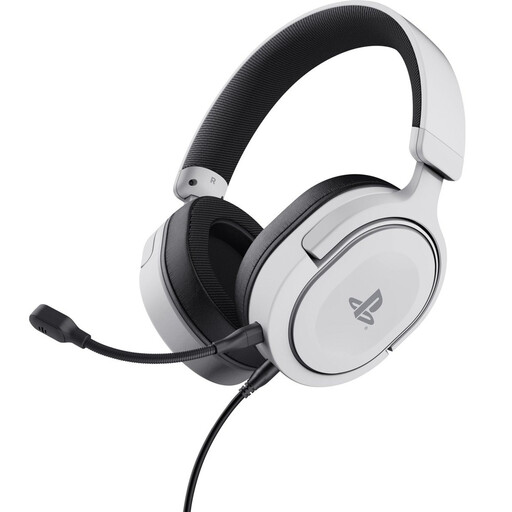
Why it suits this user: A sensible choice for PS5 and PS4 players looking for a wired headset with a detachable microphone and support for PS5 3D audio.
The product information distinguishes between stereo output and 3D audio on PS5. So you know it isn’t a full physical surround sound setup.
Officially licensed for PS5, 50mm drivers, detachable flexible microphone, rotating earcups and a weight of 253 grams.
We’ve put together a complete, up-to-date list of products that meet these strict selection criteria and the applicable European safety regulations.
Usually, yes, as long as the device has a suitable 3.5 mm socket. On PS5 and Xbox, you’ll usually connect the headset to the controller. With Nintendo Switch, you can use the socket on the console or controller. Check each product listing to see whether microphone support and platform compatibility are explicitly mentioned.
It depends on how you use it. Wired means no recharging and usually a simple plug-and-play setup. Wireless gives you more freedom to move around, but relies on a battery, receiver or Bluetooth connection. A 3.5 mm model is often practical if you regularly switch between platforms.
Its lifespan mainly depends on how the cable, hinges, microphone boom and ear cushions are treated. Pull the plug out of the device by holding the plug, not the cable. Store the headset somewhere dry, avoid high volume levels and clean the ear cushions regularly. Take breaks during long sessions and keep the volume low enough to protect your hearing.
