
Vandaag of morgen in huis

Kwaliteit gegarandeerd

Welkomstaanbiedingen ontgrendelen: GRATIS bezorging | Tot 80% korting | Gratis 30 dagen JoyPlus-proefperiode
Download de app
A gaming headset needs to do more than just play sound. During a long gaming session, you don’t want tight ear cushions, a connection that keeps dropping or teammates who can barely hear you. Yet many product claims are difficult to compare. For example, a higher driver size in millimetres doesn’t automatically mean better sound quality.
If you’re looking to buy a gaming headset, it’s worth considering how you’ll use it and what connections you need first. Read on to find out which common pitfalls to watch out for, which specifications make a practical difference and which models suit different gaming styles.
A 7.1 surround sound headset may use virtual spatial audio. That’s different from a headset with several physical speakers in each ear cup. What’s more, software-based surround sound sometimes only works on certain platforms, such as Windows. For example, the Razer Kraken X Lite states that 7.1 surround is only available on Windows 10 64-bit.
On PS5, spatial audio can instead be processed through the console settings. So don’t just check whether “7.1” is printed on the box: find out where and how the feature works.
A wireless gaming headset can connect via Bluetooth, a 2.4GHz USB receiver or both. Bluetooth is useful for a phone or tablet, while a USB dongle is usually designed for a direct connection to a PC or console. Not every Xbox, PlayStation or Nintendo Switch supports the same wireless connection method.
Also check the battery life. The stated maximum is usually based on specific conditions. A model that works with both 2.4GHz and Bluetooth may have a different battery life for each connection method.
A lightweight headset isn’t automatically a comfortable gaming headset. Headband pressure, the shape of the ear cups and the cushion material matter just as much, if not more. Faux-leather cushions can provide a good seal, but may feel warm during long sessions. Fabric cushions tend to ventilate differently.
So check both the weight and the adjustability. The models in this selection range from around 230 grams for the Razer Kraken X Lite to 340 grams for the HyperX Cloud III S.
A wired gaming headset with a 3.5mm connection often works directly with a controller, laptop or mobile phone. This makes setup easy and means you don’t have to charge it. If your PC has separate audio and microphone ports, check whether a splitter is included.
USB headsets can offer extra features, such as software-based equaliser settings or virtual spatial audio. A PS5 gaming headset may also make use of the console’s 3D audio settings. For Xbox, it’s important to check the stated Xbox compatibility separately: a connection that works with PlayStation isn’t automatically suitable for Xbox.
When choosing a gaming headset with a microphone, consider the microphone type, its position and the mute function. A unidirectional or cardioid microphone is designed to pick up sound mainly from the front. This can be useful for voice chat, but how clearly you can be heard also depends on the distance from your mouth and your surroundings.
A mute button on the ear cup or a flip-up microphone means you won’t have to search through software menus while gaming. A detachable microphone is useful if you also want to use the headset for music or on the go.
If you don’t want a cable running to your controller, you could choose a wireless headset with Bluetooth. Look out for the differences between:
The Razer BlackShark V2 HyperSpeed states a battery life of up to 70 hours and supports Bluetooth. The HyperX Cloud III S states up to 120 hours via 2.4GHz and up to 200 hours via Bluetooth. These are manufacturer figures; actual battery life may vary depending on volume, connection and usage.

Why it suits this profile: The 3.5mm connection makes this wired gaming headset easy to use with a PC, PlayStation, Xbox One, Nintendo Switch and mobile devices with a compatible connection.
There’s no battery to charge. The 7.1 feature is software-based and, according to the product information, must be activated for compatible Windows systems.
50mm drivers, a weight of 240 grams, memory foam ear cushions and a cardioid microphone.
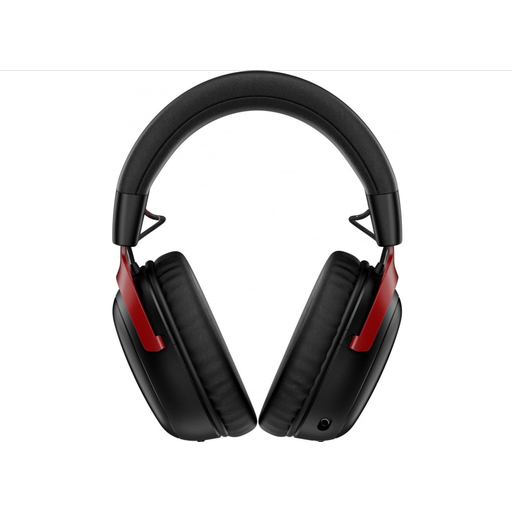
Why it suits this profile: This model combines 2.4GHz wireless connectivity with Bluetooth, so you can switch between gaming and mobile devices.
The stated battery life is given separately for each connection method, making it easier to compare the claim with how you’ll use the headset.
53mm drivers, a detachable 10mm microphone, USB-A and USB-C connections, and a stated battery life of up to 120 hours via 2.4GHz.
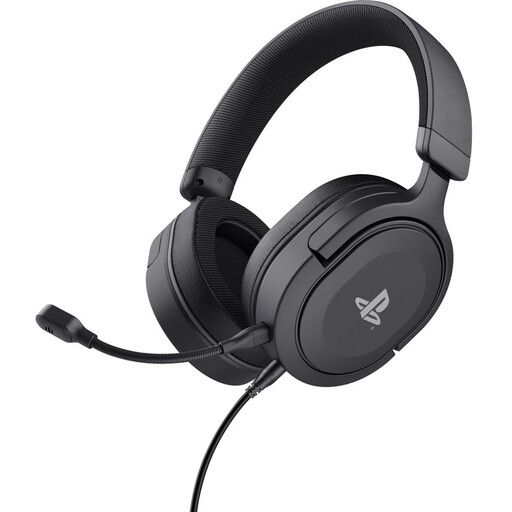
Why it suits this profile: This headset is officially licensed for PS5 and also works with PS4. The detachable 3.5mm cable is suited to using it with a console controller.
The product information clearly states that it offers stereo sound with 3D audio support on PS5. This avoids confusion between true surround sound and audio processed by the console.
50mm drivers, a detachable microphone, on-ear-cup controls and a stated weight of 253 grams.
We’ve put together a complete, up-to-date list of products that meet these strict selection criteria and current European safety regulations.
That depends on the connection and the official compatibility list. A headset with a 3.5mm jack often works with several devices, but features such as virtual surround sound, USB audio and wireless connectivity may vary by platform. If you’re looking for an Xbox gaming headset, be sure to check Xbox compatibility.
A wired gaming headset doesn’t need charging and is usually easy to connect. A wireless headset gives you more freedom to move, but you’ll need to consider battery life, dongle compatibility and Bluetooth support. Either can work well for long sessions at a desk; your gaming setup will often determine which is more convenient.
Its lifespan depends on cable use, hinges, ear cushions and storage. A detachable cable or microphone can make everyday use more flexible. Keep the headset dry, don’t pull on the cable and use a moderate volume. This helps limit wear and keeps the headset in good working order during long gaming sessions.
