
Vandaag of morgen in huis

Kwaliteit gegarandeerd

Welkomstaanbiedingen ontgrendelen: GRATIS bezorging | Tot 80% korting | Gratis 30 dagen JoyPlus-proefperiode
Download de app
A gaming headset may seem simple at first glance: choose a model with large drivers, surround sound and a microphone. However, marketing claims can give a misleading impression. A wireless gaming headset may be convenient, for example, but less suitable if the battery runs out or the connection does not work with your console. “7.1” also does not automatically mean you will hear more precise sound in every game.
With this practical guide, you can focus on the features that really make a difference while gaming: connectivity, microphone, comfort and compatibility.
A 7.1 gaming headset often uses virtual surround sound. How it works may depend on software, a USB connection or a specific platform. With the Sony INZONE H3, for example, the product specifications state that 360 Spatial Sound is linked to the INZONE Hub software on PC. These features may not work through a standard 3.5mm connection.
So check:
A surround sound headset can be useful for positional audio, but look beyond the “7.1” figure alone.
A wireless gaming headset may work via Bluetooth, 2.4 GHz or both. Bluetooth is convenient for mobile use, but not every console supports Bluetooth audio directly. A USB receiver may therefore be needed for PC, PlayStation or Xbox.
Also consider the difference between:
For an Xbox headset, check specifically whether Xbox Series X|S or Xbox One is mentioned. A USB receiver for PC or PlayStation will not automatically work with every Xbox console.
An over-ear gaming headset can be comfortable, but the fit, weight and materials determine how pleasant it remains to wear after several hours. Faux-leather ear cushions often provide a good seal, while fabric cushions may feel more breathable. A headband that is too tight or a heavy frame can still become uncomfortable.
So look at:
A wired gaming headset with a 3.5mm connection is suitable if you want to play directly through a controller, laptop or smartphone. There is no need to charge it, and the connection is widely compatible. One drawback is having a cable on your desk or trailing from your controller.
USB headsets can offer extra features, such as software-based equaliser settings or virtual surround sound. However, check whether your console supports USB audio and whether all features are available on that platform.
A wireless model is better suited to players who want to move around freely. As well as the stated number of hours, check the charging connection, the type of wireless connection and whether you can continue playing with a wired connection. According to the product specifications, the Trust GXT 491 Fayzo, for example, offers 2.4GHz, Bluetooth and a 3.5mm connection, while its battery life is up to 22 hours.
A gaming headset with microphone is particularly useful if you often communicate with teammates. A directional microphone can reduce background noise, but actual speech clarity also depends on the microphone’s position and the chat software being used.
Useful features include:
A detachable microphone is practical if you also want to use the headset for music or while out and about. You are less likely to lose a fixed, fold-up microphone.
A headset for PC and console must not only fit physically; its features must also work on your platform. A 3.5mm model is often broadly compatible with PC, PlayStation, Xbox, Nintendo Switch and mobile devices, but some PCs may require a splitter for separate microphone and audio connections.
Check before buying:
Driver sizes of 40, 50 or 53 mm do not provide a complete indication of sound quality. They mainly describe the diameter of the speaker unit. Also consider the frequency response, impedance and type of sound reproduction.
A headset with noise cancellation can provide two different functions:
Microphone noise reduction is different again from active noise cancellation for your ears. So read carefully to see which function is meant.

Why it suits this profile: This wired gaming headset uses a 3.5mm connection and, according to the product specifications, is suitable for PC, laptop, PlayStation, Xbox and Nintendo Switch. That makes it a practical choice if you want to start playing without charging.
No battery, Bluetooth pairing or separate software required. The headset provides stereo sound, so you are not paying for surround features you may not use.
244 grams, over-ear ear cushions, 50mm drivers, volume control and a foldable microphone.
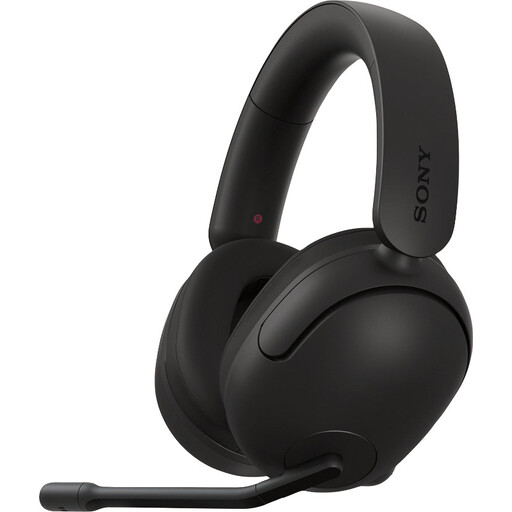
Why it suits this profile: This model is aimed at PC and PS5 users who want to combine a wired connection, positional audio and an adjustable microphone.
The product specifications clearly state that 360 Spatial Sound is activated via PC software. The model remains usable via 3.5mm, but without all the software features.
299 grams, USB audio box, 3.5mm cable, 40mm speakers and a flip-up microphone.

Why it suits this profile: According to the product specifications, this wireless gaming headset offers both 2.4GHz and Bluetooth. That suits intensive gamers who want to play on PC, console and mobile without constantly switching headsets.
The connections and battery claims are listed separately: up to 120 hours via 2.4GHz and up to 200 hours via Bluetooth, according to HyperX. However, check which mode your device supports.
53mm drivers, detachable 10mm boom microphone, memory foam, USB-A and USB-C connections, and DTS Spatial Audio for PC.
We have put together a complete, up-to-date list of products that fully meet these strict selection criteria and the applicable European safety regulations.
A wired model with a 3.5mm connection is often broadly compatible, provided your device has a suitable port. With USB and wireless models, always check the platforms listed. Xbox compatibility may differ from PC or PlayStation support.
That depends on the battery life, weight and fit. Look at the stated play time, but bear in mind features such as lighting, microphone use and volume. A wired gaming headset remains a practical choice if you do not want to charge it.
No. Stereo can be sufficient for casual games, chat and music. Virtual surround sound can provide a greater sense of space, but check whether the feature works on your platform and whether software is required. Only choose the feature if you are actually going to use it.
