
Vandaag of morgen in huis

Kwaliteit gegarandeerd

Welkomstaanbiedingen ontgrendelen: GRATIS bezorging | Tot 80% korting | Gratis 30 dagen JoyPlus-proefperiode
Download de app
A gaming headset might seem simple at first: choose a model with good sound, plug it in and start playing. In practice, details such as the connection, weight and microphone can determine whether you’re still comfortable using it after a few weeks. This applies to a gaming headset for PC, as well as one for PlayStation, Xbox, Nintendo Switch or a smartphone.
These common pitfalls are worth watching out for:
First, consider which devices you want to use your gaming headset with. A wired headset with a 3.5 mm connection is usually easy to connect to multiple devices, as long as they have a suitable headphone port. The Logitech G G335 uses plug-and-play via 3.5 mm and, according to the product information, is listed for PC, PlayStation, Xbox and Nintendo Switch.
A wireless gaming headset can connect via:
Check the product page particularly carefully when choosing a gaming headset for Xbox. A model that works with PlayStation and PC won’t necessarily work with Xbox. For example, the HyperX Cloud III S lists compatibility with PC, mobile devices and Xbox Series S/X, while other models specifically mention PlayStation, Switch and Android.
An over-ear gaming headset surrounds your ears and can partially block out background noise. Check the size of the ear cushions, the material and how adjustable the headband is. Weight also matters during long sessions:
A lighter headset isn’t automatically more comfortable. The shape of the headband, pressure around your ears and ventilation all play a part. If you wear glasses, look for soft cushions and a fit that isn’t too tight.
A gaming headset with a microphone is particularly useful for team chat, streaming and online meetings. Check how to mute the microphone. On several models, you can do this by flipping the microphone up; others have a separate mute button or a detachable microphone.
The speaker diameter doesn’t tell you on its own how good the sound will be. A larger driver can offer a different sound profile, but tuning and software are just as important. Virtual surround sound, DTS or Dolby Atmos may create a more immersive soundscape, according to the manufacturer, but performance depends on support from your device and software. Treat this as a feature to check, rather than a guarantee of a particular gaming experience.
Battery life is important for wireless use. The product information includes the following figures:
Actual play time can vary depending on the volume, lighting and connection mode.
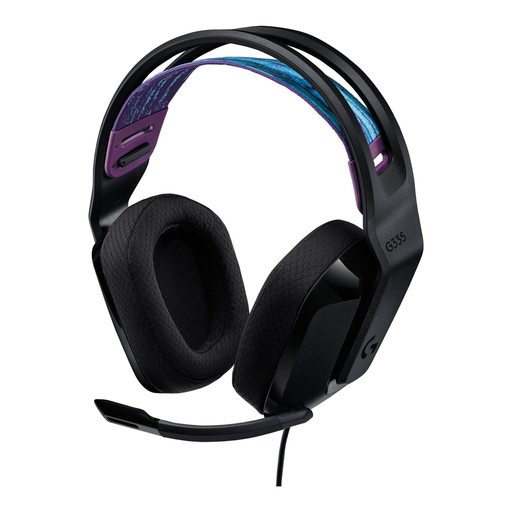
Why it suits this profile: This wired headset uses a 3.5 mm connection and, according to the product information, works with PC, PlayStation, Xbox and Nintendo Switch. That means no need for extra dongles or charging.
The simple plug-and-play connection avoids issues with wireless platform support and a flat battery.
240 grams, memory foam ear cushions, volume control on the ear cup and a flip-up microphone.
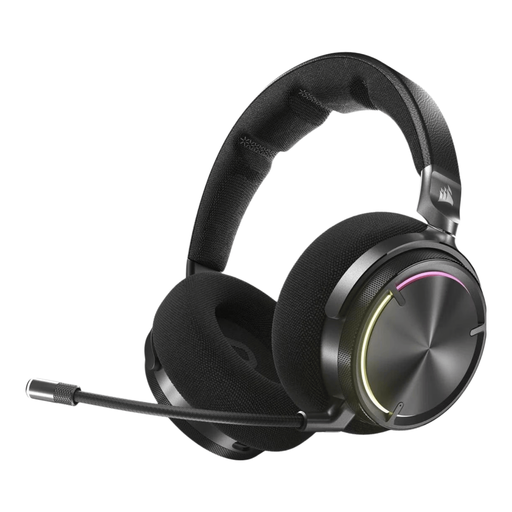
Why it suits this profile: According to the product description, this model combines 2.4 GHz and Bluetooth, 50 mm graphene drivers, active noise cancellation and Dolby Atmos support.
Dual connectivity and software settings give you more control than a headset with just one wireless mode.
20–40,000 Hz, 30-hour battery life, built-in microphone and controls on the ear cup.

Why it suits this profile: For long gaming sessions and streaming, the stated battery life is worth noting: up to 120 hours via 2.4 GHz and up to 200 hours via Bluetooth, according to HyperX.
The headset lists both use modes separately, so you don’t have to interpret the battery claim as one general figure.
53 mm drivers, detachable microphone, 2.4 GHz and Bluetooth 5.3, plus compatibility with PC, PS5, PS4, Switch and Xbox Series S/X.
We’ve put together a complete, up-to-date list of products that meet these strict selection criteria and the applicable European safety regulations.
Not always. The PS5 doesn’t support every Bluetooth audio connection directly. A headset with a dedicated 2.4 GHz USB receiver may be a better option. Always check the platform list and included dongle before ordering.
Battery life per charge varies by model and use mode. The lifespan of the headset itself depends on factors including use, charging habits, cables and hinges. Charge it with a suitable USB-C cable, keep it away from moisture and don’t store it somewhere hot for long periods.
No. Stereo can be enough for music, chat and many games. Virtual 7.1 surround sound may create a more immersive effect, according to the manufacturer, but check that the feature works with your PC or console. Also consider comfort, microphone quality and compatibility; these features have a greater impact on everyday use.
