
Vandaag of morgen in huis

Kwaliteit gegarandeerd

Welkomstaanbiedingen ontgrendelen: GRATIS bezorging | Tot 80% korting | Gratis 30 dagen JoyPlus-proefperiode
Download de app
A gaming headset needs to do more than play sound. You want to hear your teammates clearly, mute yourself quickly and play comfortably for hours. However, some specifications are less straightforward than they may seem. For example, a large number on the packaging does not automatically mean that a headset is right for your setup.
In this buying guide, we explain what to look for in a gaming headset with microphone. We also compare several models for different types of users: from budget-conscious beginners to players who regularly switch between PC, console and smartphone.
A surround sound headset may use virtual spatial audio. This can make it easier to identify directions in games, but the final experience also depends on the game, software and settings on your PC or console. So check whether the feature works on your platform and whether software or an activation code is required.
According to the product specifications, 7.1 surround sound is activated via software on the Razer website for the Razer BlackShark V2 X. The Trust GXT 491 Fayzo is listed as offering virtual 7.1 audio. These are practical differences compared with a wired headset that only provides stereo sound.
A wireless gaming headset does not always work with every device in the same way. Some models use a USB receiver, while others use Bluetooth or a combination of both. Also check whether your console has a spare USB port and whether it supports the connection you want to use.
A long battery life is useful, but the stated usage time depends on the connection method, volume and features such as lighting. Treat a battery-life claim as a product specification under certain conditions, rather than as a fixed playing time in every situation.
Pay attention to how the microphone is muted. A flip-to-mute microphone is muted by flipping the microphone upwards. Other models have a mute button on the cable or earcup. A detachable microphone is useful if you also want to use the headset for music or films.
Also check whether the microphone is fixed, foldable or detachable. This will help you avoid buying a headset with a design that does not suit the way you intend to use it.
A wired gaming headset with a 3.5mm connection is generally easy to connect to a controller, laptop, PC or mobile device. There is no need to charge it or set up a wireless connection. However, pay attention to the cable length and your PC’s connections. Some computers have separate microphone and audio ports, in which case a splitter may be required.
Wireless models offer greater freedom of movement. According to the product information, the Trust GXT 491 Fayzo supports 2.4GHz, Bluetooth and a wired connection. The HyperX Cloud III S uses 2.4GHz and Bluetooth 5.3 according to its product specifications. Before buying, check which mode is suitable for your device.
An over-ear gaming headset should fully surround your ears without feeling too tight. Consider the weight, how adjustable the headband is and the material used for the ear cushions. Memory foam can feel comfortable, while mesh or fabric may feel cooler during long sessions.
Weight is not the only factor. The shape of the headband, the pressure around your ears and the size of the earcups all determine how comfortable a headset feels. If you wear glasses, it is worth paying extra attention to the edges of the ear cushions.
A headset with volume control on the earcup or cable lets you make quick adjustments without opening the in-game menu. A physical mute button or flip-to-mute function is convenient during online chat.
Also consider the audio reproduction. A frequency range such as 20 Hz–20 kHz describes the range listed in the product specifications, but on its own it does not tell you everything about balance, speech clarity or sound positioning.

Why it suits this profile: This wired gaming headset connects via 3.5mm to PC, laptop, PlayStation, Xbox and Nintendo Switch. There is no need to charge it.
The fixed cable removes the need to manage battery life, while the product specifications clearly state stereo audio rather than virtual surround sound.
244 grams, 50mm drivers, over-ear ear cushions, volume control and a foldable microphone.
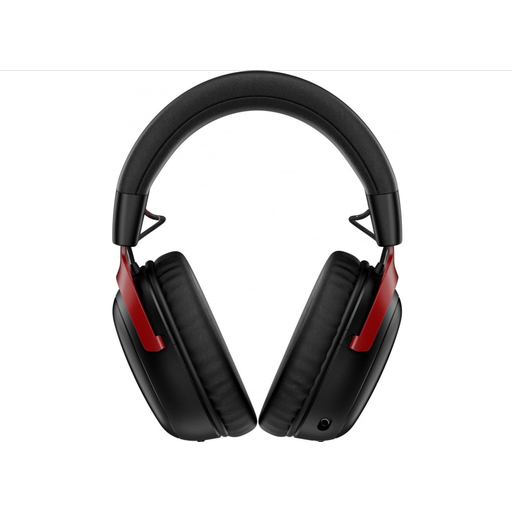
Why it suits this profile: Ideal for players looking for wireless freedom, Bluetooth and a long stated battery life in a single headset.
The product specifications distinguish between 2.4GHz use and Bluetooth, and list the included USB-A and USB-C connections.
Up to 120 hours via 2.4GHz according to the product information, 53mm drivers, a detachable microphone and volume wheel.

Why it suits this profile: Convenient for anyone who switches between PC, console and smartphone and wants the option to play both wirelessly and via a cable.
The product specifications list the connections separately: 2.4GHz, Bluetooth and 3.5mm. This makes it clear in advance which connection options are available.
Up to 22 hours of stated battery life, virtual 7.1 audio, 50mm drivers and a detachable microphone.
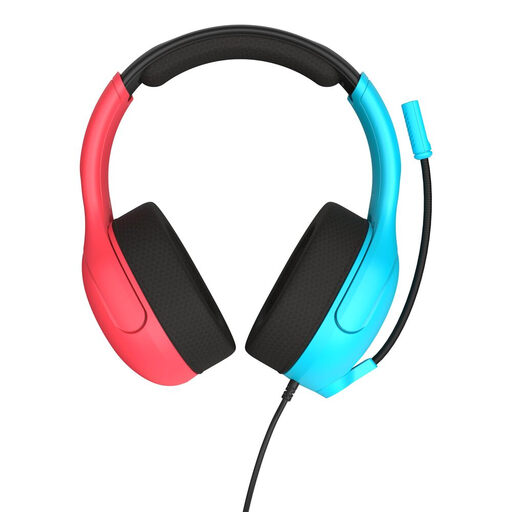
Why it suits this profile: A practical gaming headset for Nintendo Switch users who want a 3.5mm connection, volume wheel and simple mute function.
The wired connection does not require a battery, while the flip-to-mute microphone makes the mute status immediately visible.
40mm speakers, mesh ear cushions, flip-to-mute microphone and volume wheel on the earcup.
We have put together a complete, up-to-date list of products that fully meet these strict selection criteria and the applicable European safety regulations.
It depends on the model. A headset with a 3.5mm connection will usually work through the controller or headphone port, but always check the compatibility list. For Xbox, support from the controller and the chat protocol being used may be relevant. A wireless gaming headset may require a specific USB receiver or Bluetooth support.
Choose wired if you do not want to charge a battery, value plug-and-play convenience or mainly play through a controller. Choose wireless if freedom of movement and multiple connection options are more important. For wireless models, pay attention to battery life, charging time, range and the connections available.
Its lifespan depends on how it is used, stored and handled. Do not pull on the cable, bend the headband beyond its adjustment range or store the headset somewhere damp. Clean the ear cushions with a soft, dry cloth and avoid keeping the volume high for extended periods. Also check the statutory guarantee and any additional manufacturer’s warranty before placing your order.
