
Vandaag of morgen in huis

Kwaliteit gegarandeerd

Welkomstaanbiedingen ontgrendelen: GRATIS bezorging | Tot 80% korting | Gratis 30 dagen JoyPlus-proefperiode
Download de app
A gaming headset with a microphone may seem simple to choose. However, you only find out after buying whether the fit, connection and microphone really suit the way you use it. A budget model may work perfectly well with a controller, for example, but be less suitable for PC gaming with separate audio and microphone ports. A wireless gaming headset can also be convenient without a cable, but less practical if you often forget to charge it.
In this guide, we explain what to look for and match different models to clear user profiles.
A description such as 7.1 surround sound headset may sound appealing, but check how this feature is provided. Virtual surround sound often works via software, a USB dongle or a specific console and PC configuration. With some models, the feature is therefore not available on every platform.
Also pay attention to the difference between stereo, virtual surround sound and true multi-channel audio. A headset labelled 7.1 does not automatically deliver the same experience on every device.
“Multi-platform” does not always mean that every function works everywhere. A USB headset may be suitable for PC, but not connect directly to an Xbox controller with a 3.5mm connection. When choosing a gaming headset for PS5, Xbox or Nintendo Switch, check:
An over-ear gaming headset can become warm during a long session. Pay attention to its weight, the material used for the ear cushions and how adjustable the headband is. Faux leather can partly block out external noise, while fabric or breathable material may feel more comfortable during extended use.
A headset that feels too tight or heavy will be used less often, regardless of its audio features.
A wired gaming headset has no battery and generally works directly via 3.5mm or USB. This makes it suitable for gamers who want to play without having to charge it. However, a cable can get in the way and requires care when storing the headset.
A wireless gaming headset usually uses Bluetooth or a 2.4GHz receiver. For gaming, the included USB receiver is often important, as the connection and compatibility vary between devices. Also check the stated battery life. “Up to” 22 or 70 hours is a maximum manufacturer claim; actual battery life may vary depending on volume, lighting and connection mode.
A good gaming headset for online play has a microphone that is easy to position or mute. Useful features include:
Check whether microphone sensitivity and software features are available on your platform. Manufacturer descriptions of noise reduction are brand product claims, so treat them as technical information for comparison rather than a guarantee of an identical user experience in every room.
Larger drivers, such as 40mm or 50mm, indicate the size of the built-in speaker units, but do not in themselves tell you how the headset will sound to you. Instead, consider the whole package: frequency range, audio type, weight and ear cushion material.
For longer sessions, a lighter headset may feel more comfortable. A 273-gram model, such as the Corsair HS55, offers a different wearing experience from a 373-gram headset. Shape also matters: with an over-ear gaming headset, the cushions should fully surround your ears without putting pressure on the outer ear.

Why it suits this profile: This wired model uses a 3.5mm connection and a separate USB connection for the lighting. This makes it straightforward for PC and console users who do not need a battery.
The product specification makes it clear that USB only powers the LED lighting. This prevents confusion about the audio connection.
3.5mm plug-and-play, flexible microphone, over-ear design and RGB lighting.
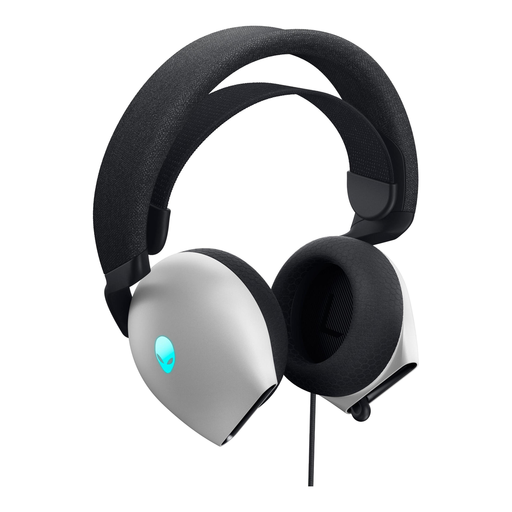
Why it suits this profile: The AW520H combines USB and 3.5mm connections with 40mm drivers, memory foam ear cushions and a flip-up microphone. It is well suited to PC gamers who want multiple connection options.
The connection is not limited to USB. Via 3.5mm, the headset can also be used without specific PC software.
Dolby Atmos support according to the product specification, a 2-metre cable and RGB logo lighting.
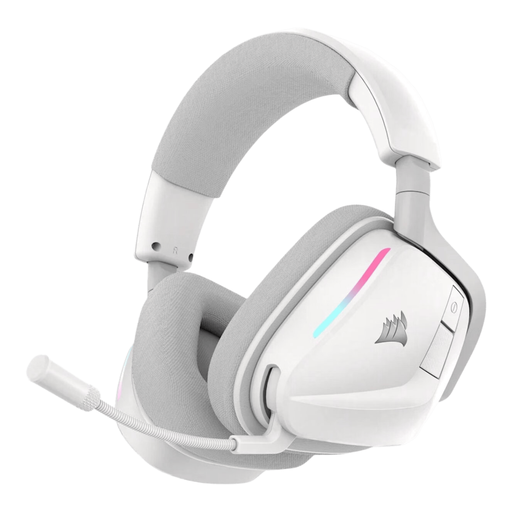
Why it suits this profile: This wireless gaming headset is designed for long sessions and flexible use with 2.4GHz and Bluetooth. The product specification states a battery life of up to 70 hours in 2.4GHz mode.
The battery life and charging function are clearly stated. This allows you to decide in advance whether wireless gaming fits your routine.
50mm drivers, USB-C fast charging, RGB lighting and a microphone with stated noise reduction.
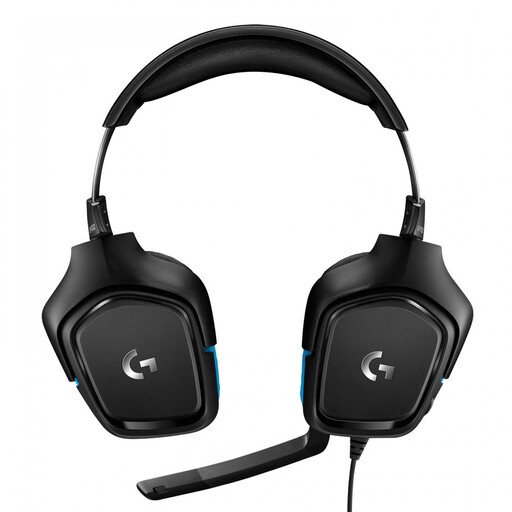
Why it suits this profile: The G432 is a wired 7.1 surround sound headset with 50mm drivers and a USB DAC. The product specification lists support for PC, Mac, PlayStation 4, Xbox One and Nintendo Switch.
The USB DAC and required Logitech G HUB software are specified. This makes it clear that the surround function may require a specific installation.
50mm drivers, 6mm flip-to-mute microphone, volume control and swivelling earcups.
We have put together a complete, up-to-date list of products that fully meet these strict selection criteria and the applicable European safety regulations.
That depends on the connection and platform support. A 3.5mm model will often work via the controller or console connection, but USB and surround sound functions may be more limited. Always check the product specifications for the model you have chosen.
A wireless model needs to be charged regularly. Its electricity costs are generally limited, but the battery does have a finite lifespan. A wired gaming headset has no battery and can be used directly as long as the connection is available.
Its lifespan depends on cable strain, hinges, ear cushions, moisture and daily use. Store the headset in a dry place, avoid bending the headband unnecessarily and do not pull on the cable. With wireless models, the condition of the battery is another important consideration.
