
Vandaag of morgen in huis

Kwaliteit gegarandeerd

Welkomstaanbiedingen ontgrendelen: GRATIS bezorging | Tot 80% korting | Gratis 30 dagen JoyPlus-proefperiode
Download de app
A gaming headset needs to do more than just play sound. You want to hear your teammates clearly, pinpoint footsteps and wear your headset for long periods without pressure on your ears. Yet it can be hard to compare the options. Manufacturers use terms such as surround sound, low latency and noise cancellation, while important details are sometimes less clearly stated.
In this guide, we explain what to look for in a gaming headset with a microphone, which common pitfalls to avoid and which models suit different types of user.
A headset described as “7.1” or having “surround sound” often uses virtual surround technology. The speakers may still be stereo, with software simulating a sense of space. This can help with positioning, but how well it works depends on the game, the software and your personal preference.
So check whether it uses genuine multi-channel hardware or virtual processing. The Sony INZONE H3, for example, has 2.0 stereo speakers; according to the product information, its 360 Spatial Sound feature is activated through software.
A wireless gaming headset can connect via Bluetooth, a 2.4 GHz receiver or both. Bluetooth is handy for mobile use, but a USB receiver may offer different latency and compatibility for gaming. Also check whether the receiver works directly with your console.
If you’re looking for a gaming headset for Xbox, take extra care: some models are compatible with Xbox only via a specific wireless connection, while other platforms use Bluetooth. So a headset that works with a PC will not necessarily work with every Xbox or PlayStation setup.
An RGB gaming headset can look great with an illuminated desktop setup, but RGB does not improve the microphone or sound quality. First, consider the weight, ear cushions, adjustability and where the cable or USB receiver sits. For long sessions, a comfortable over-ear headset is often more important than lighting.
A wired gaming headset with a 3.5 mm connection often works with PCs, laptops, controllers, Nintendo Switch and mobile devices. You won’t need to charge it or rely on a wireless connection. If you’re using a desktop PC, check whether it has a single combined port. If it has separate microphone and headphone ports, you may need a splitter.
A USB headset may offer software features such as equaliser settings or virtual spatial audio. A wireless gaming headset with 2.4 GHz and Bluetooth is more flexible: 2.4 GHz is designed for gaming, while Bluetooth is handy for a phone or tablet. Check the stated battery life; “up to” means a maximum figure under certain conditions.
A microphone that flips up to mute is handy during online conversations. A detachable microphone is useful if you also want to use the headset for music. Also check whether the microphone is adjustable and whether the controls are on the earcup, on the cable or accessed through software.
Brands may mention extra noise cancellation or AI voice isolation. Treat these as product features, not guaranteed results: according to Turtle Beach’s own product information, the Stealth 600 Gen 3 has a microphone with AI voice isolation, but how clearly you can be heard also depends on your surroundings, distance and settings.
Weight alone does not determine whether a headset is comfortable. Look for:
A low impedance, such as 32 or 35 ohms, can be handy with controllers and laptops. However, this does not by itself tell you how good a headset will sound.
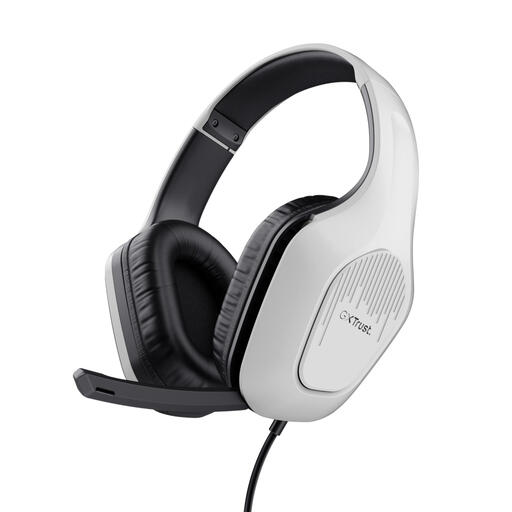
Why it suits this profile: According to the product information, the 3.5 mm connection works with PC, laptop, PlayStation, Xbox and Nintendo Switch. That makes it a straightforward choice if you want to get started without worrying about charging.
You won’t need to rely on a battery or wireless receiver. The product information also clearly states that this is a stereo headset, not one with virtual 7.1 audio.
50 mm drivers, over-ear cushions, a weight of 244 grams, a 2-metre cable and a fold-up microphone.
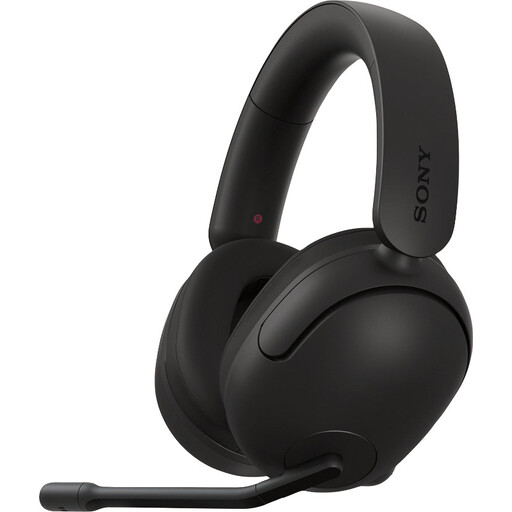
Why it suits this profile: This wired model is aimed at PC and PlayStation 5 users who value software settings and spatial audio.
The product details list the USB audio box, 3.5 mm cable and INZONE Hub software. This makes it clear which features are activated through software.
40 mm drivers, an adjustable microphone, a 3.5 mm connection, compatibility with PC and PS5, and a stated weight of 299 grams.
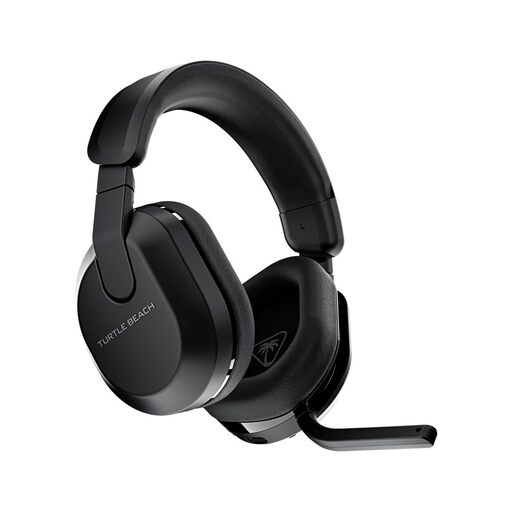
Why it suits this profile: A good fit for players who use several platforms and don’t want a cable running between their seat and console.
The listed connections are 2.4 GHz and Bluetooth 5.2, with QuickSwitch for switching between sources. Be sure to check support for your platform first.
Up to 80 hours of stated battery life, 50 mm drivers, a flip-to-mute microphone, and support for Xbox, PlayStation, PC, Switch, Steam Deck and mobile devices.

Why it suits this profile: According to the product specifications, the Fayzo combines Bluetooth, 2.4 GHz and a wired connection. That suits gamers who switch between a PC, console and smartphone.
You’re not tied to a single connection type. If the battery runs flat, the supplied audio cable can be used as an alternative, according to the product information.
Up to 22 hours of stated battery life, 50 mm drivers, a detachable microphone, a 3.5 mm audio cable and a weight of 290 grams.
We’ve put together a complete, up-to-date list of products that meet these strict selection criteria and the applicable European safety regulations.
It depends on how you use it. A wired gaming headset does not need charging and is easy to connect via 3.5 mm or USB. Wireless models give you more freedom to move, but need a battery and may also require a USB receiver. If you play for long sessions, the stated battery life is an important thing to check.
Its lifespan depends on strain on the cable, the hinges, the ear cushions and how you store it. Keep the headset dry, avoid pulling on the cable and don’t bend the microphone beyond its adjustment range. Ear cushions can wear out over time, and not every model has replaceable ones. So check whether replacement parts are available before you buy.
Not always. A 3.5 mm model often works through a controller or headphone socket, but support for USB and wireless models varies by platform. Before buying, check the official compatibility list and see whether features such as surround sound or software are only available on Windows.
