
Vandaag of morgen in huis

Kwaliteit gegarandeerd

Welkomstaanbiedingen ontgrendelen: GRATIS bezorging | Tot 80% korting | Gratis 30 dagen JoyPlus-proefperiode
Download de app
A gaming headset needs to do more than just play sound. You want to play comfortably, communicate clearly, and be certain that the connection works with your PC, PlayStation, Xbox or Nintendo Switch. Yet there are several marketing claims and technical details that can easily lead you to overpay or choose an unsuitable model.
A 7.1 surround sound headset often uses virtual audio processing. That’s quite different from having seven physical speakers inside the ear cups. The effect can vary from game to game, platform to platform, and software to software. So check whether surround sound works only on PC, or on a console too.
With the Logitech G432, DTS Headphone:X is set up via Logitech G HUB according to the product description. On the Razer BlackShark V2 X, the 7.1 feature is tied to software and an activation code. A wired headset can therefore require extra installation steps.
A wireless gaming headset can connect via 2.4 GHz, Bluetooth, or both. These connections are not interchangeable. Bluetooth, for example, doesn’t always work directly with a PS5 or PS4. A USB dongle may be needed, and some dongles only work with certain devices.
Check before you buy:
Manufacturers usually state battery life under specific conditions. Lighting, 2.4GHz gaming and Bluetooth can all give different results. According to the product description, the Razer Barracuda X offers up to 50 hours of use. The Trust GXT 491 Fayzo states up to 22 hours. The HyperX Cloud III S claims up to 120 hours via 2.4 GHz and up to 200 hours via Bluetooth.
Treat these figures as product specifications under the stated conditions, not as a guaranteed usage time for every user.
A wired gaming headset with a 3.5mm connection is simple to plug in and never needs charging. That’s practical for consoles where you connect the headset to the controller. The downside is the cable, which can get in the way.
A wireless gaming headset gives you more freedom of movement. For gaming, 2.4GHz via a USB receiver is usually the relevant connection. Bluetooth is mainly handy for smartphones, tablets and everyday use. A headset with both options, like the Trust GXT 491 Fayzo or Razer Barracuda X, is flexible if you use multiple devices.
Pay attention to the type of microphone and how you mute it. A gaming headset with a microphone can have a detachable, flip-up or fixed microphone. A detachable model is handy when you also want to use the headset for music or on the go. With a flip-up microphone, muting is usually quick and easy.
“Noise cancelling microphone” shouldn’t be confused with active noise cancellation for your ears. On some models, it refers to a microphone design that the manufacturer claims reduces background noise. Your surroundings, distance from your mouth and settings also affect how clearly you’re heard.
An over-ear gaming headset should fully enclose your ears. Check the weight, the shape of the ear cups, the cushion material and the adjustability of the headband. A lightweight headset isn’t automatically comfortable for everyone; pressure distribution and the space around your ears also matter.
Memory foam, swivelling ear cups and an adjustable headband can improve the fit. Also consider whether you wear glasses, whether the room gets warm, and how long your gaming sessions last. Take regular breaks and don’t listen at high volume for extended periods.
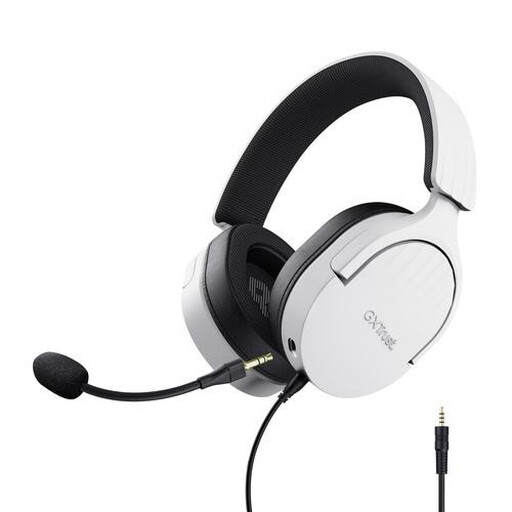
Why this fits the profile: This wired headset works via 3.5mm with PC, laptop, PlayStation, Xbox and Nintendo Switch. That makes it ideal if you want to get started without worrying about charging.
The specifications clearly state stereo audio and no virtual 7.1 feature. So you’re not paying for a surround claim that this model doesn’t deliver.
50mm drivers, over-ear cushions, detachable microphone and on-earcup controls.

Why this fits the profile: This model combines a metal frame, memory foam ear cushions, a detachable microphone and multiple connection options for different gaming platforms.
The product information lists compatibility with PC, PS5, Xbox Series X|S, Nintendo Switch, Mac and mobile devices. Just check which included cable or adapter you need for each device.
53mm drivers, virtual DTS Headphone:X audio, USB and 3.5mm connection, and microphone with mute indicator.
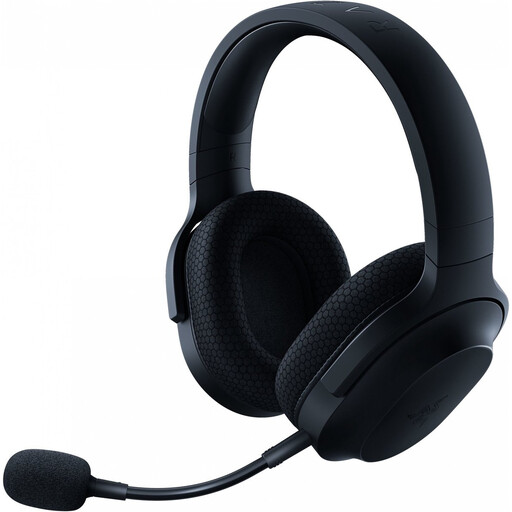
Why this fits the profile: Ideal for gamers who want to play wirelessly and also use the headset with Bluetooth or a 3.5mm cable.
The three connection options are listed separately. That means you can check in advance which mode works with your PC, PlayStation, Nintendo Switch or smartphone.
2.4GHz dongle, Bluetooth 5.2, 3.5mm connection, detachable microphone and, according to the product description, up to 50 hours of battery life.
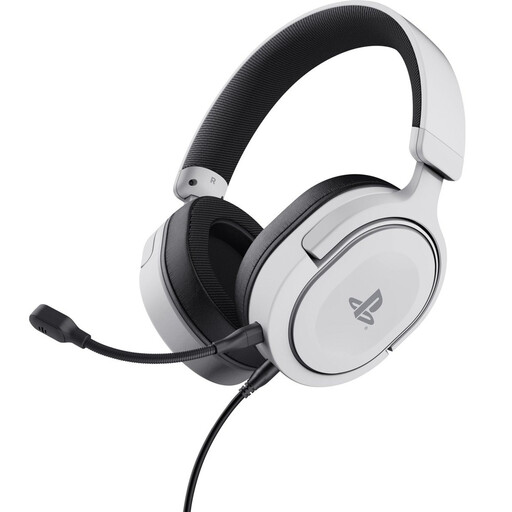
Why this fits the profile: A straightforward choice for PS5 and PS4 players who want a wired, lightweight headset with a detachable microphone.
The connection uses a detachable 3.5mm cable. You don’t need to worry about battery status or wireless compatibility.
50mm drivers, 253 grams, soft ear cushions and, according to the product specifications, 3D audio support on PS5.
We’ve put together a full, up-to-date list of products that fully meet these strict selection criteria and comply with current European safety regulations.
That depends on the connection. A 3.5mm headset often works with PCs, consoles and mobile devices that support this connection. With USB or wireless models, you need to check the compatibility list and the type of dongle. Pay extra attention with Xbox to make sure the model is suitable for your Xbox generation.
The lifespan depends on use, storage and maintenance. Cables, hinges, the headband and ear cushions are usually the parts that take the most strain. A detachable cable or microphone can be practical if a component needs replacing. Store the headset in a dry place, don’t pull on the cable, and clean the ear cushions according to the instructions.
Besides the purchase price, a wireless model requires a charging cable and has a built-in battery. Over time, the battery capacity can decrease. A wired gaming headset has no charging costs and remains usable as long as the connection and cable work properly. So choose based on where you play and whether you value freedom of movement, not just on battery life.
