
Vandaag of morgen in huis

Kwaliteit gegarandeerd

Welkomstaanbiedingen ontgrendelen: GRATIS bezorging | Tot 80% korting | Gratis 30 dagen JoyPlus-proefperiode
Download de app
A gaming headset needs to do more than just play game audio. You want to be able to distinguish footsteps, hear your teammates clearly, and play comfortably for hours on end. Yet there are some clear pitfalls to watch out for. A flashy RGB gaming headset, for example, might be limited to just one platform, while a wireless gaming headset may need recharging after only a few hours.
In this buying guide from the Joybuy Product Recommendation Officer, we compare verifiable specifications and match them to different usage scenarios.
The term 7.1 surround sound headset sounds appealing, but you need to check how this feature actually works. On some models, surround sound is virtual and only available via software on PC. On a PS5, for instance, the headset might operate in stereo or use the console's own 3D audio technology instead.
So look out for the following:
Bluetooth is handy for a smartphone, but not every Bluetooth connection is designed for low-latency gaming. A model with a 2.4GHz USB receiver is often more practical for PC and console. Also check whether Bluetooth and the 2.4GHz connection can be used simultaneously. The Trust GXT 491 Fayzo, for example, mentions dual wireless via 2.4GHz and Bluetooth.
A lightweight over-ear gaming headset isn't automatically comfortable. The shape of the ear cushions, the clamping force, the materials and the adjustability all play a part too. A 240-gram headset with an elastic headband can feel very different from a 290-gram model with thicker cushions.
Pay attention to the dimensions and design before you buy. Memory foam, an adjustable headband and swivelling ear cups can be practical during long sessions, but fit is ultimately a personal thing.
A wired gaming headset with a 3.5mm connection is simple to plug into most controllers, laptops and Nintendo Switch devices. A USB model can offer digital audio and software features, but it depends on having a suitable USB port.
A wireless gaming headset typically uses a USB receiver, Bluetooth or both. Always check the platform specifications. The Logitech G G335 works with a 3.5mm connection and, according to the product information, is compatible with PC, PlayStation, Xbox and Nintendo Switch. The Razer Kraken Kitty V2 BT, on the other hand, is described as a Bluetooth model for PC.
For wireless models, the stated battery life is an important point of comparison. Also look at the connection mode being used. The Corsair VOID RGB V2 Wireless claims up to 70 hours via 2.4GHz, while the Trust GXT 491 Fayzo states up to 22 hours. Actual playtime can vary depending on volume, lighting and connection type.
Also check:
A headset with a microphone should deliver clear voice transmission. A flip-to-mute or detachable microphone is handy if you want to use the headset without the mic. Pay attention to how noise cancellation is described. "Noise cancelling" can refer to the microphone or to the listening function – these are two different things.
Drivers of 40mm or 50mm don't on their own tell you how a headset will sound. They mainly indicate the diameter of the speaker unit. Also look at the frequency response, connection type and available software. A wide frequency range is no guarantee that everyone will find the same sound profile pleasing.
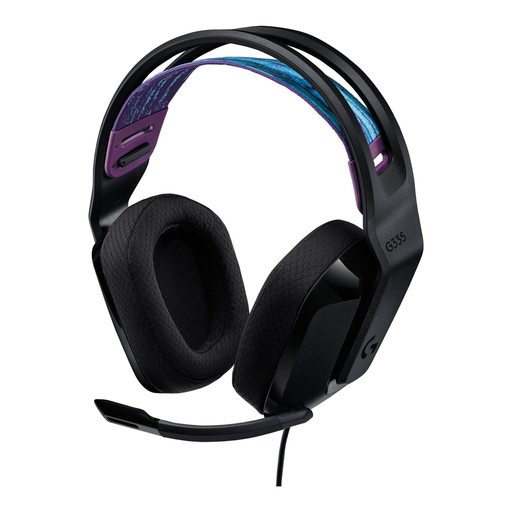
Why this fits the profile: The plug-and-play 3.5mm connection is ideal for users who want to get started on PC, PlayStation, Xbox or Nintendo Switch without needing software or charging.
No reliance on a battery or wireless dongle. The product information states compatibility with multiple platforms and a 1.8-metre cable.
240 grams, memory foam ear cushions, adjustable elastic headband and a microphone that flips up to mute.
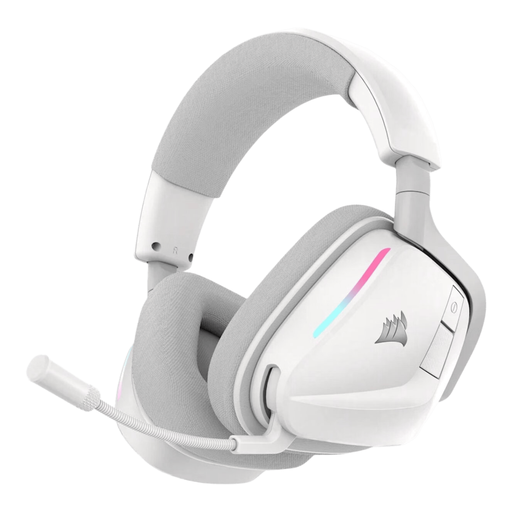
Why this fits the profile: Ideal for anyone who wants one headset for PC, PS4, PS5, Nintendo Switch and mobile devices, with a choice of 2.4GHz and Bluetooth 5.3.
The product information clearly distinguishes between 2.4GHz and Bluetooth. This means you can choose the connection that suits PC, console or mobile use.
Up to 70 hours of battery life via 2.4GHz, 50mm neodymium drivers, USB-C fast charging and a bendable microphone.

Why this fits the profile: A practical choice for anyone who wants to switch between wired, 2.4GHz and Bluetooth, and needs an over-ear gaming headset for longer play sessions.
The connection options and compatibility are clearly described. You will need to check the virtual 7.1 function per device and software though.
50mm drivers, up to 22 hours of battery life, detachable microphone, swivelling ear cups and a design made from 85% recycled plastic according to the product information.
We've put together a full, up-to-date list of products that fully meet these strict selection criteria and comply with current European safety regulations.
That depends on the connection. Check whether the USB receiver works with PS5 and whether the product information explicitly mentions PS5. Bluetooth without proper support may be limited for game audio and chat.
The lifespan depends on usage, cable strain, hinges, ear cushions and battery wear. Store the headset in a dry place, don't pull on the cable, and charge a wireless model with the supplied or suitable USB-C cable. An integrated battery may lose capacity over time.
That really depends on your platform and personal preference. On PC, software-based surround sound can offer additional settings. On consoles, stereo or the system's built-in spatial audio may be sufficient. So compare compatibility and connection method first, rather than just looking at the 7.1 label.
